How to Solder Wires to a Circuit Board

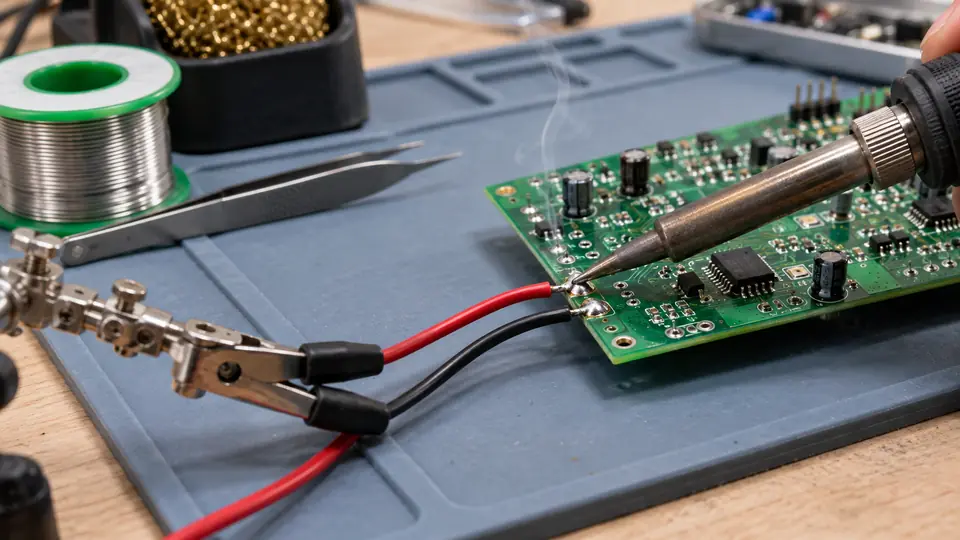
Learning how to solder wires to a circuit board starts with one practical goal: heat the wire conductor and the PCB pad together so solder can wet both surfaces. The joint should form without melting insulation, scorching the board, or relying on a large blob of solder for mechanical support.
Most permanent wire connections use a plated through-hole pad. Some repairs require attaching a wire directly to a surface pad or exposed trace. The preparation and heat-transfer principles are similar, but a surface attachment needs extra strain relief because the copper pad can lift under tension.
Prepare the wire, board, and work area
Disconnect all power sources before working on the board. Remove batteries where possible, and follow the equipment’s service information for safely discharging stored energy. Support the board on a stable, heat-resistant surface so it cannot shift while the solder is cooling.
Useful equipment and materials include:
- A temperature-controlled soldering iron with a tip that fits the joint
- Electronics solder compatible with the board and process
- Flux suitable for electronics work, if the solder’s flux core is insufficient
- Wire strippers and flush cutters
- A PCB holder, vise, or other stable support
- Isopropyl alcohol or another cleaner compatible with the selected flux and board
- Eye protection and suitable ventilation for fumes produced by heated flux and process materials
A small chisel or bevel tip often provides better contact with a wire and pad than a needle-like tip. Select a geometry that can touch both surfaces without contacting nearby components. A tip that is too fine may transfer heat slowly, encouraging prolonged contact or an unnecessarily high temperature setting.
Confirm the electrical connection before soldering
Verify the pad assignment, wire color, polarity, and connector orientation against the schematic or board markings. Check that the wire gauge fits the hole without forcing it. An oversized wire can damage the hole plating, while a very small wire may need separate mechanical support.
Plan strain relief before making the joint. A cable tie, clamp, adhesive intended for electronics, connector housing, or nearby anchor point can prevent movement from reaching the soldered pad. Solder creates the electrical bond, but a PCB pad is rarely a suitable cable anchor for a wire that will be pulled or flexed repeatedly.
Strip the correct amount of insulation
Strip enough insulation for the conductor to pass through the pad while keeping exposed wire to a minimum. Avoid nicking or cutting strands, since damaged strands reduce the conductor’s mechanical strength.
For stranded wire, twist loose strands gently into their original bundle. Light tinning can keep them together, but apply very little solder. Heavy pre-tinning can make the wire too large for the hole and may wick solder under the insulation, creating a long, stiff section that is prone to fatigue where the solder ends.
How to solder a wire into a through-hole pad
-
Clean and tin the iron tip. Remove oxidation with the cleaning method appropriate for the plated tip, then coat the working surface with a thin layer of fresh solder. The coating improves thermal contact. Do not file or aggressively abrade a plated tip as routine maintenance.
-
Inspect the pad and conductor. Both surfaces should be free from heavy oxidation, contamination, and old damaged solder. If reusing a pad, remove enough old solder to let the wire enter without force. Add a small amount of compatible flux if wetting is likely to be difficult.
-
Insert and secure the wire. Pass the conductor through the component side so the exposed end reaches the copper pad on the solder side. Position the insulation close to the board without trapping it inside the hole. Hold the wire with a fixture or gentle temporary bend so it cannot move during soldering. Avoid sharply folding it against the pad, which complicates later repair.
-
Place the tip against the wire and pad. Contact both at the same time. A small amount of molten solder already on the tip can form a thermal bridge, but it should not become the main source of solder for the joint.
-
Feed solder into the heated joint. Touch solder where the wire and pad meet, preferably away from the iron tip. When both surfaces are hot enough, solder should melt against them and flow around the conductor. Add only enough to wet the pad and wire while preserving the recognizable shape of the connection.
-
Remove the solder, then the iron. Stop feeding solder once the joint is adequately covered. Lift the iron away and keep the wire still while the solder solidifies. Movement during cooling can produce cracks or an irregular, weak bond.
-
Trim the protruding conductor if necessary. Use flush cutters while controlling the cut end so it does not fly toward your eyes or nearby circuitry. Leave enough conductor to avoid cutting into the joint.
The appropriate iron setting depends on the solder alloy, tip geometry, pad size, wire gauge, copper area, and station behavior. Start with a setting suitable for the chosen solder and equipment. If the joint heats slowly, first check tip condition, contact area, cleanliness, and tip size. Raising the setting cannot compensate reliably for poor contact or an oxidized surface.
Attaching a wire directly to a surface pad
A wire may need to connect to a surface pad when there is no usable through-hole, such as during a PCB modification or repair. This type of connection places greater mechanical stress on the copper-to-board bond.
-
Strip and lightly tin the wire, keeping the tinned section short.
-
Apply compatible flux to the pad and add a controlled amount of solder. The pad should remain identifiable rather than disappearing beneath a large mound.
-
Position the tinned wire against the pad. Route it parallel to the board where practical instead of pulling upward from the copper.
-
Touch the iron to the wire and pad until the existing solder reflows and joins the surfaces. Remove the iron as soon as wetting occurs, then hold the wire motionless while the connection cools.
-
Add strain relief away from the pad after inspecting and testing the joint. Do not cover the connection until any required cleaning and verification are complete.
Avoid pressing the wire into the pad with the iron. Excessive force and repeated heating can loosen the copper land or damage its connection to a trace. If the pad begins moving, stop. Repairing a lifted or detached pad requires a different connection strategy, often involving a sound trace, via, component lead, or approved repair point.
Inspect and test the finished connection
Examine the joint under good lighting and magnification if the area is small. A satisfactory connection generally shows wetting between the solder, conductor, and pad. The wire should remain in its intended position, and the joint should have no cracks, loose strands, visible gaps, or contact with neighboring pads.
Brightness is not a dependable pass-or-fail test. Different solder alloys and cooling conditions produce different surface finishes. More useful warning signs include:
- Solder sitting as a rounded bead without spreading onto the pad or wire
- A cracked or disturbed surface caused by movement during cooling
- Stray strands extending toward adjacent conductors
- A solder bridge between pads
- Charred board material or melted insulation
- A pad that shifts when the wire moves
- So much solder that the wire and pad cannot be inspected
With the circuit unpowered, use a multimeter to check continuity from the wire to the intended circuit point. Check adjacent pads for unintended shorts where spacing is tight. Continuity confirms a conductive path at the time of testing, but it cannot establish correct polarity, circuit function, current capacity, or long-term mechanical reliability.
Apply only a gentle check for looseness. Pulling firmly on an unsupported wire can damage an otherwise usable PCB pad. Secure the cable separately if normal use could transmit movement to the connection.
Correcting common soldering problems
| What you observe | Likely factors | What to change |
|---|---|---|
| Solder melts on the iron but beads up on the joint | The pad or wire may be oxidized, contaminated, insufficiently heated, or lacking suitable flux | Stop heating, let the area cool, clean the surfaces, apply compatible flux, and improve contact between the tip, wire, and pad |
| The insulation melts before solder flows | Heating is taking too long, the tip has poor contact, or the wire insulation has limited heat resistance | Use a clean tip with adequate contact area, stabilize the wire, and complete the joint efficiently rather than repeatedly reheating it |
| The solder forms a large lump | Too much solder was fed, or it melted mainly on the tip without wetting the surfaces | Remove excess with desoldering braid or another suitable method, then remake the joint with both surfaces heated together |
| The wire moves after cooling | The joint may have been disturbed, poorly wetted, or mechanically unsupported | Inspect for cracks and poor bonding. Rework once with flux and stable support rather than adding solder over a defective joint |
| The pad starts lifting from the board | Excessive heat, force, or repeated rework may have weakened the copper bond | Stop heating and assess the remaining trace and connection point. Do not push the pad back with the iron or continue adding solder |
| Adjacent pads are bridged | Excess solder, loose strands, or poor positioning may be connecting the conductors | Remove power, apply flux, and draw away the excess with a clean tip or desoldering braid. Inspect again under magnification |
Repeatedly reheating a stubborn joint can damage hole plating, traces, insulation, and nearby components. If solder still refuses to wet after cleaning and adding suitable flux, reassess the materials. Some wires have coatings that must be removed by a process appropriate for that wire type, and some metal surfaces are difficult to solder with ordinary electronics flux.
Cleaning and securing the connection
Clean flux residue when required by the flux chemistry, board requirements, or manufacturer guidance. Use a cleaner compatible with the residue, PCB materials, labels, plastics, and components. Avoid assuming that every flux can be cleaned effectively with the same solvent.
After the board is dry and the connection has passed inspection and electrical checks, install the planned strain relief. The wire should have enough slack to avoid pulling on the pad, but it should not be free to rub against sharp leads, hot components, fans, or enclosure edges. Recheck polarity and routing before restoring power.

- Jesse
Jesse is the editor behind Soldering Gear, where he covers soldering irons, stations, rework equipment, and the tools that belong on a practical electronics bench. His work focuses on comparing product specifications, features, compatibility, and intended uses so readers can make more informed buying decisions.
- Best Soldering Iron for Phone Repair: 9 Picks in 2026 October 27, 2026
- Best Hot Air Rework Station for Phone Repair: 9 Picks in 2026 October 26, 2026
- Why Is My Soldering Iron Not Melting Solder? October 25, 2026
- Best Portable Solder Fume Extractor: 9 Picks in 2026 October 24, 2026
- Best Desoldering Wick: 9 Picks in 2026 October 23, 2026