Best Digital Microscope for Soldering: 9 Picks in 2026

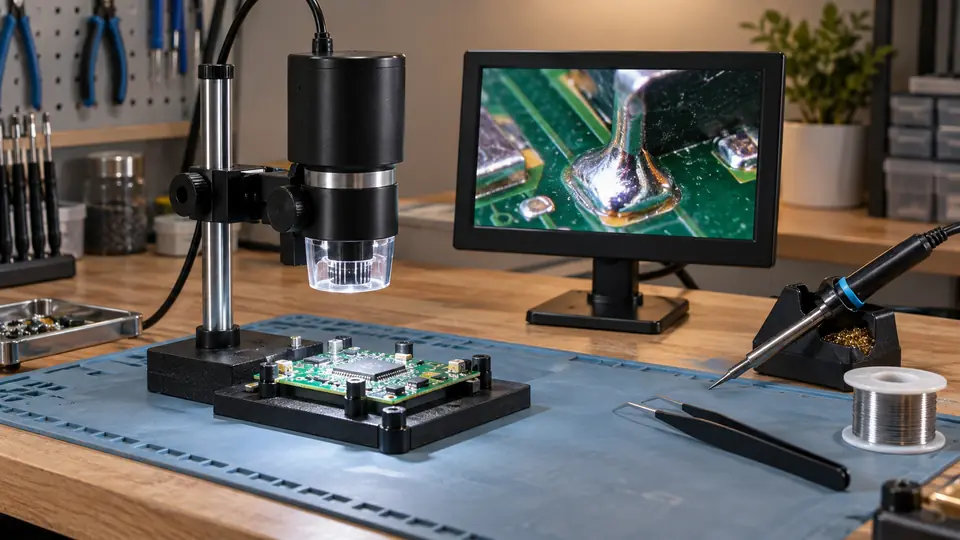
A digital microscope for soldering has to do more than enlarge a circuit board. You need enough working room for a soldering iron and tweezers, a stand that stays put when your hands are busy, lighting that does not turn shiny solder into a white glare, and a screen that lets you watch the joint without bending over the bench. That is why a huge advertised magnification number can be less useful than a stable arm, a long working distance, or a clear view of the whole repair area.
The practical split is between compact inspection scopes and fuller bench systems. A small screen and flexible arm can make quick PCB checks easy, while a taller metal stand and long-distance lens give you room for micro-soldering, phone repair, and watch work. Digital magnification also needs a little skepticism. It can enlarge the image, but it does not automatically add optical detail or make a cramped setup easier to use. The LINKMICRO LM210S stands out overall because its 10.1-inch display, 4K 60FPS output, taller stand, and larger working area are closely matched to serious electronics work.
The picks below are ranked around actual soldering use, including bench clearance, viewing comfort, lighting, image output, focus control, recording features, and the difference between a specialist setup and an all-purpose microscope. Some are better for occasional PCB inspection, while others make more sense as a dedicated repair station.
Quick Answer
- Best Overall: LINKMICRO LM210S for its 4K 60FPS display and output, tall stand, 10.1-inch screen, and generous soldering workspace.
- Best for 3D Inspection: TOMLOV TM3K-3D for side-viewing, 360-degree rotation, dual magnetic lenses, and a long-distance soldering lens.
- Best Premium Autofocus Option: Elikliv EM4K-AF for autofocus, 4K video, a rechargeable battery, and freeze or split-screen functions.
- Best Budget Choice: Aikokkl 5-inch LCD Digital Soldering Microscope for basic PCB inspection in a compact setup.
Best Digital Microscope for Soldering Comparison Table
| Product | Type | Display And Output | Soldering Strength |
|---|---|---|---|
| LINKMICRO LM210S | Digital bench microscope | 10.1-inch screen, 4K 60FPS HDMI | Tall stand and large work area |
| TOMLOV TM3K-3D | 3D digital microscope | 7-inch IPS, 3K, HDMI and USB | Side-viewing and long-distance lens |
| Elikliv EM4K-AF | Autofocus digital microscope | 8-inch IPS, 4K video, HDMI and USB | Autofocus and rechargeable battery |
| Andonstar AD249S-M Plus | Three-lens digital microscope | 10.1-inch screen, 2160P HDMI | Expanded soldering station accessories |
| Andonstar AD210 | Digital bench microscope | 10.1-inch IPS, 1080P video | Long working distance and large stand |
| Andonstar AD246S-M | Three-lens digital microscope | 2160P video and HDMI | Dedicated soldering lens and boom arm |
| TOMLOV DM9 Max | Digital inspection microscope | 10.1-inch IPS, 1080P video | Large screen and adjustable side lighting |
| Aikokkl 5-inch LCD | Compact digital microscope | 5-inch IPS, PC camera mode | Small footprint and flexible arm |
| TOMLOV TriL110 | Three-lens digital microscope | 10.1-inch IPS, 2K video | Rotating lenses and 12.6-inch stand |
The detailed reviews explain which setups leave room for your tools, which are better for documentation, and where the headline magnification claims matter less than the stand and lens arrangement.
1. LINKMICRO LM210S 4K 60FPS HDMI Digital Microscope — Best Overall
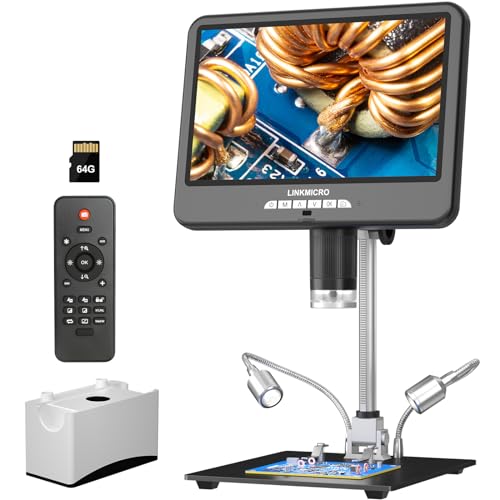
The LM210S is the strongest match for a dedicated soldering bench because its major features point in the same direction. The 10.1-inch IPS screen gives you a broad viewing surface, while the listing specifies 4K 60FPS display and recording, including 4K 60FPS HDMI output when paired with a suitable 4K 60FPS monitor and HDMI 2.0 interface. That smoother image can be useful when a board, tool, or hand moves through the frame during repair work.
Its 12.6-inch stand and fine-gear adjustment are just as important as the image specification. A soldering microscope needs space beneath the lens, and the product information specifically positions this model for larger objects and electronics repair. The included 64GB memory card, wireless remote, built-in microphone, and claims of 64MP still-image saving make it particularly suited to repair documentation or tutorial recording. The trade-off is that this is a substantial bench setup, not a tiny inspection camera.
Pros
- 4K 60FPS viewing, recording, and HDMI output are specified.
- 10.1-inch IPS display provides a broad built-in viewing area.
- 12.6-inch stand offers useful clearance for soldering tools.
- Includes a 64GB memory card and wireless remote.
- Built-in microphone supports narrated repair videos or tutorials.
Cons
- A suitable 4K 60FPS monitor is recommended for the full HDMI capability.
- The larger stand and screen require more bench space than compact scopes.
This is the pick for someone who wants a primary electronics microscope rather than a casual magnifier. It makes the most sense for PCB repair, close inspection, recording, and repeated bench work where a large screen and roomy stand can save neck and hand strain. Buyers who want a portable or very inexpensive setup should look elsewhere, but the LM210S gives the most balanced combination of viewing quality, clearance, and documentation features in this group.
To buy this product, click here.
2. TOMLOV 3D Digital Soldering Microscope TM3K-3D — Best for 3D Inspection
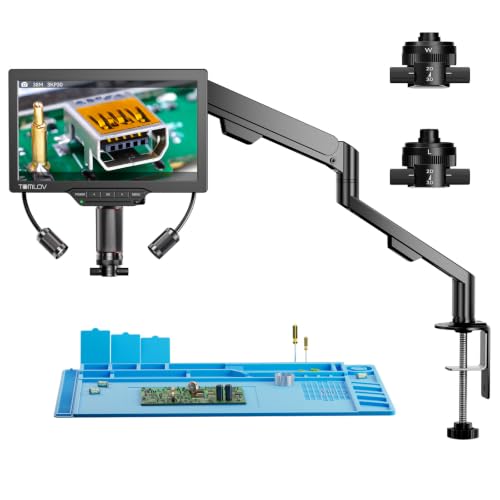
A flat overhead image can show whether a solder joint is present, yet side-view inspection often tells you more about component height, bridging, and the shape of a joint. The TM3K-3D addresses that angle with side-viewing and 360-degree 3D rotation. Its L long-distance lens is aimed at PCB soldering, micro-soldering, and watch repair, while the W wide-angle lens handles larger subjects such as coins and jewelry.
The magnetic lens system is a practical detail for a busy bench. Switching between the L and W lenses does not require tools, and the articulating arm allows the screen and camera position to be adjusted around the work. A 7-inch IPS screen, 3K video, HDMI output, USB computer connection, and an adjustable gooseneck spotlight round out the setup. This is a specialized choice, though, and buyers who only need a straightforward overhead view may not benefit from its more elaborate perspective controls.
Pros
- 3D side-viewing and 360-degree rotation support multi-angle inspection.
- Long-distance L lens is intended for PCB and micro-soldering work.
- Magnetic dual lenses switch without tools.
- Supports built-in, HDMI, and USB computer viewing.
- Gooseneck spotlight allows more targeted illumination than a fixed light.
Cons
- The 7-inch display is smaller than the 10.1-inch screens on several alternatives.
- Its specialized 3D system may be more than needed for basic board inspection.
Choose this model if viewing a joint from the side is part of the job, especially around tall components, connectors, watch parts, or intricate mechanical details. The adjustable arm and long-distance lens give your hands room to work, while the magnetic lens change keeps the setup flexible. It ranks below the LINKMICRO for conventional bench use because the display is smaller and the product’s biggest advantage is more specialized.
To buy this product, click here.
3. Elikliv Autofocus 4K Digital Microscope EM4K-AF — Best Autofocus Option

Manual focus is normal on this type of equipment, but it can become tedious when the object height changes repeatedly. The EM4K-AF uses a stated autofocus system with a TOF sensor and automatic distance adjustment. The listing describes focus changes in about two seconds, though that remains a published product claim rather than an independently measured result. For a bench where boards, connectors, and components move under the camera, autofocus is the defining reason to choose it.
The 8-inch IPS display shows 1280 by 800 resolution, while the camera is specified for 4K video and 52MP images. HDMI and USB outputs support larger-screen viewing, and the built-in battery gives the unit more freedom away from a fixed outlet. A taller 10-inch stand, 16GB card, remote controller, freeze mode, and split-screen viewing add useful documentation and comparison tools. The screen is smaller than the top pick, and autofocus is not automatically superior for every close-up task, particularly if you prefer to set a fixed focus point.
Pros
- Autofocus uses a stated TOF distance sensor.
- 4K video and 52MP image capture are listed.
- Built-in battery supports use away from a fixed power source.
- Freeze and split-screen functions assist detail comparison.
- HDMI and USB outputs support larger displays or computer analysis.
Cons
- The built-in screen is 8 inches, smaller than several competing models here.
- Autofocus behavior may be less desirable than fixed manual focus for a stationary joint.
The EM4K-AF suits repairers who frequently change sample height or want less manual focus adjustment. Its battery and autofocus also make it more flexible for demonstrations, inspection away from the main bench, or quick checks across different objects. Choose a manual-focus model instead if predictable focus control and a larger soldering clearance are more important than convenience.
To buy this product, click here.
4. Andonstar AD249S-M Plus — Best Integrated Soldering Station

Some microscope kits stop at the camera, screen, and stand. The AD249S-M Plus pushes further toward a repair station by adding an extension base, component storage boxes, tool holder, rotatable helping hands, soldering mat, and tweezers. The listing says the extension base increases the soldering station area by 230 percent. That claim describes the supplied configuration, and the practical takeaway is simple: this model gives you more organized room around the board than a bare microscope stand.
The three-lens design also broadens its use. Lens L is listed for soldering and repair, Lens A for coins and larger objects, and Lens D for biological slides. The 10.1-inch display, 2160P video, HDMI output, remote, eight lighting levels, and supplied 32GB card cover documentation and shared viewing. The abundance of accessories adds setup value, but it also creates more pieces to arrange and more reasons to verify exactly what you need before ordering.
Pros
- Includes an extension base with component storage boxes.
- Rotatable helping hands and tool holder support board work.
- Three lenses cover soldering, general inspection, and slides.
- 10.1-inch display and 2160P HDMI video suit detailed viewing.
- Includes soldering mat, 32GB card, tweezers, and lighting controls.
Cons
- The expanded station footprint needs more bench space.
- Lens changes require removing and installing lenses with screws.
This is a strong choice for someone building a complete repair corner and wanting storage and holding tools integrated around the microscope. It is less appealing for a minimalist bench or a user who already owns a good PCB holder and helping hands. Compared with the standard AD249S-M, the Plus earns its position through the added workspace rather than a fundamentally different viewing system.
To buy this product, click here.
5. Andonstar AD210 10.1-Inch LCD Digital Microscope — Best Large-Screen Value

The AD210 focuses on the physical shape of a soldering workspace. It has a 10.1-inch IPS display, a metal stand with a maximum height listed at 12.6 inches, and an adjustable working distance from 1cm to 26cm. That range matters because a board can need a close inspection one minute and a wider view the next. A tall stand also leaves more room for a soldering iron, tweezers, or a larger circuit board beneath the lens.
Its imaging specifications are more modest than the LM210S, with 1080P video and 12MP photos, but the package includes a 32GB card, card reader, remote, top and side lights, and a bottom light stage. The biological-slide capability is secondary for soldering, yet the separate illumination types can help with reflective solder joints or shadowed components. Buyers who prioritize smooth 4K video should rank it lower, while anyone wanting a broad screen and straightforward bench clearance may find the AD210 easier to justify.
Pros
- 10.1-inch IPS screen provides a comfortable built-in view.
- Adjustable working distance is listed from 1cm to 26cm.
- Tall metal stand provides room for hands and tools.
- Top, side, and bottom lighting support different subjects.
- Includes 32GB storage, card reader, remote, and slide accessories.
Cons
- Video output is listed as 1080P rather than 2160P or 4K.
- The broad accessory set may be unnecessary for soldering-only use.
The AD210 fits a general-purpose bench where soldering shares space with coins, slides, or other close-up projects. It is a sensible middle ground for buyers who care more about screen size, stand height, and lighting flexibility than maximum recording resolution. Pick a higher-ranked model for 4K documentation or specialized 3D inspection, but the AD210 remains a practical large-screen setup for ordinary PCB work.
To buy this product, click here.
6. Andonstar AD246S-M 3 Lens Digital Microscope — Best Multi-Purpose Mid-Range Pick

The AD246S-M uses three interchangeable lenses to cover different distances and subjects. Lens L is the soldering and repair lens, Lens A covers coins and larger objects, and Lens D is intended for biological slides. For a shared household or classroom bench, that range is more meaningful than simply advertising a very high maximum zoom. The listing gives Lens L a 15x to 60x range on the microscope screen, with higher digital values when output to a monitor.
A metal boom arm adjusts front to back, left to right, and by angle, creating a larger work envelope than a simple fixed column. The system records 2160P video, supports HDMI, includes a 32GB card, and offers eight LED intensity levels. A remote helps capture images without touching the screen. The compromises are familiar: lens changes require screws, and the highest magnification figures include digital zoom, so this should be judged as a flexible digital inspection system rather than an optical laboratory microscope.
Pros
- Dedicated L lens is intended for circuit-board repair and soldering.
- Three-lens system covers repair, general viewing, and biological slides.
- 2160P recording and HDMI output support larger-screen viewing.
- Adjustable metal boom arm offers several positioning directions.
- Includes remote, 32GB card, HDMI cable, and prepared slides.
Cons
- Lens changes require removing and installing screws.
- Advertised high magnification includes digital zoom rather than optical magnification.
Choose the AD246S-M when the microscope needs to serve more than one person or project. It is particularly useful for a bench that moves between PCB repair, demonstrations, and general inspection. It ranks below the newer, more work-focused systems because its soldering setup is less extensive and its screen is not as large as the 10.1-inch alternatives.
To buy this product, click here.
7. TOMLOV DM9 Max Digital Microscope — Best for Comfortable General Inspection

The DM9 Max is built around a comfortable viewing experience. Its 10.1-inch IPS display has a 178-degree viewing angle, and the stand reaches 12.6 inches with a 7-by-8-inch base. Those dimensions give the camera room to show a coin, board section, or watch component while keeping the screen at a useful distance from the operator. For occasional soldering, that broad view can feel more natural than peering into a small display.
Eight adjustable LEDs around the lens and two dimmable gooseneck lights let you change both brightness and direction. That matters with solder joints because a bright ring can reflect off a smooth surface and hide the edge of the joint. The camera supports listed photo resolutions up to 20MP and video up to 1080P, with PC or monitor connection, a wireless remote, one-button capture, and a pre-installed 16GB card. Its main weakness is that it is positioned more as a general inspection microscope than a purpose-built micro-soldering station.
Pros
- 10.1-inch IPS screen offers a broad 178-degree viewing angle.
- 12.6-inch stand and larger base provide useful object clearance.
- Eight ring LEDs and two side lights can be adjusted separately.
- Wireless remote reduces screen disturbance during capture.
- PC and monitor connection support shared or enlarged viewing.
Cons
- Video recording is listed at 1080P rather than 4K.
- The product information emphasizes general inspection more than dedicated micro-soldering.
The DM9 Max is a good fit for a mixed bench where coin inspection, watch parts, crafts, and light PCB work share the same equipment. It offers a comfortable screen and flexible illumination without the more involved lens system of the Andonstar kits. For dense micro-soldering, choose a model with clearer long-distance or specialized 3D features, but for everyday close inspection this setup keeps the experience simple.
To buy this product, click here.
8. Aikokkl 5-Inch LCD Digital Soldering Microscope — Best Budget Choice

The Aikokkl takes a compact route to PCB inspection. Its 5-inch IPS screen and flexible gooseneck arm can fit into a tighter workspace than the taller, heavier systems above. The listing identifies it for solder joints, coin errors, and other small details, with up to 1000x digital magnification. That figure should be read as digital enlargement, not the same thing as optical magnification, and focus requires physically adjusting the distance before turning the focus wheel.
For a basic repair corner, the plug-and-play PC camera mode is useful. Windows users can open the built-in Camera application, while Mac users can use Photo Booth, according to the product information. The compact approach brings limitations: a microSD card up to 32GB is required for saving 1080P videos and large batches of photos, and the card is not included. The smaller display and flexible arm also provide less structured support than a metal column or boom stand.
Pros
- Compact 5-inch IPS display suits smaller workspaces.
- Flexible arm can be positioned around irregular objects.
- PC camera mode is described as plug and play on Windows and Mac.
- Designed specifically for solder joints and small PCB details.
- 1080P recording is supported when a microSD card is installed.
Cons
- Manual focus and physical distance adjustment are required.
- MicroSD card is required for saving and is not included.
This model is the sensible lower-cost starting point for occasional PCB checks, simple repairs, and tight benches. It is less suitable for a busy repair station where a rigid stand, broad screen, or larger working area matters. The Aikokkl earns its place through compactness and direct PC connectivity, not through the strongest support structure or highest image specification.
To buy this product, click here.
9. TOMLOV TriL110 3-Lens Digital Microscope — Best Triple-Lens Alternative

The TriL110 gives the three-lens format a rotating lens barrel, so moving between its coin, soldering, and biological lenses is more direct than swapping separate screw-mounted lenses. Its soldering lens is listed with a 10x to 1500x range, while the taller bracket and larger base leave room for watch repair and board work. The biological lens reaches a much higher advertised range, but its stated 3mm to 4mm observation distance makes it a poor choice for hands-on soldering under that lens.
The 10.1-inch IPS display, 24MP photos, 2K video, adjustable lens LEDs, side lights, and bottom light stage make this a capable shared inspection system. A 12.6-inch stand and 7-by-8-inch base are helpful for larger objects, and the wireless remote supports capture without touching the unit. The product is versatile, but its highest magnification claims should not overshadow the soldering lens and actual clearance beneath the camera.
Pros
- Rotating lens barrel provides quick access to three lenses.
- 10.1-inch IPS display gives a broad shared viewing area.
- 12.6-inch stand and larger base support bench work and full-object views.
- Adjustable lens LEDs, side lights, and bottom light stage cover varied subjects.
- Includes wireless remote and microSD storage for photos and video.
Cons
- The 3mm to 4mm distance of the biological lens is unsuitable for tool clearance.
- 2K video is below the 4K options higher in this ranking.
The TriL110 is a reasonable choice for a family, classroom, or mixed-use bench that values fast lens changes. It is less focused on dedicated soldering than the LINKMICRO or TM3K-3D, yet the soldering lens and tall stand make it more relevant than a basic coin microscope. Keep the lens-specific working distances in mind, since the highest advertised number is not the feature that makes it useful for repair.
To buy this product, click here.
Buying Guide: Choosing a Digital Microscope for Soldering
Working Distance Matters More Than Maximum Digital Zoom
Your hands and tools need to fit beneath the lens. A microscope that can enlarge an image dramatically but forces the camera close to the board can become awkward for soldering. Taller stands, boom arms, and long-distance lenses are more useful for live repair than a headline magnification number alone.
Separate Optical Detail From Digital Enlargement
Several listings use large digital magnification figures. Digital zoom enlarges the displayed image, but it does not create the same information as optical magnification. Judge the system by its lens purpose, screen clarity, working room, focus control, and output quality rather than the biggest number in the title.
Choose Lighting That Handles Reflective Solder
Ring LEDs can brighten a joint, yet direct light can also reflect from solder and wash out the detail you are trying to see. Side lights or an adjustable gooseneck spotlight give you more control over shadows and glare. The AD210, DM9 Max, TM3K-3D, and TriL110 offer useful forms of adjustable or directional lighting.
Match The Display And Output To Your Work
A built-in screen is convenient for a compact bench, while HDMI or USB output helps with teaching, recording, or a larger monitor. If 4K 60FPS matters, check the rest of the signal chain too. The LM210S listing recommends a 4K 60FPS monitor with HDMI 2.0 for its full HDMI output capability.
Manual Focus Versus Autofocus
Manual focus gives you direct control over a fixed board and avoids unexpected refocusing. Autofocus can be convenient when object height changes or several samples need checking. The Aikokkl requires physical distance adjustment and a focus wheel, while the Elikliv EM4K-AF uses a stated autofocus and TOF system.
Stand Stability And Bench Footprint
A camera shake can make a fine joint look worse than it is, especially while recording. Metal columns, boom arms, and larger bases generally provide a more structured setup than a flexible gooseneck, although the trade-off is space. Measure the area around your soldering mat before choosing a tall 10.1-inch or 12.6-inch system.
Check Storage And Accessory Details
Some models include a memory card, while the Aikokkl requires one for saving and does not include it. Lens kits also differ in how quickly they change and what each lens is intended to do. Treat included accessories as part of the purchase decision, but do not assume that an accessory shown as compatible is automatically included.
Best Digital Microscope for Soldering FAQ
What Magnification Do I Need For Soldering?
There is no single useful number for every repair. A practical soldering microscope needs a clear view of the joint while leaving room for the iron and tweezers. Working distance, field of view, lighting, and focus control often matter more than the maximum digital magnification printed in a listing.
Are Digital Microscopes Good For PCB Repair?
Yes, a digital microscope can be useful for PCB inspection and soldering, especially when the image appears on a screen instead of through eyepieces. Choose a model with a stable stand, enough clearance, adjustable lighting, and a camera position that lets your hands work comfortably beneath the lens.
Is 4K Necessary For A Soldering Microscope?
No. A 1080P system can still be suitable for routine inspection. 4K becomes more useful for larger displays, recording, teaching, and detailed documentation. The camera resolution should be matched with the display and output connection, since a 4K claim does not mean every connected monitor will show 4K.
What Is A Long-Distance Lens?
A long-distance lens is intended to focus while leaving more space between the lens and the workpiece. That clearance gives you room for tools and hands. The TM3K-3D identifies its L lens for long-distance PCB soldering, while other systems create clearance through a taller stand or adjustable working distance.
Is Autofocus Better Than Manual Focus?
Autofocus can save time when the height of the object changes, but manual focus can feel more predictable on a fixed PCB. The better option depends on your workflow. If you frequently move between components or objects, autofocus may be convenient. For a stationary board, manual control is often sufficient.
Can I Use A Microscope With A Computer?
Several products here support USB computer viewing, while others also provide HDMI output. The exact connection mode varies by model. The Aikokkl uses a PC camera mode, and the larger systems can connect to a computer or external monitor for a bigger view, recording, or demonstrations.
Do I Need A Separate Light For Soldering?
Not necessarily. Built-in LEDs can illuminate the work, but adjustable side lighting or a gooseneck spotlight can help reduce glare from shiny solder. If the microscope has only a fixed ring light, changing the board angle or adding controlled bench lighting may still be useful.
Can A Digital Microscope Replace An Optical Stereo Microscope?
It depends on the work. Digital models offer a screen, recording, easy group viewing, and computer output. An optical stereo microscope provides a different viewing experience and should not be treated as equivalent based on a digital zoom number. For this roundup, the products are digital systems intended for screen-based inspection.
Final Verdict
The LINKMICRO LM210S is the strongest overall choice for soldering because its important features reinforce one another. The 10.1-inch screen, 4K 60FPS capability, 12.6-inch stand, fine-gear adjustment, wireless remote, and 64GB card make it suitable for regular PCB repair and documentation. Its larger footprint and recommended 4K monitor connection are reasonable trade-offs for a dedicated bench setup.
The TOMLOV TM3K-3D is the better specialist option for side-view and multi-angle inspection, while the Elikliv EM4K-AF is the more convenient choice for autofocus and battery-powered flexibility. For a lower-cost entry point, the Aikokkl handles basic PCB viewing in a compact format, although it gives up the rigid stand and broad display of the larger systems. Match the microscope to your actual board size, hand clearance, lighting needs, and recording setup, and judge working distance before getting distracted by a giant magnification claim.

- Jesse
Jesse is the editor behind Soldering Gear, where he covers soldering irons, stations, rework equipment, and the tools that belong on a practical electronics bench. His work focuses on comparing product specifications, features, compatibility, and intended uses so readers can make more informed buying decisions.
- Best Soldering Iron for Phone Repair: 9 Picks in 2026 October 27, 2026
- Best Hot Air Rework Station for Phone Repair: 9 Picks in 2026 October 26, 2026
- Why Is My Soldering Iron Not Melting Solder? October 25, 2026
- Best Portable Solder Fume Extractor: 9 Picks in 2026 October 24, 2026
- Best Desoldering Wick: 9 Picks in 2026 October 23, 2026