Best Soldering Microscope: 9 Picks in 2026

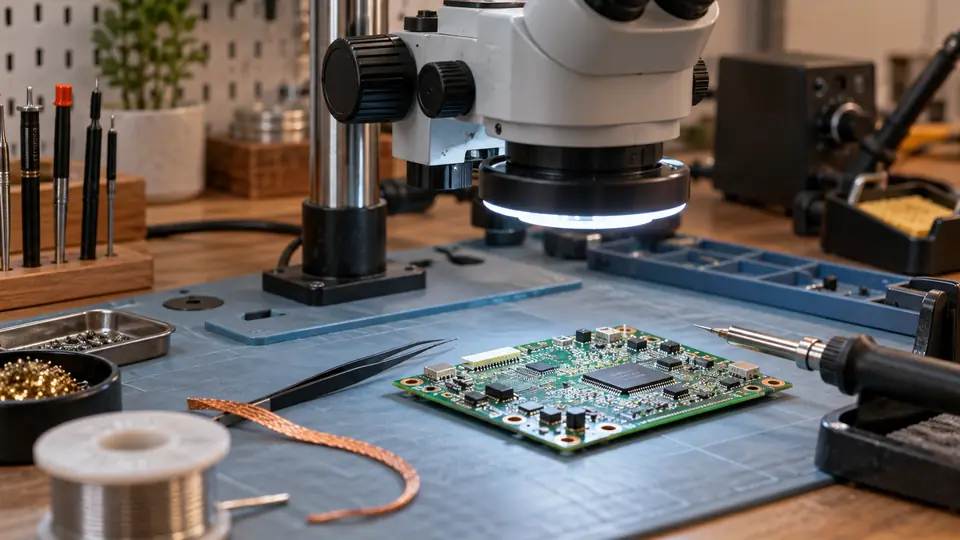
A soldering microscope earns its place on an electronics bench when your eyes begin losing the battle against tiny pads, hairline bridges, and crowded PCB layouts. The useful question is not which model advertises the biggest magnification number. It is whether you can position the board, keep both hands near the work, see a broad enough area, and adjust focus without constantly bumping the setup.
Digital models dominate this selection because they combine a built-in screen, adjustable stands, LED lighting, and camera output in relatively compact packages. Still, their headline specifications need careful reading. Digital magnification is not the same as optical magnification, and a 2,000X claim does not automatically make soldering easier. Working distance, stand reach, lighting control, screen size, and focus behavior matter far more when a hot iron and tweezers are moving around a board.
The products below range from compact inspection tools to elaborate multi-lens stations. The TOMLOV TM4K-AF Flex stands out as the strongest overall choice for buyers who want autofocus, 4K video, a flexible arm, and a more polished bench setup. Less expensive models make sense for occasional inspection, while the Andonstar and TOMLOV multi-lens systems suit readers who want one microscope for electronics, coins, slides, and demonstrations.
Quick Answer
- Best Overall: TOMLOV Autofocus 4K Digital Microscope TM4K-AF Flex for autofocus control, a flexible arm, 4K video, and 52MP imaging.
- Best Alternative: Elikliv Autofocus 4K Digital Microscope EM4K-AF for buyers who want autofocus, a rechargeable design, and split-screen viewing.
- Best Bench Station: Andonstar AD249S-M Plus for its larger display, boom arm, extension base, helping hands, and tool storage.
- Best Budget Choice: Aikokkl 5" LCD Digital Soldering Microscope for basic PCB inspection in a smaller workspace.
Best Soldering Microscope Comparison Table
| Product | Type | Display And Imaging | Stand And Working Setup | Best For |
|---|---|---|---|---|
| TOMLOV TM4K-AF Flex | Autofocus digital | 4K, 52MP, 8-inch screen | 360-degree flexible arm | Regular PCB and SMD work |
| Elikliv EM4K-AF | Autofocus digital | 4K, 52MP, 8-inch screen | 10-inch stand, rechargeable design | Portable inspection and comparisons |
| TOMLOV TM3K-3D | 3D digital | 3K, 7-inch screen | 360-degree articulating arm | Side-view PCB inspection |
| Andonstar AD249S-M Plus | Three-lens digital | 2160P, 10.1-inch screen | Boom arm and extension base | Complete soldering station |
| Andonstar AD246S-M | Three-lens digital | 2160P, up to 2000X listed | Adjustable metal boom stand | Multi-purpose bench use |
| Andonstar AD210 | Digital microscope | 1080P, 12MP, 10.1-inch screen | Metal stand, up to 12.6 inches | Coins, PCBs, and slides |
| TOMLOV DM9 Max | Digital microscope | 20MP, 1080P video, 10.1-inch screen | 12.6-inch stand and broad base | Large-screen inspection |
| TOMLOV DM9 | Digital microscope | 12MP, 1080P video, 7-inch screen | 8.5-inch metal stand | Coins and light soldering |
| Aikokkl 5" LCD Microscope | Compact digital | 5-inch IPS, 1080P recording | Flexible gooseneck arm | Basic PCB repair |
The detailed reviews explain how each microscope handles focus, clearance, lighting, recording, and hands-on bench work.
1. TOMLOV Autofocus 4K Digital Microscope TM4K-AF Flex — Best Overall

Focus adjustment is often the fussy part of digital microscope work. You move a board, lift a component, or lean toward a different section, and the sharp image slips away like a radio station between channels. The TOMLOV TM4K-AF Flex addresses that frustration with autofocus, a TOF sensor, and preset focus points labeled P1 and P2. The available product information describes focus adjustment in about two seconds, though that remains a listing claim rather than an independent measurement.
Its 4K video, 52MP image capability, 8-inch screen, and 360-degree articulating arm give it a strong practical profile for PCB inspection. The arm lets you shift the camera around the work area instead of forcing every board into one fixed position. The screen lists 1280 by 800 resolution, while HDMI and USB outputs provide larger-screen or computer viewing. That combination suits repair documentation, close inspection, and repeated work where manual refocusing becomes a nuisance.
Pros
- Autofocus uses a TOF sensor for automatic distance adjustment.
- P1 and P2 focus presets help switch between uneven surfaces.
- 4K video and 52MP image capability support detailed documentation.
- 360-degree flexible arm provides broad positioning control around a PCB.
- Includes HDMI and USB output options plus an 8-inch IPS display.
Cons
- The available information does not clearly state the exact working distance for soldering.
- Autofocus may be less predictable around cluttered boards or reflective surfaces than a fixed manual setup.
This is the strongest fit for readers who want a modern digital bench microscope and expect to record, compare, or inspect boards frequently. The autofocus system is the main reason to choose it over lower-cost manual-focus models. Buyers who prefer a purely optical view or need exact latency information should verify those details before ordering, but for a screen-based setup with flexible positioning, this is the most complete package here.
To buy this product, click here.
2. Elikliv Autofocus 4K Digital Microscope EM4K-AF — Best For Portable Inspection

The Elikliv EM4K-AF takes a similar autofocus route but adds a few features that change how the microscope behaves away from a fixed bench. Its rechargeable design can be useful for moving between work areas, while the 10-inch stand and broad base provide room for coins, boards, and larger samples. A repairer checking several boards on a crowded table may appreciate being able to view the screen without threading another monitor into the workspace.
The camera system is specified at 4K video and 52MP imaging, with an 8-inch IPS display and HDMI and USB outputs. Freeze and split-screen modes are particularly useful for comparing two images or holding a view while a component is moved. The listing also describes a smart controller and included 16GB card. That makes the EM4K-AF a capable inspection and documentation tool, although the product information does not provide a detailed working-distance figure for soldering clearance.
Pros
- Autofocus and TOF sensing reduce repeated manual focus adjustments.
- Rechargeable design supports inspection away from a fixed power position.
- 4K video and 52MP imaging provide strong documentation capability.
- Freeze and split-screen functions help compare views or hold an image steady.
- Broad base and 10-inch stand accommodate larger samples and boards.
Cons
- The exact battery capacity and operating time are not identified in the available information.
- The listing does not clearly specify the usable soldering working distance.
Choose this model if autofocus and flexible placement matter as much as image quality. It is a good match for mixed inspection, teaching, and repair work, especially where split-screen comparison has real value. The TOMLOV has a more clearly described flexible-arm setup, while the Elikliv counters with a rechargeable design and comparison tools, so the better choice depends on whether your bench is fixed or mobile.
To buy this product, click here.
3. TOMLOV 3D Digital Soldering Microscope TM3K-3D — Best For Side-View Inspection
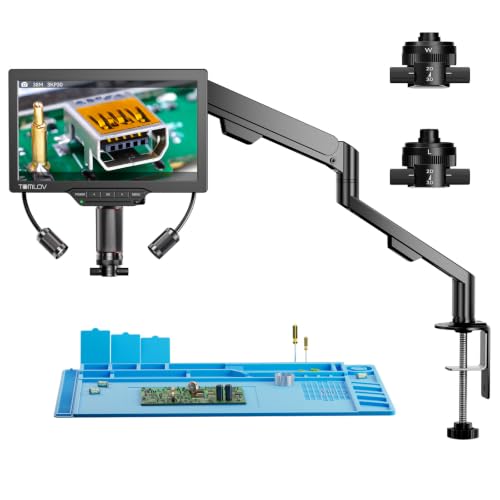
A conventional top-down camera can show a solder joint clearly while hiding the shape of a pin, the edge of a chip, or the way a component sits above the board. The TOMLOV TM3K-3D approaches that problem with side-viewing and 360-degree rotating 3D imaging. Its L lens is described as a long-distance option for PCB soldering and watch repair, while the W lens offers a wider view for coins, jewelry, and specimens.
Magnetic lens switching keeps the changeover quick, and the 7-inch IPS display gives the setup a reasonably compact footprint. The 3K system can connect through HDMI, USB, or the built-in screen, so a reader can move from bench inspection to computer analysis without changing the microscope itself. A flexible articulating arm and adjustable gooseneck light also help position the image and illuminate the joint from a more useful angle.
Pros
- Side-viewing and 360-degree rotation expose component profiles and joint angles.
- Magnetic dual lenses switch without a tool-based lens change.
- Long-distance L lens is aimed at PCB soldering and watch repair.
- Supports built-in display, HDMI, and USB viewing.
- Articulating arm and adjustable gooseneck light offer flexible positioning.
Cons
- The available information does not identify a precise optical or digital magnification range.
- A 7-inch display provides less viewing area than the 10.1-inch options here.
This is the intriguing choice for work where depth and component profile matter more than a very large screen. It may suit microchips, connectors, watch parts, and solder joints that need checking from several angles. Buyers who mainly inspect flat boards from above may find the 3D system more specialized than necessary, but the side-view capability gives it a purpose that standard digital microscopes often lack.
To buy this product, click here.
4. Andonstar AD249S-M Plus — Best Complete Bench Station

Some microscope buyers are really building a small repair station, and the AD249S-M Plus recognizes that reality. Its 10.1-inch display sits above a setup with a metal base, boom arm, plastic extension base, component storage boxes, tool holder, soldering mat, and rotatable helping hands. Instead of balancing a board, tweezers, and iron around a narrow stand, the user gets a more organized working area from the start.
The three-lens system gives the microscope separate roles. Lens L is listed for soldering and repair, Lens A for coins and larger subjects, and Lens D for biological slides. The soldering lens range is listed as 15X to 60X on the built-in display and 60X to 240X through a larger HDMI monitor. Those figures are digital microscope listing specifications, not optical magnification equivalents, so the large numbers should not be confused with a stereo microscope view.
Pros
- 10.1-inch display provides a broad viewing area for extended inspection.
- Three lenses cover soldering, general objects, and biological slides.
- Extension base adds workspace and component storage boxes.
- Includes helping hands, tool holder, soldering mat, and bottom light stage.
- HDMI output, remote control, and eight LED brightness levels support demonstrations and recording.
Cons
- The larger stand and accessories require more bench space than compact models.
- Lens changes require removing and installing lenses with screws.
This model makes the most sense for a permanent repair bench where the extra station hardware will actually be used. It is more elaborate than necessary for someone who only wants to inspect an occasional solder bridge, yet the extension base and helping hands can save the familiar dance of chasing parts across a crowded mat. Choose it over the standard multi-lens systems when work organization matters as much as the camera.
To buy this product, click here.
5. Andonstar AD246S-M — Best Multi-Lens Value

The AD246S-M offers much of the multi-purpose character found in the Plus model without the same expanded station package. Its three lenses divide the work between soldering and repair, general objects such as coins and plants, and biological slides. A metal boom arm can move front to back, side to side, and through angle adjustments, giving the operator more room to position a PCB beneath the camera.
Its 2160P video, HDMI output, adjustable LED lighting, wireless remote, and included 32GB card make it useful for documenting repairs or showing a close-up image to a group. The listing gives separate ranges for each lens, with Lens L aimed at soldering and Lens D intended for slides. Since the lens roles differ, switching lenses is more meaningful than simply dialing a larger digital zoom number.
Pros
- Three-lens design covers repair, general inspection, and slides.
- Adjustable metal boom arm provides room for hands and tools.
- 2160P video and HDMI output support large-screen viewing.
- Includes a 32GB microSD card, HDMI cable, remote, slides, and tweezers.
- Eight LED intensity levels allow lighting changes for different samples.
Cons
- Lens changes require removing and installing screws.
- It lacks the Plus model’s expanded base, storage boxes, and included helping hands.
This is a sensible pick for a reader who wants one microscope to serve several hobbies but does not need a built-in storage-heavy soldering station. It has a broader role than a compact PCB camera, while the separate soldering lens keeps the kit relevant to bench repair. The trade-off is a little more setup work and fewer station accessories than the Plus version.
To buy this product, click here.
6. Andonstar AD210 — Best For General Bench Inspection

The AD210 keeps the viewing experience comfortable with a 10.1-inch IPS display and a 178-degree viewing angle. Its metal stand reaches up to 12.6 inches, and the listed working-distance range runs from 1 cm to 26 cm. That range is especially useful for a bench microscope because the iron, tweezers, and board need breathing room beneath the lens instead of crowding into a short tunnel.
For electronics, the top and side lights are intended for coins and soldering, while the bottom light stage handles slides. The system records 1080P video and 12MP photos, includes a 32GB card and reader, and uses a remote for capture, zoom, and image-color adjustments. It does not offer the autofocus or 4K imaging of the top-ranked models, but its large screen and generous stand make it a practical general-purpose tool.
Pros
- 10.1-inch IPS screen provides comfortable shared viewing.
- Listed 1 cm to 26 cm working-distance range supports varied sample positions.
- Metal stand reaches up to 12.6 inches for coins and hands-on repair.
- Top, side, and bottom lighting serve soldering, coins, and slides.
- Includes 32GB card, reader, remote, slide kit, and bottom light stage.
Cons
- Its 1080P video and 12MP photo capability trail the 4K models.
- The available information does not describe autofocus.
This model fits a mixed-use bench where viewing space matters more than maximum image resolution. A reader checking a connector one afternoon and a coin or slide the next can use the same stand and lighting system without buying separate inspection tools. For frequent documentation or rapid refocusing, the autofocus models are stronger, but the AD210 offers a straightforward, roomy setup.
To buy this product, click here.
7. TOMLOV DM9 Max — Best Large-Screen Budget Alternative

A 10.1-inch screen changes the feel of digital inspection. Instead of peering into a small rectangle while your shoulders creep toward the bench, the DM9 Max gives solder joints, coin details, and watch parts a larger viewing area. Its listed 5X to 1500X zoom range, 20MP photo capability, and 1080P video recording cover the typical inspection tasks this style of microscope is built for.
The 12.6-inch stand and 7 by 8-inch base provide a spacious platform, while eight lens LEDs and two dimmable gooseneck lights let the user reduce shadows or shift illumination away from reflective surfaces. A remote controls capture and recording without touching the display. The listing also identifies PC and monitor connection, a pre-installed 16GB card, and a microphone for audio in video mode, though the latter matters mainly for demonstrations or narrated repair records.
Pros
- 10.1-inch IPS display offers a broad 178-degree viewing angle.
- 12.6-inch stand and 7 by 8-inch base provide substantial bench room.
- 20MP photos and 1080P video support repair documentation.
- Ten adjustable lights include lens LEDs and gooseneck side lights.
- Remote control, PC connection, and included 16GB card add convenience.
Cons
- Video resolution is 1080P rather than 4K.
- The product information does not identify a precise soldering working-distance measurement.
The DM9 Max is a strong fit for someone who wants a large, comfortable screen without moving into the more elaborate 4K autofocus category. It is especially appealing for coin and electronics inspection shared with another person across the bench. Buyers doing very fine work across uneven heights may prefer autofocus, while those who value a broad screen and adjustable lighting get a lot of practical utility here.
To buy this product, click here.
8. TOMLOV DM9 — Best For Coins And Light Soldering

The TOMLOV DM9 is built around a steady metal base, an 8.5-inch adjustable stand, and a 7-inch screen. That arrangement feels more like a stable inspection platform than a tiny handheld camera, which helps when a coin, PCB, or watch part needs to stay still while the viewer adjusts height and focus. The listing describes up to 1200X magnification, but practical clarity will still depend on distance, lighting, and the subject itself.
Eight built-in LEDs and two flexible gooseneck lights give the user more control over glare and shadow than a single fixed light source. The 12MP camera records 1080P video, and the included 16GB card supports saved images and footage. PC and Mac viewing is also listed. For someone who alternates between coin collecting and occasional soldering, this is a more natural fit than a specialized high-end repair microscope.
Pros
- Stable metal base and adjustable 8.5-inch stand support hands-on inspection.
- Seven-inch screen is larger and easier to share than a phone display.
- Eight built-in LEDs and two flexible lights provide directional illumination.
- Includes 16GB storage for photos and videos.
- PC and Mac connection supports larger viewing and demonstrations.
Cons
- The 7-inch screen is smaller than the large-screen models above it.
- The listing emphasizes coins and general inspection as much as soldering.
Pick the DM9 when the microscope will live between a coin tray and a light electronics project. It provides a stable base, usable lighting, and a built-in display without the bulk of a full soldering station. For dense SMD repair or frequent documentation, the larger-screen or autofocus choices offer more specialized control.
To buy this product, click here.
9. Aikokkl 5" LCD Digital Soldering Microscope — Best Budget Compact Pick

The Aikokkl takes a smaller, simpler approach. Its 5-inch IPS screen and flexible gooseneck arm are aimed at close inspection of solder joints, small components, and coin details in tight spaces. The product information clearly states that it is not an autofocus camera. Focus comes from changing the lens-to-object distance and turning the focus wheel, so setup takes a little patience before the image settles.
That manual behavior is a limitation, but it also makes the operating concept easy to understand. Connect it to a Windows computer through PC Camera mode or use Photo Booth on a Mac, with no third-party software listed as necessary. The microscope can record 1080P video, but a microSD card supporting up to 32GB is required and is not included. For a compact bench where occasional PCB inspection matters more than large-screen comfort, its straightforward design is appealing.
Pros
- Compact 5-inch IPS display suits smaller workspaces.
- Flexible gooseneck arm adapts to irregular objects and tight setups.
- Plug-and-play PC camera mode is listed for Windows and Mac.
- 1080P recording supports basic repair documentation.
- Manual focus and distance adjustment keep operation straightforward.
Cons
- It does not autofocus, and a microSD card is required for saving photos and videos but is not included.
- The 5-inch display offers less viewing space than the larger bench models.
This is the practical entry point for someone who wants a screen-based microscope without filling half the bench. It suits basic PCB inspection, connector checks, and occasional component work, provided the user is comfortable setting focus manually. A larger stand is preferable for regular soldering with bulky boards, while this compact model fits best where space and lower cost carry real weight.
To buy this product, click here.
Buying Guide For A Soldering Microscope
Working Distance Matters More Than The Largest Magnification Number
A soldering microscope must leave room for an iron, tweezers, and both hands beneath the lens. A huge digital magnification claim is of limited use if the camera sits too close to the board or shows such a narrow area that the next pad disappears off-screen. Look for a stand and lens arrangement that gives the board practical clearance, then use magnification as a way to refine the view rather than as the main buying target.
Digital Magnification Is Not Optical Magnification
Every product here is a digital microscope or digital-heavy system. The listed 1,200X, 1,500X, 2,000X, or 2,500X figures should not be read as equivalent to optical magnification through a stereo microscope. Digital zoom enlarges the camera image, while useful soldering clarity also depends on the sensor, lens, display, lighting, and focus position. A stable, moderately enlarged view is often more useful than an extreme zoom that shows a tiny patch of the board.
Choose Manual Focus Or Autofocus Around Your Workflow
Manual focus can work well when the board stays at one height and the operator wants predictable control. The Aikokkl, Andonstar, and standard TOMLOV models use focus and height adjustments rather than autofocus. Autofocus models such as the TOMLOV TM4K-AF Flex and Elikliv EM4K-AF are more attractive for uneven surfaces, moving samples, or repeated inspection across different heights. Autofocus can still react to a crowded or reflective board, so confirm that the system behaves well for your intended work if fast focus changes are critical.
Stand Stability And Arm Positioning Affect Soldering Comfort
A camera that shakes whenever the table is touched quickly becomes irritating. Metal bases, broad stands, boom arms, and articulating arms help create a more usable work envelope, but larger hardware also consumes bench space. The Andonstar AD249S-M Plus is the most station-like setup here, while the TOMLOV TM3K-3D emphasizes arm movement and side viewing. Compact gooseneck designs are easier to place in a crowded area but may offer less control for large boards.
Lighting Should Reveal Joints Without Washing Them Out
Ring LEDs can brighten a dark PCB, yet shiny solder and component packages may reflect a direct beam straight back into the camera. Adjustable intensity and side lighting let you move illumination across the joint. Models with gooseneck lights, such as the TOMLOV DM9 and DM9 Max, give more freedom than a fixed light ring. The Andonstar systems add separate lighting roles for top, side, and bottom illumination, which helps when the microscope also serves coin or slide inspection.
Screen Size And Outputs Change How Long You Can Work
A 5-inch screen keeps the setup compact, while 10.1-inch displays make shared viewing and longer inspection sessions more comfortable. HDMI and USB outputs can move the image to a larger monitor or computer, although the exact output experience depends on the connected equipment. If repair records matter, check whether the product includes storage. The Aikokkl requires a microSD card that is not included, while several TOMLOV and Andonstar models list included cards.
Match The Microscope To The Board, Not The Advertisement
A basic microscope may be enough for checking through-hole joints, reading markings, or finding a visible bridge. Dense SMD work benefits more from clearance, stable positioning, controllable lighting, and a broad field of view. Side-view work may favor the TOMLOV TM3K-3D, while frequent refocusing points toward an autofocus model. For occasional mixed use, a multi-lens system can make sense, but lens switching adds another step that a dedicated soldering setup avoids.
Best Soldering Microscope FAQ
Is A Digital Microscope Good For Soldering?
Yes, a digital microscope can be useful for PCB inspection and soldering when it provides enough working clearance, a stable stand, adjustable lighting, and a view that does not lag excessively. The products here use screens rather than eyepieces, which lets the operator keep eyes on a display while hands work below the camera. Digital magnification alone does not guarantee a useful soldering image.
What Magnification Is Best For Soldering?
There is no single best number for every board. Moderate magnification with a broad field of view is usually easier for locating pads, moving an iron, and keeping surrounding components visible. Higher digital zoom can help inspect a joint after soldering, but extreme advertised magnification may produce a narrow image that is awkward during live work.
Is Autofocus Worth It On A Soldering Microscope?
Autofocus is useful when the board has uneven surfaces, the sample moves, or the operator frequently changes height. The TOMLOV TM4K-AF Flex and Elikliv EM4K-AF list autofocus and TOF sensing. Manual focus remains reasonable for a fixed board position and can provide a more deliberate view, especially when an autofocus system might choose a nearby component instead of the target joint.
How Much Working Distance Do I Need?
You need enough room for the PCB, iron, tweezers, and fingers to move beneath the lens without collisions. The exact requirement depends on the stand, lens, board thickness, and task. A model with a stated adjustable working-distance range, such as the Andonstar AD210, gives clearer information than one that only advertises magnification. Confirm the actual clearance before ordering if you work on tall connectors or assembled boards.
Are Digital Magnification And Optical Magnification The Same?
No. Optical magnification comes from the lens system, while digital magnification enlarges the camera image. Digital zoom can make details appear larger, but it does not automatically add genuine detail. Compare screen clarity, focus behavior, lighting, and field of view rather than choosing solely by the largest number in the product title.
Do I Need HDMI Or USB Output?
You do not need either output if the built-in display is comfortable and large enough for your work. HDMI can help when you want a larger monitor, while USB can support computer viewing or documentation where the product lists that function. Output compatibility and software behavior can vary, so verify the connection details for your computer or monitor before relying on it.
Can These Microscopes Replace A Stereo Microscope?
They can cover many inspection tasks, but a digital microscope and a stereo optical microscope provide different viewing experiences. A digital model offers a screen, recording, and easy shared viewing. An optical microscope may provide a more direct depth perception and a different sense of motion. For occasional repair and documentation, digital models are convenient. For continuous precision work, compare the viewing method and hand clearance carefully.
Final Verdict
The TOMLOV TM4K-AF Flex is the strongest overall choice in this group because it combines autofocus, a TOF sensor, focus presets, 4K video, 52MP imaging, an 8-inch screen, and a flexible arm. Those features address the practical annoyances that make digital microscope work tiring, especially when the board surface changes height or the operator needs to move between several inspection points. The Elikliv EM4K-AF is a close alternative for buyers who value a rechargeable design, freeze mode, and split-screen comparison.
For a more complete soldering station, the Andonstar AD249S-M Plus adds a large screen, extension base, tool storage, helping hands, and a soldering mat. The Andonstar AD210 is a simpler large-screen option, while the Aikokkl offers a smaller and lower-cost route for occasional PCB checks. Match the purchase to your bench rather than chasing the biggest magnification claim. Clearance, lighting, focus behavior, and stand stability will shape the quality of your soldering view long after the number on the box stops sounding impressive.

- Jesse
Jesse is the editor behind Soldering Gear, where he covers soldering irons, stations, rework equipment, and the tools that belong on a practical electronics bench. His work focuses on comparing product specifications, features, compatibility, and intended uses so readers can make more informed buying decisions.
- Best Cordless Soldering Iron: 9 Picks in 2026 September 28, 2026
- Best Portable Soldering Iron: 9 Picks in 2026 September 27, 2026
- What Temperature for Soldering Electronics? September 26, 2026
- Best Soldering Station for Beginners: 9 Picks in 2026 September 25, 2026
- Best Solder Fume Extractor: 9 Picks in 2026 September 24, 2026