Why Is My Soldering Iron Not Melting Solder?

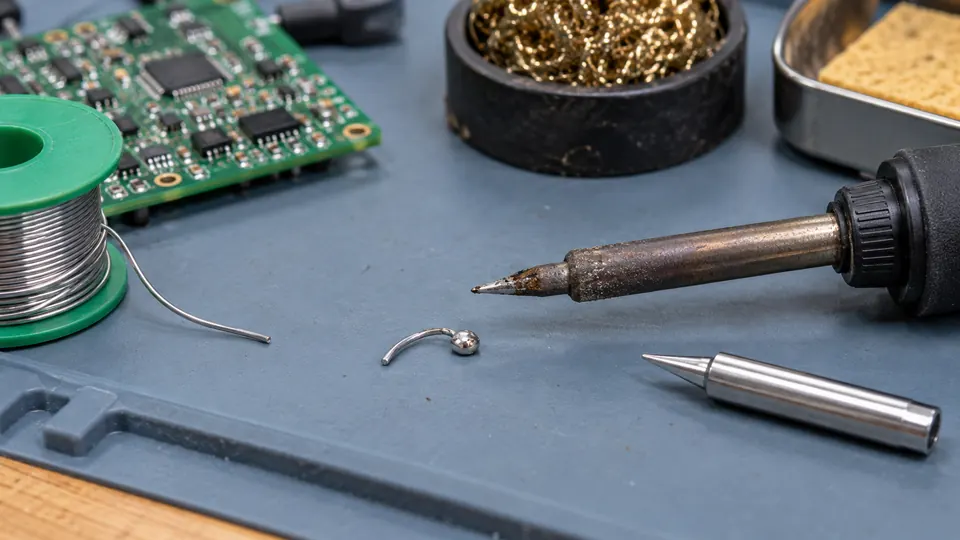
A soldering iron may fail to melt solder because the tip is oxidized, the station is set too low, the tip is installed incorrectly, or the iron cannot deliver enough heat to the joint. The fastest way to narrow down the problem is to compare what happens on the tip with what happens at the workpiece.
Touch a small amount of known, compatible solder to the clean working face of the heated tip. If it does not melt there, investigate the iron, tip, temperature setting, and solder. If it melts on the tip but refuses to flow at the joint, the problem is more likely poor thermal contact, oxidized surfaces, insufficient flux, or a workpiece that draws heat faster than the iron can replace it.
First determine where the solder stops melting
This simple distinction prevents unnecessary temperature increases and repeated heating of the PCB or component.
| What you observe | Likely area to investigate | Next check |
|---|---|---|
| Solder does not melt anywhere on the tip | Power, temperature setting, sleep mode, heating element, tip installation, or solder alloy | Confirm that the station is heating and that the correct tip is fully installed |
| Solder melts only on one small part of the tip | Oxidized or damaged tip plating | Clean and re-tin the usable working surface |
| Solder melts on the tip but balls up instead of coating it | Oxidation, contamination, depleted flux, or damaged plating | Clean the hot tip gently and apply fresh solder or compatible tip-tinning compound |
| Solder melts on the tip but remains solid at the joint | Poor heat transfer, excessive thermal mass, surface oxidation, or unsuitable tip geometry | Improve contact and heat both surfaces before feeding solder to the joint |
| The iron starts hot but quickly loses the ability to melt solder | Insufficient thermal recovery, a loose tip, or a failing heater or sensor | Test on a smaller joint and inspect the tip installation after the tool cools |
| Solder melts but will not spread across the pad or lead | Poor wetting caused by contamination, oxidation, incompatible materials, or inadequate flux | Clean the surfaces and use flux suitable for the soldering process |
Check the iron before heating the joint again
-
Confirm that the tool has finished heating. Check the station display or ready indicator where provided. Make sure the station is not in standby or sleep mode and that the temperature control has not been turned down accidentally.
-
Verify the selected temperature against the solder and application. Solder alloys have different melting behavior. Lead-free electronics solder commonly requires a higher working temperature than common tin-lead solder, but raising the setting without limit can damage the tip and workpiece. Follow the solder and equipment guidance where available.
-
Inspect the tip installation. A loose, partially inserted, incompatible, or incorrectly assembled tip may heat poorly. Switch off and unplug the tool, allow it to cool, and confirm that the tip and retaining parts are installed correctly for that iron or handpiece.
-
Try a known piece of electronics solder. Unlabeled wire may be an unfamiliar alloy, solid metal wire, brazing filler, or solder intended for a different process. Testing with known solder helps separate a material problem from an iron problem.
A temperature display reports the station’s control value, which may not represent the temperature at every part of the tip under load. A poorly fitted or heavily oxidized tip can transfer little useful heat while the station appears to be operating normally.
An oxidized tip may be hot but still seem ineffective
A healthy plated tip should accept a thin coating of molten solder on its working surface. This coating, called tinning, improves thermal contact by filling tiny air gaps between the tip and the workpiece.
Oxidation often appears as a dark, crusted, or discolored area that solder avoids. The solder may form a bead and roll away rather than spreading over the tip. This behavior can make a sufficiently hot iron seem cold.
How to restore a tip that will still accept solder
-
Heat the iron to an appropriate normal working setting.
-
Wipe the tip briefly on brass tip-cleaning wool or a properly dampened soldering sponge.
-
Immediately apply fresh flux-cored solder to the working faces.
-
Leave a thin solder coating on the tip rather than wiping it completely dry.
A compatible tip-tinning or tip-activator compound may help with more persistent oxidation. Use it according to its product directions, then coat the restored surface with solder.
Do not file or aggressively sand a plated soldering tip. Removing the protective plating exposes the underlying metal and usually shortens the tip’s life. Replace a tip that has holes, deep pitting, exposed core material, or a surface that cannot be re-tinned through appropriate cleaning.
If solder melts on the tip but not on the joint
This usually points to heat-transfer trouble rather than a solder melting-point problem. The joint must receive enough heat for the pad, terminal, lead, or wire to reach soldering temperature. Melting solder on the tip and carrying a blob to a cold joint rarely produces reliable wetting.
Increase contact area without using excessive pressure
Place a tinned face of the tip so it touches both parts being joined. A tiny amount of molten solder between the tip and joint can form a thermal bridge and improve heat flow. After the surfaces heat, feed solder at the joint near the tip. The joint should melt the incoming solder and allow it to wet the prepared surfaces.
Heavy pressure provides little benefit and can damage pads, component leads, and the tip. Reposition the tip to create better contact instead.
Use a tip suited to the joint geometry
An extremely fine conical tip may fit into a tight area but have too little contact area for efficient heating. A suitably sized chisel, bevel, hoof, or other geometry can transfer heat more effectively while still providing adequate access.
Choose the tip according to:
- the size and shape of the pad, lead, wire, or terminal;
- the workpiece’s thermal mass;
- the available access around nearby components;
- the contact area the tip can make with the joint; and
- compatibility with the specific iron or handpiece.
For small electronic joints, the best choice is often a tip that contacts a useful portion of the joint without touching adjacent conductors. The finest available tip is frequently less effective than a modestly wider one.
Account for large copper areas and metal parts
Ground planes, thick wires, shield tabs, large connector shells, battery terminals, and substantial metal chassis parts can draw heat away rapidly. An iron may melt solder in open air yet cool sharply as soon as it touches one of these surfaces.
For these joints, use an appropriate tip with greater contact area and equipment capable of maintaining useful tip temperature under load. Where the component and process permit it, controlled preheating may reduce the thermal difference. Avoid applying prolonged heat with an undersized tool, since nearby insulation, PCB laminate, pads, and components may be damaged before the joint reaches soldering temperature.
Flux and surface condition affect whether solder appears to melt properly
Molten solder does not automatically bond to dirty or oxidized metal. It may remain in a ball, cling to the tip, or move around the joint without spreading. This can look like incomplete melting when the underlying problem is poor wetting.
Check the following surfaces:
- PCB pads: Look for contamination, heavy oxidation, damaged plating, lifted copper, or old coating that blocks wetting.
- Component leads: Tarnished or contaminated leads may require cleaning and fresh compatible flux.
- Wires: Darkened copper, enamel insulation, or heavily oxidized strands may resist tinning.
- Terminals and connectors: Some finishes or base metals are difficult to solder or require a particular flux and process.
Use flux intended for the solder, materials, and electronics application. Plumbing fluxes and strongly corrosive fluxes are generally unsuitable for electronic assemblies unless the process specifically calls for them and includes the necessary residue control.
Coatings also matter. Magnet wire may have enamel that must be removed or processed by an approved method. Aluminum, stainless steel, and some plated surfaces cannot be treated like ordinary tinned copper. More temperature will not correct a basic material or flux incompatibility.
The temperature setting may be too low, but higher is not always the fix
The required setting depends on the solder alloy, tip geometry, joint size, copper area, station behavior, and component sensitivity. The tip must remain hot enough under contact to bring the joint above the solder’s melting range.
A low setting may produce these symptoms:
- solder softens but does not become fully molten;
- the solder melts slowly in open air and stops melting against the workpiece;
- the station takes an unusually long time to recover between joints; or
- the solder forms irregular deposits because the surfaces never become hot enough for proper wetting.
Increase the setting gradually within the limits appropriate for the equipment, solder, and workpiece. If a large increase is needed for an ordinary small joint, stop and inspect the tip condition, tip fit, contact technique, and station operation. Excessive temperature can accelerate oxidation and make wetting worse, especially if the tip sits hot without a protective solder coating.
When the solder itself is the problem
Solder that is unfamiliar, mislabeled, heavily oxidized, or intended for another process can confuse the diagnosis. Common possibilities include:
- a solder alloy with a higher melting range than expected;
- wire with little or no active flux remaining at the point of use;
- very old or contaminated solder that wets poorly;
- solid solder wire being mistaken for flux-cored electronics solder;
- low-temperature solder residue mixed with a different alloy from earlier work; or
- non-solder filler metal that resembles solder wire.
Test the iron with a short section of clearly identified electronics solder. Read the alloy and flux information on the spool rather than relying on appearance. Solder diameter affects how quickly material is fed into a small joint, but diameter by itself does not determine whether the alloy can melt.
Signs of an equipment fault
The iron or station may need service if basic checks do not restore normal operation. Possible warning signs include:
- the tip remains cold although the power indicator is on;
- the station reports readiness almost immediately from a cold start;
- the displayed temperature changes erratically;
- the handpiece heats intermittently when its cable moves;
- the tip heats weakly despite correct installation and a clean surface;
- the station shows a sensor, heater, or handpiece error; or
- there is visible cable damage, a loose connector, unusual odor, smoke from the tool, or discoloration around electrical parts.
Switch off and unplug equipment showing electrical damage, overheating, or intermittent cable behavior. Do not continue testing it against a PCB. User-replaceable heaters, sensors, fuses, handpieces, and tips vary by model, so consult the equipment documentation before replacing parts. Internal mains-powered repairs should be left to someone qualified to perform them safely.
Know when to stop reheating the joint
Repeatedly holding the iron on a stubborn connection can lift PCB pads, separate traces, soften connector housings, shrink wire insulation, or overheat components. Stop and reassess if the pad starts moving, the laminate discolors, insulation retreats from the conductor, or the component and surrounding area continue accumulating heat without the solder flowing.
Let the assembly cool, then check tip tinning, tip size, flux, surface condition, and thermal demand. For a large terminal or ground connection, changing to suitable equipment is safer than extending contact time with an iron that cannot maintain heat at the joint.

- Jesse
Jesse is the editor behind Soldering Gear, where he covers soldering irons, stations, rework equipment, and the tools that belong on a practical electronics bench. His work focuses on comparing product specifications, features, compatibility, and intended uses so readers can make more informed buying decisions.
- Best Soldering Iron for Phone Repair: 9 Picks in 2026 October 27, 2026
- Best Hot Air Rework Station for Phone Repair: 9 Picks in 2026 October 26, 2026
- Why Is My Soldering Iron Not Melting Solder? October 25, 2026
- Best Portable Solder Fume Extractor: 9 Picks in 2026 October 24, 2026
- Best Desoldering Wick: 9 Picks in 2026 October 23, 2026