How to Choose a Soldering Iron

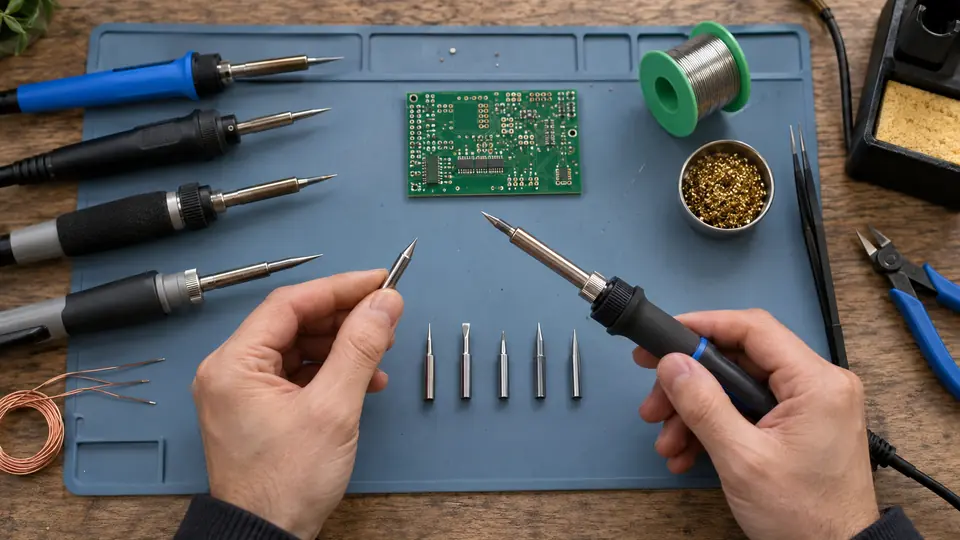
The right soldering iron is determined by the joints you expect to make, their thermal demand, the space around them, and where you will work. For regular electronics assembly and repair, a temperature-controlled station with interchangeable tips is usually the most practical choice. Occasional wire work may need less equipment, while large connectors, heavy cable, sheet metal, and fine-pitch components can call for more specialized tools.
Power and maximum temperature are easy specifications to compare, but they do not describe the whole tool. Heat recovery, tip geometry, temperature regulation, tip availability, and handpiece comfort can matter as much as—or more than—headline wattage and maximum temperature in everyday use.
Start With the Work You Plan to Do
Choosing a soldering iron becomes easier once the expected joints are grouped by size and type. A tool suitable for small circuit-board pads may struggle with a connector attached to a large ground plane. A bulky iron that heats heavy terminals quickly may be awkward around dense surface-mount parts.
| Typical work | Useful characteristics | Potential limitations to avoid |
|---|---|---|
| Basic through-hole PCB assembly | Temperature control, a suitably sized chisel or other appropriate tip, comfortable handpiece, readily available replacement tips | Very fine tips with poor contact area, unstable temperature behavior, bulky handpieces |
| General electronics repair | Fast recovery, broad tip selection, adjustable temperature, compact tips for restricted access | Proprietary tips that are difficult to obtain, slow recovery on copper-heavy boards |
| Surface-mount rework | Good temperature stability, suitable fine chisel or bevel tips, light cable, documented ESD-safe construction where required by the devices being handled | Assuming the sharpest conical tip is always best, limited visibility around a large heater barrel |
| Wires, plugs, and small connectors | A tip that contacts both parts effectively, adequate recovery, stable stand | Insufficient capacity for larger conductors, excessive heat that damages insulation |
| Heavy terminals, shielding, and large connectors | Greater thermal capacity, larger tip options, strong recovery | Small electronics irons that remain in contact too long without heating the joint effectively |
| Portable field work | Compact size, appropriate power source, secure storage, replaceable tips | Short battery runtime, incompatible power supplies, exposed hot tips during transport |
| Stained glass, sheet metal, or other high-mass work | A tool intended for sustained heating of larger joints | Small PCB stations that lack the necessary thermal capacity or suitable tip shapes |
If your projects cover widely different joint sizes, one general-purpose station may handle the middle of the range. Specialized work at either extreme can require another handpiece, a higher-capacity station, hot air, or a different soldering process.
Choose the Appropriate Iron Format
Fixed-Temperature Pencil Irons
A basic pencil iron is inexpensive and simple. It can be adequate for occasional repairs where the joint size and solder alloy remain fairly consistent. Its limitations become more noticeable when the work spans joints with very different thermal demands.
Some pencil irons are regulated internally, while others simply balance heater output against heat lost to the surrounding air and workpiece. Two tools that look similar can behave quite differently. Check whether the stated temperature is actually controlled or merely an approximate operating value.
Adjustable Pencil Irons
An adjustable iron places temperature controls in the handle or cord rather than a separate station. This format saves space and may suit a portable kit. Look beyond the presence of a display. Useful questions include whether the tool regulates tip temperature, how quickly it recovers after touching a joint, and whether the controls can be changed accidentally during use.
Temperature-Controlled Stations
A station separates the power and control electronics from the handpiece. This arrangement can support a lighter handpiece and more capable temperature regulation, while the separate base commonly provides dedicated controls and a holder. Stations are well suited to regular PCB assembly, repair, and mixed bench work.
Features such as sleep mode, motion sensing, presets, and password locks can be convenient, but they should follow the fundamentals: effective heat delivery, a comfortable handpiece, dependable tip availability, and suitable electrical construction.
USB-C and Battery-Powered Irons
Compact electronic irons can be useful for field repairs, mobile tool kits, and crowded benches. Their performance depends on the complete power system. Confirm the required charging or power protocol, cable rating, supply output, connector type, and battery capacity. A common connector shape does not guarantee that every charger will operate the iron at its intended output.
Portable irons also need a safe stand and a transport plan. A recently switched-off tip remains hot, and some compact products provide minimal protection around it.
Butane Irons and Soldering Guns
A butane iron can operate away from electrical power, but temperature control may be less precise and hot exhaust can affect nearby materials or components. It is generally better suited to particular field tasks than routine precision PCB work.
A soldering gun heats rapidly and can serve some heavy electrical joints. Its size, tip configuration, and operating characteristics usually make it a poor general choice for delicate electronics.
Temperature Control and Heat Recovery Are Different
Temperature control sets a target and adjusts heater operation in response to changing conditions. Heat recovery describes how effectively the tool restores tip temperature after heat flows into a joint. A high maximum setting does not compensate for weak recovery, a poorly matched tip, or inadequate contact.
When a tip touches a large copper area, heat leaves the tip quickly. A capable station responds by supplying more energy. A weaker system may remain hot in open air yet lose useful tip temperature as soon as it contacts the work. The result can be slow wetting and prolonged heating of the board or connector.
Nominal wattage indicates electrical input or heater capacity under specified conditions. It does not provide a complete measurement of heat delivered through the tip. Heater location, control response, tip construction, thermal losses, and joint contact all affect performance.
For mixed electronics work, prioritize active temperature regulation and recovery over an unusually high advertised maximum temperature. Operating requirements still depend on solder alloy, flux, board construction, component sensitivity, tip geometry, and joint mass.
Tip Choice and Tip Availability Matter
A soldering station is tied to a particular tip system. Before buying, check which tip families fit the handpiece, which shapes are offered, their typical cost, and whether replacements are readily available. Similar-looking tips may have different dimensions, sensors, heater arrangements, or electrical connections.
Tip Shape Affects Heat Transfer
The smallest component does not automatically require the smallest tip. A very fine conical tip may contact the joint over only a small area, which can limit heat transfer. A small chisel or bevel can provide greater contact area while still fitting between neighboring parts.
- Chisel tips provide a flat contact surface and work well for many through-hole joints, wires, pads, and general PCB tasks.
- Conical tips can reach confined locations, but contact area may be limited depending on how the tip meets the joint.
- Bevel and hoof tips can hold a small amount of solder and provide useful surface contact for certain SMD and drag-soldering techniques.
- Larger chisel or bevel tips can improve heat transfer into heavy terminals, shields, and copper-rich joints when the handpiece supports them.
A practical starter selection is often more valuable than a large collection of highly specialized shapes. For general electronics, that may mean a small or medium chisel, a finer tip that still provides usable contact, and a larger tip for higher-mass joints. The exact sizes must match the work and the compatible tip series.
Traditional Tips Versus Cartridge Systems
Some irons place the heater and temperature sensor in the handpiece, with a separate metal tip fitted over or onto the heater. Cartridge systems integrate the heater, sensor, and working tip more closely. This arrangement can provide fast thermal response because the heater and sensor are positioned close to the working end.
Some cartridge systems also allow convenient tip or cartridge changes, although the mechanism varies by product family. Replacement cost and availability deserve attention. A low-priced station can become inconvenient if its tips are scarce, while a more expensive system may have a broad, stable supply of compatible shapes.
Third-party tips can vary in fit, plating quality, calibration, thermal behavior, and service life, so apparent compatibility should be verified carefully.
Match Thermal Capacity to the Largest Routine Joint
Select enough capacity for the largest joint you expect to solder regularly, without making the handpiece needlessly large for your smallest work. This balance matters more than choosing the highest wattage on the shelf.
Signs that an iron may lack useful thermal capacity include:
- The tip melts solder in open air but struggles after contacting the joint.
- Solder wets the tip yet does not flow readily onto a clean, fluxed terminal or pad.
- The tool requires prolonged contact with large connectors or copper planes.
- Performance changes sharply after each joint because the tip recovers slowly.
These symptoms can also result from oxidation, contamination, poor tip contact, insufficient flux, or an unsuitable tip shape. Raising the temperature should not be the first response. Check tip condition, joint cleanliness, contact area, and equipment suitability before increasing the setting.
For frequent work on heavy cable, battery connectors, metal shielding, or large terminals, a second high-capacity tool may be more practical than forcing one small station to cover every task.
Evaluate Handpiece Comfort and Bench Usability
Specifications cannot show whether a handpiece feels balanced or whether its cable constantly pulls against your grip. These details matter during precise work and longer sessions.
- Grip-to-tip distance: A shorter distance can improve control and visibility around small components.
- Handle diameter and weight: The handpiece should feel secure without requiring a tight grip.
- Cable flexibility: A stiff or heavy cable can rotate the iron or drag it from its stand.
- Tip visibility: The heater barrel and retaining hardware should not unnecessarily obscure the joint.
- Stand stability: The holder should accept the iron easily and resist sliding or tipping.
- Control layout: Temperature adjustments and presets should be clear without being easy to change by accident.
- Tip-changing method: Consider whether tips can be changed conveniently and how hot components will be handled safely.
If possible, examine the handpiece before buying. Product dimensions and photographs can help when hands-on evaluation is unavailable, but they may not reveal cable stiffness, balance, or stand quality.
Decide Which Electrical and Safety Features Apply
For work on static-sensitive electronics, look for a station that specifically documents ESD-safe construction and appropriate tip-grounding characteristics. A grounded mains plug by itself does not establish the complete ESD behavior of the handpiece and tip.
Electrical safety is especially significant for mains-powered equipment. Choose products intended for the local supply voltage and plug standard, with appropriate safety documentation from a credible supplier. Inspect cords, connectors, insulation, and strain relief before use. Avoid equipment with exposed wiring, damaged enclosures, or questionable mains construction.
An automatic sleep function reduces the time a tip remains at full operating temperature while idle. This can support tip life and reduce unnecessary heating. Auto shutoff provides an additional safeguard, though neither feature replaces a stable stand and careful bench habits.
Flux fumes and heated process residues should be managed with suitable ventilation or extraction for the workspace and materials being used. Keep the stand away from flammable items, wear eye protection where molten solder or clipped leads may travel, and wash hands after handling lead-containing solder.
Look Past the Initial Purchase Price
The cost of an iron includes the parts required to keep it useful. Review the complete system rather than comparing base units alone.
- Replacement tips and the range of available geometries
- Heating elements or cartridge tips
- Handpiece and cable replacement options
- Included stand, sponge tray, or brass-wool holder
- Required external power supply for compact irons
- Availability of manufacturer support and spare parts
- Compatibility with future handpieces or higher-capacity tools
A package containing many tips has limited value if the shapes do not suit your work or replacements cannot be purchased later. Conversely, a simple station with a dependable tip ecosystem may remain useful across a wider range of projects.
A Practical Selection Process
- List your common joints. Separate small PCB pads, ordinary through-hole joints, wires, connectors, ground planes, and high-mass terminals.
- Identify the thermal extremes. Note the smallest restricted-access joint and the largest joint you expect to handle routinely.
- Select the tool format. Choose a station for regular bench work, a compact powered iron for portability, or a specialized high-capacity tool for consistently heavy work.
- Confirm real temperature regulation. Determine whether the tool senses and controls temperature rather than relying on a simple power adjustment.
- Check the tip system. Verify compatible shapes, availability, replacement cost, and whether the tip range covers your joint sizes.
- Assess recovery and heater construction. Look for credible technical documentation and useful information about performance under load rather than relying on maximum-temperature claims.
- Review ergonomics. Consider grip size, tip visibility, cable flexibility, stand stability, and control placement.
- Confirm power and electrical compatibility. Match the product to the local mains supply or verify the protocol and output required by a portable iron.
- Add application-specific features. ESD documentation, sleep mode, rapid tip changes, presets, or portability should reflect actual work requirements.
- Calculate ongoing costs. Include the tips, cartridges, replacement handpieces, power supply, and accessories needed for normal use.
What Usually Works for Common Buyers
First Electronics Iron
A temperature-controlled bench station with a comfortable handpiece and readily available tips is a sound starting point. It should recover adequately on ordinary PCB joints and small connectors without requiring extreme temperature settings. A small or medium chisel tip is useful for many common tasks, provided it matches the joint and tip system.
Occasional Repairs and Portable Use
An adjustable compact iron can work well if its power requirements are understood and its tip range matches the repairs. Include a secure stand and verify that the intended battery, charger, or power supply can operate it correctly.
Regular PCB Repair
Prioritize fast response, a short grip-to-tip distance, a flexible cable, dependable temperature control, and a mature tip family. Documented ESD-safe construction may be appropriate for sensitive devices. Surface-mount package type may also justify separate hot-air or reflow equipment.
Heavy Wires, Large Connectors, and Mixed Work
Choose a tool with sufficient thermal capacity and larger compatible tips for frequent heavy joints. An iron that transfers heat promptly can expose surrounding insulation and components to less prolonged heating than an undersized iron held against the joint for an extended period.
If your bench regularly spans small PCB work and heavy cables or shielding, a general electronics station paired with a separate high-capacity iron may provide better control than one oversized handpiece used for everything.

- Jesse
Jesse is the editor behind Soldering Gear, where he covers soldering irons, stations, rework equipment, and the tools that belong on a practical electronics bench. His work focuses on comparing product specifications, features, compatibility, and intended uses so readers can make more informed buying decisions.
- How to Choose a Soldering Iron September 29, 2026
- Best Cordless Soldering Iron: 9 Picks in 2026 September 28, 2026
- Best Portable Soldering Iron: 9 Picks in 2026 September 27, 2026
- What Temperature for Soldering Electronics? September 26, 2026
- Best Soldering Station for Beginners: 9 Picks in 2026 September 25, 2026