How to Use a Soldering Station

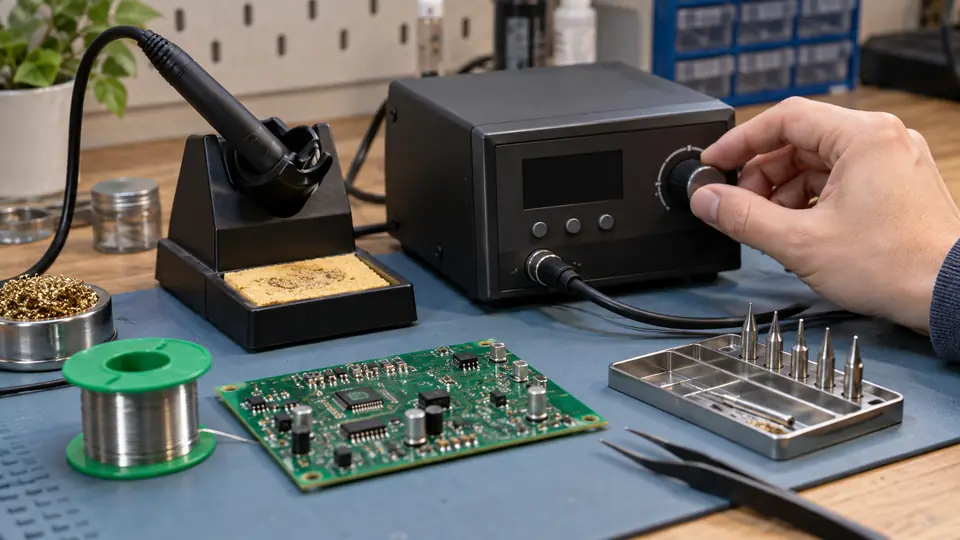
A soldering station gives the operator control over tip temperature while providing a secure stand for the handpiece. Using one effectively requires more than selecting a temperature. Tip geometry, surface condition, contact area, flux, and the thermal mass of the joint all influence how readily heat moves into the work.
The basic sequence is straightforward: install a compatible tip while the station is cold, prepare the work area, select an appropriate temperature, tin the heated tip, warm both surfaces of the joint, apply solder to the joint, and inspect the result. Adjust the station only after checking simpler causes of poor heat transfer.
Know the Station Controls and Accessories
Station features vary, so consult the operating instructions for control functions, compatible tips, sleep settings, calibration procedures, and maintenance requirements. A typical station includes:
- Control unit: Supplies power to the handpiece and regulates the selected temperature.
- Handpiece: Contains the heating element, temperature sensor, and replaceable tip system.
- Stand: Holds the hot handpiece securely between joints.
- Cleaning medium: Usually brass wool, a damp sponge, or both.
- Temperature display or dial: Shows the selected setpoint and, on some stations, an indication of heating status or measured tip temperature.
The displayed setpoint should not be confused with the exact temperature at the solder joint. Contact quality, sensor location, tip construction, heat loss, and station recovery all affect the temperature reached during soldering.
Prepare the Work Area
Place the station on a stable, heat-resistant surface where the stand cannot be knocked over. Route the handpiece cable so it does not catch on the work or pull the iron from its holder. Keep paper, solvents, loose wires, and other flammable materials away from the hot tip.
Use suitable ventilation for fumes produced by heated flux and process residues. Position extraction so it draws fumes away from the breathing zone without cooling the joint excessively. Wear eye protection, especially while trimming leads or handling wire that may spring free.
Disconnect power from the circuit before soldering. Stored electrical energy may remain in some equipment after it is unplugged, so follow the equipment’s service procedure where capacitors or hazardous voltages may be present. For static-sensitive components, use an appropriate ESD-controlled setup and verify that the station and accessories meet the requirements of the work.
Choose and Install the Tip
Fit or replace a tip only as directed by the station manufacturer. Some cartridge systems can be changed with approved heat-resistant tools, while other handpieces must be switched off and allowed to cool. Tip families are usually specific to a handpiece or station series, so physical similarity does not establish compatibility.
Select a tip that can reach the joint and provide useful contact area. A very narrow conical point may struggle to heat a pad and component lead because only a tiny area touches them. A small chisel or bevel often transfers heat more effectively where access permits.
- Small pads and closely spaced leads: Use a tip that offers controlled contact without touching adjacent conductors.
- General through-hole joints: A chisel with a face suited to the pad and lead often provides effective contact.
- Wires, connectors, and larger copper areas: A broader tip may be needed to supply heat without prolonged contact.
- Restricted access: Tip length and shape may matter as much as face width.
A larger tip is unsuitable if it risks contacting nearby parts. A tiny tip is also unsuitable if it forces the operator to raise the setting or hold the iron on the joint for an extended period. Match the contact surface to the joint geometry and thermal demand.
Set Up the Tip Cleaner
If the stand uses a sponge, wet it with water and squeeze out the excess. It should be damp rather than saturated. A dripping sponge cools the tip sharply and can leave water around the stand.
Brass wool removes light oxidation and surplus solder with less cooling. Use the cleaning medium supplied or approved for the station. Avoid steel wool, files, sandpaper, and aggressive scraping on plated tips. Damage to the plating can expose the underlying metal and shorten tip life.
Set the Working Temperature
Start with guidance supplied for the solder alloy, station, components, and process. Tin-lead and lead-free alloys have different melting behavior, and formulations within each category also vary. Large copper areas draw more heat than small isolated pads, while heat-sensitive components may limit acceptable contact time.
The station should be hot enough to bring the complete joint to soldering temperature promptly, yet controlled enough to avoid unnecessary oxidation and damage. If solder melts on the tip but refuses to flow onto the work, increasing the setpoint should not be the first response. Check these factors first:
- The tip is clean and properly tinned.
- The tip face contacts both surfaces being joined.
- The tip has enough contact area for the joint.
- The work surfaces are clean and solderable.
- The flux is suitable and active.
- The station has reached its setpoint.
- The joint is within the station’s practical heating capacity.
High settings accelerate flux consumption and tip oxidation. They can also damage pads, insulation, connectors, or components. If a sound joint requires prolonged heating, reassess tip selection, surface preparation, or equipment capacity before raising the setting substantially.
How to Use a Soldering Station Step by Step
-
Secure and prepare the work. Hold the circuit board or workpiece so it cannot move while the solder cools. Clean contaminated conductors and pads using methods suitable for their materials. Apply compatible flux where the solder or process requires it.
-
Turn on the station and select the starting temperature. Use the alloy, component, and equipment guidance as the starting point. Allow the station to indicate that it has reached the selected setting.
-
Clean and tin the tip. Wipe the hot tip briefly in brass wool or across the damp sponge. Apply a small amount of fresh solder so the working face has a continuous solder coating. Tinning protects the surface and improves thermal contact.
-
Place the tip against the joint. Position the tip so it touches both parts that must be joined, such as a PCB pad and component lead. Use light, steady contact. Heavy pressure does little to improve heat transfer and can damage pads or the tip.
-
Feed solder to the heated surfaces. Touch solder to the joint near the tip rather than melting the entire amount directly onto the tip. The heated conductors should melt the solder and allow it to wet their surfaces. A tiny amount of solder already on the tip can help form a thermal bridge, but it does not replace heating the joint itself.
-
Stop adding solder once coverage is adequate. More solder does not automatically improve the connection. Use enough to form the required bond without hiding the joint geometry, creating a large mound, or bridging adjacent conductors.
-
Withdraw the solder, then the tip. Remove the solder wire first, followed by the iron. Keep the work still while the joint solidifies. Movement during cooling can create an irregular or mechanically disturbed connection.
-
Return the handpiece to its stand. Never place a hot iron on the bench. Clean and retin the tip as needed, but avoid wiping it repeatedly between every small action if the surface remains clean and wetted.
Recognize a Properly Formed Joint
Solder should wet the intended metal surfaces rather than remain as a bead sitting on top. On a typical through-hole connection, the solder should bond to the pad and lead without cracks, visible gaps, accidental bridges, or signs of pad damage. The exact surface finish may be bright or comparatively matte depending on the alloy and process.
Inspect the area under adequate lighting and magnification where appropriate. Look for:
- Clear wetting of the surfaces that require bonding
- No contact between conductors that should remain separate
- No loose lead, wire, or terminal
- No lifted pad, damaged trace, melted insulation, or scorched board material
- No excessive solder concealing adjacent features
- No cracked or disturbed outline around the connection
Electrical testing may be appropriate after inspection, but a simple continuity check confirms only a conductive path between the test points. It cannot establish correct polarity, full circuit operation, mechanical strength, or the absence of every unintended connection.
Use the Station’s Temperature Control Effectively
Temperature control is most useful when paired with sound technique. Watch how the station behaves as the joint absorbs heat. Some displays show heating activity or recovery, which can help reveal that a large joint is drawing significant energy from the tip.
If the joint responds slowly, try a tip with a broader compatible contact face before making a large temperature increase. Fresh tinning may also restore heat transfer. For large ground planes, heavy terminals, shielding, or thick wires, a small station or tip may lack sufficient thermal capacity despite a high displayed setpoint.
Sleep and standby modes can reduce unnecessary time at full operating temperature. Configure them according to the station instructions and work pattern. If the station wakes from sleep, wait until it has recovered before starting a temperature-sensitive joint.
Adjust Technique for Different Work
Through-Hole Components
Contact the component lead and pad together, then feed solder into the heated junction. Large ground-connected pads often need more heat transfer than isolated signal pads. If one joint on the same board is consistently slower, the copper layout may be drawing heat away.
After the joint has formed, trim the lead where required while controlling the cut end so it does not fly. Avoid cutting so close that the joint or pad is stressed.
Wires and Terminals
Prepare wires so the strands are contained and the connection remains stable during soldering. Solder provides an electrical bond, but cables exposed to pulling or repeated flexing generally need suitable mechanical support or strain relief.
Insulation that retreats, softens, or melts can indicate prolonged heating, an undersized tip, poor contact, or a material with limited heat tolerance. Stop and reassess rather than continuing to heat the terminal.
Surface-Mount Components
Use controlled solder quantity, suitable flux, stable alignment, and magnification where needed. A tip must fit between nearby features while retaining enough contact area to transfer heat. Bridges can often be corrected with flux and an appropriate tip or desoldering material.
Package type and lead spacing affect the suitable process. Drag soldering, solder paste, hot air, or reflow methods may be preferable for certain packages rather than soldering every lead individually with a pointed tip.
Correct Common Problems Before Raising the Temperature
| What you observe | What it may indicate | What to check next |
|---|---|---|
| Solder melts on the tip but beads on the joint | Dirty or oxidized surfaces, exhausted or unsuitable flux, or insufficient heating of the work | Clean the surfaces, apply compatible flux, and confirm that the tip touches both parts |
| The station reaches its setpoint, but a large joint heats slowly | Too little tip contact area or more thermal demand than the setup can supply effectively | Use a broader compatible tip and confirm that the station and handpiece suit the task |
| Solder will not coat the tip | Oxidation, contamination, incompatible solder or flux, a worn tip, or inadequate heating | Use fresh solder and suitable flux, then follow the manufacturer’s tip-recovery procedure if needed |
| The joint forms a large blob | Excess solder or poor wetting beneath the solder | Remove excess solder where necessary and verify bonding to both surfaces |
| Pads lift or insulation melts | Excessive heat, prolonged contact, repeated rework, or unsuitable technique | Stop heating, assess the damage, and correct tip size, preparation, or equipment choice |
| Temperature appears unstable | A loose tip, incorrect assembly, contamination, a worn component, or a station fault | Switch off and cool the unit, inspect installation, and follow the station’s diagnostic guidance |
Shut Down and Leave the Tip Protected
At the end of the session, remove heavy contamination from the tip and apply a fresh coating of solder to its working surfaces. This coating helps protect the plating from oxidation while the iron cools.
Place the handpiece fully in its stand, switch off the station, and allow it to cool undisturbed. Do not touch the tip to check whether it is cool. Coil or store the cable only after the handpiece has cooled enough to avoid damaging insulation or nearby materials.
Dispose of solder scraps, clipped leads, used cleaning material, and flux-contaminated waste according to applicable local requirements. After handling lead-containing solder, wash hands before eating, drinking, or touching the face. Flux fumes arise mainly from heated flux and other process materials, rather than being ordinary lead vapor from the solder.

- Jesse
Jesse is the editor behind Soldering Gear, where he covers soldering irons, stations, rework equipment, and the tools that belong on a practical electronics bench. His work focuses on comparing product specifications, features, compatibility, and intended uses so readers can make more informed buying decisions.
- Best Soldering Iron for Phone Repair: 9 Picks in 2026 October 27, 2026
- Best Hot Air Rework Station for Phone Repair: 9 Picks in 2026 October 26, 2026
- Why Is My Soldering Iron Not Melting Solder? October 25, 2026
- Best Portable Solder Fume Extractor: 9 Picks in 2026 October 24, 2026
- Best Desoldering Wick: 9 Picks in 2026 October 23, 2026