How to Use Flux When Soldering

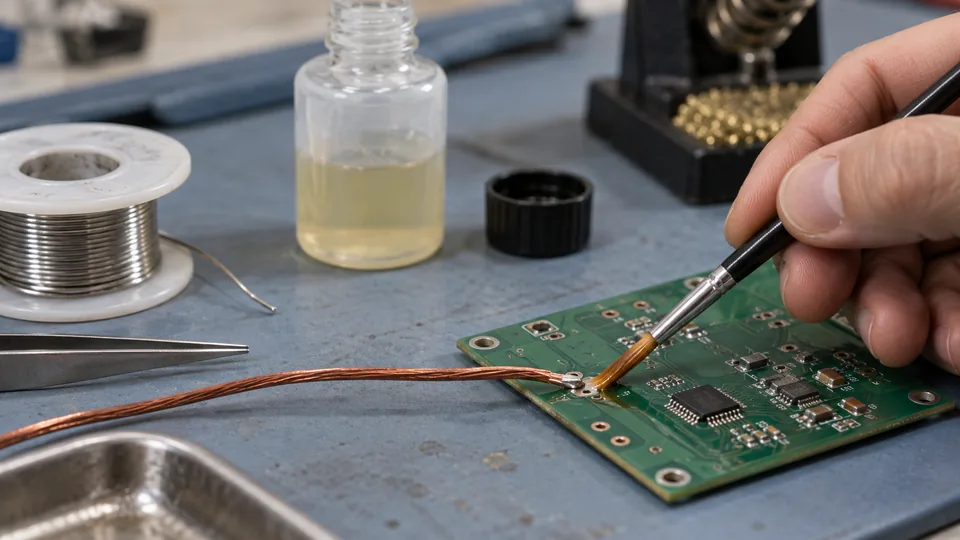
Flux helps molten solder spread across metal by removing light surface oxides and limiting further oxidation during heating. Apply a small, even amount to the surfaces that will form the joint, heat those surfaces together, and then feed solder into the heated joint. Flux works best as part of proper surface preparation and heat transfer. It cannot compensate for dirty metal, an unsuitable soldering tip, or insufficient heating.
Many solder wires contain a flux core, but separate flux can still be useful for rework, oxidized leads, stranded wire, surface-mount soldering, and joints that resist wetting. The flux must be compatible with the solder alloy, materials, assembly, and cleaning process.
Choose a Flux That Matches the Work
Fluxes differ in activity, residue, and cleaning requirements. Product labels and technical documentation should identify the intended application and any required cleanup.
| Flux type | Common application | Residue considerations |
|---|---|---|
| Rosin flux | General electronics assembly and repair | Residue requirements depend on the formulation, process, and finished assembly. |
| No-clean flux | Electronics where a controlled amount of benign residue may remain | The residue may still require removal for inspection, conformal coating, high-impedance circuits, or appearance. |
| Water-soluble flux | Electronics processes requiring more active oxide removal | Residue commonly requires prompt and thorough cleaning according to the flux manufacturer’s instructions. |
| Acid or plumbing flux | Copper pipe, sheet metal, and other specified non-electronic work | Corrosive residue must be handled and cleaned as directed. Do not use ordinary plumbing flux on circuit boards or electronic connections. |
Flux compatibility cannot be determined from its physical form. A liquid, gel, paste, pen, or syringe describes how the product is dispensed, rather than whether its chemistry is suitable for electronics. Check the label instead of assuming that every product sold as soldering flux is interchangeable.
How to Use Flux When Soldering Electronics
-
Prepare the surfaces. Disconnect power from the assembly. Remove grease, dirt, and loose contamination with a method that is safe for the board and components. Heavily corroded parts may need replacement or appropriate preparation because flux is intended mainly for manageable oxide films.
-
Position the parts before applying heat. Insert the component, align the surface-mount lead, or form the wire connection so it will remain stable during soldering. Flux and solder should not serve as mechanical strain relief for a wire exposed to pulling or repeated movement.
-
Apply a thin layer of flux to the joint area. Coat the metal surfaces that need to accept solder. A flux pen works well for controlled application on pads and leads. A small brush, needle bottle, or syringe can place liquid or gel flux more precisely. Avoid flooding connectors, switches, relays, or areas where residue could become trapped.
-
Use a clean, tinned soldering tip. Select a tip that can reach the joint while providing useful contact area. A very fine point can transfer heat poorly if it touches the work across only a tiny area. A suitable chisel, bevel, hoof, or conical tip depends on the joint geometry, copper area, and nearby components.
-
Heat both parts of the joint. Place the tip so it contacts the pad and lead, or both conductors in a wire joint. The goal is to raise the joining surfaces to a temperature at which solder can wet them. Avoid pressing hard. Pressure does little to improve heat transfer compared with a properly tinned tip and adequate contact area.
-
Feed solder to the heated joint. Touch the solder near the interface between the parts rather than melting a large amount directly onto the iron. The external flux will activate as the joint warms, while flux inside flux-cored solder is released as the solder melts. Add only enough solder to form the required bond and coverage.
-
Remove the solder, then remove the iron. Keep the assembly still while the solder solidifies. Movement during cooling can leave an irregular, cracked, or mechanically unstable joint. If the solder refuses to spread within a reasonable working period, stop heating and diagnose the cause rather than continuing until the pad, insulation, or component is damaged.
-
Inspect and clean as required. Look for wetting across the intended surfaces, sufficient coverage, solder bridges, cracks, exposed gaps, disturbed solder, or damage to pads and insulation. Brightness varies among alloys and processes, so reflectivity is a poor pass-or-fail test. Clean residue according to the flux manufacturer’s guidance and the assembly’s requirements.
How Much Flux to Apply
Use enough flux to wet the target surfaces with a thin film. More flux can create extra fumes, spread residue across the assembly, obscure inspection, and complicate cleaning. Large pools rarely correct the underlying reason for poor solder flow.
The appropriate amount changes with the task:
- Through-hole joints: Place a small amount around the pad and lead, especially during rework or when existing solder has been heated before.
- Stranded wire: Work a modest amount into the exposed strands before tinning or joining. Keep solder and flux from wicking farther under the insulation than the connection requires.
- Surface-mount work: Apply a controlled film across the pads or leads. Excess liquid flux can move small components, hide bridges, or spread beneath packages.
- Desoldering braid: A light coating can improve wetting between the braid and molten solder. Some braid already contains flux, so extra application may be unnecessary.
- Large terminals: Cover the intended soldering area without coating the entire connector. Persistent beading may indicate inadequate heating, oxidation, contamination, or unsuitable surface plating rather than too little flux.
Using Flux in Common Soldering Tasks
Through-Hole Components
Apply flux where the component lead meets the copper pad. Heat the lead and pad together, then introduce solder at their interface. The solder should wet the pad and climb the lead enough to form the required connection without burying the joint under a large mound.
During rework, fresh flux is especially helpful because the original flux may have been consumed during the first heating cycle. Repeatedly reheating old solder without adding suitable flux can make wetting less reliable and increase the chance of pad damage.
Wires and Terminals
Flux can help solder penetrate clean stranded wire, but capillary action can draw molten solder beyond the intended joint. Excessive wicking creates a stiff section beside the termination that may be vulnerable to bending. Use suitable strain relief where the connection will experience movement.
For a terminal, apply flux to the contact area, heat the terminal and wire together, and feed solder where the surfaces meet. If insulation begins to soften or shrink significantly before solder flows, stop and check tip contact, tip size, surface condition, and the thermal capacity of the equipment.
Surface-Mount Rework
A thin layer of gel or liquid flux can help existing solder reflow and reduce bridging during touch-up or drag soldering. Align the component first, then apply flux to the leads and pads. Control the solder quantity closely, since excess solder can bridge adjacent pins.
Package type, pitch, board construction, and repair objective may make hot air, solder paste, or another rework method more appropriate than point-by-point iron soldering. Protect nearby parts from accidental movement and unnecessary heat.
Copper Pipe and Metalwork
Plumbing requires flux specifically identified for the pipe, fitting, solder alloy, and applicable installation requirements. Clean and prepare the mating surfaces, apply the flux sparingly to the specified areas, assemble the joint, and heat the fitting so the work melts the solder. Follow the product instructions for residue removal and water-system preparation.
Keep plumbing products separate from electronics supplies. Acid-based flux residue can continue attacking circuit conductors and component leads after soldering.
What Proper Flux Action Looks Like
As the joint heats, flux may thin, bubble, change color, or release fumes. These behaviors vary by formulation and do not provide a reliable measurement of joint temperature or flux effectiveness. The more useful observation is how the solder interacts with the metal.
Effective flux use commonly produces these signs:
- Molten solder spreads across the intended clean metal instead of remaining as a rounded bead.
- Solder follows the joint interface and forms a continuous bond to both surfaces.
- The joint reaches workable flow without prolonged heating or heavy pressure.
- Oxide films do not immediately reform across the heated soldering area.
Flux may darken or become spent after extended heating. Adding fresh flux can help during a controlled rework attempt, but repeated cycles should prompt a check for contaminated surfaces, unsuitable materials, poor tip contact, depleted tip plating, inadequate thermal capacity, or a component that should be replaced.
Why Solder Still Will Not Wet the Joint
| What you observe | Possible explanation | What to check next |
|---|---|---|
| Solder melts on the tip but beads on the work | The joint may be dirty, heavily oxidized, too cool, or made from a difficult-to-solder material. | Stop heating, allow the work to cool, verify the material, clean it appropriately, add fresh compatible flux, and improve tip contact. |
| Flux burns or darkens before solder spreads | The heating period may be too long, the setting may be excessive, or the tip may be transferring heat inefficiently. | Inspect tip condition and geometry. Use a tip with better contact area where access permits, then apply fresh flux before another attempt. |
| Solder wets one surface but avoids the other | One part may have contamination, incompatible plating, heavier thermal mass, or poor contact with the iron. | Examine and prepare the unwetted surface. Position the tip so both joining surfaces receive heat. |
| The tip will not retain a thin solder coating | The tip may be oxidized, contaminated, too hot, or physically damaged. | Clean it using a method suitable for the plated tip and retin it. Do not file plated tips as routine maintenance. |
| Bridges keep forming between adjacent leads | There may be too much solder, excess flux obscuring the area, poor alignment, or unsuitable tip movement. | Remove excess solder with a controlled method, clean enough residue to inspect the pins, realign the part, and reapply a small amount of flux. |
Cleaning Flux Residue
Cleaning requirements are set by the flux chemistry and the needs of the finished assembly. The term no-clean does not mean that residue is appropriate in every circuit or production process. Residue can interfere with inspection, test probes, conformal coating, or sensitive high-impedance circuitry. Excess hand-applied no-clean flux may also remain less fully activated than it would under a controlled process.
Use a cleaner confirmed as compatible with the flux, board, component markings, plastics, adhesives, and coatings. Isopropyl alcohol can remove some residues, but it is not effective for every formulation. Smearing dissolved residue across a larger area is not thorough cleaning. Where cleaning is required, use the specified solvent or process, remove loosened residue, and let the assembly dry fully before restoring power.
Practical Safety While Applying Flux
Work with appropriate ventilation and avoid positioning your face directly over rising flux fumes. Flux fumes are generated by heated process materials. They should not be described as ordinary vaporized lead from solder.
Keep flux containers away from the hot iron, close them after use, and follow their storage instructions. Wear eye protection where splashes or clipped leads present a risk. Wash your hands after handling solder and flux, particularly when using lead-containing solder. Prevent liquid flux from entering powered equipment, and keep flammable solvents away from ignition sources and hot surfaces.

- Jesse
Jesse is the editor behind Soldering Gear, where he covers soldering irons, stations, rework equipment, and the tools that belong on a practical electronics bench. His work focuses on comparing product specifications, features, compatibility, and intended uses so readers can make more informed buying decisions.
- How to Use Flux When Soldering October 28, 2026
- Best Soldering Iron for Phone Repair: 9 Picks in 2026 October 27, 2026
- Best Hot Air Rework Station for Phone Repair: 9 Picks in 2026 October 26, 2026
- Why Is My Soldering Iron Not Melting Solder? October 25, 2026
- Best Portable Solder Fume Extractor: 9 Picks in 2026 October 24, 2026