Best Soldering Station for Beginners: 9 Picks in 2026

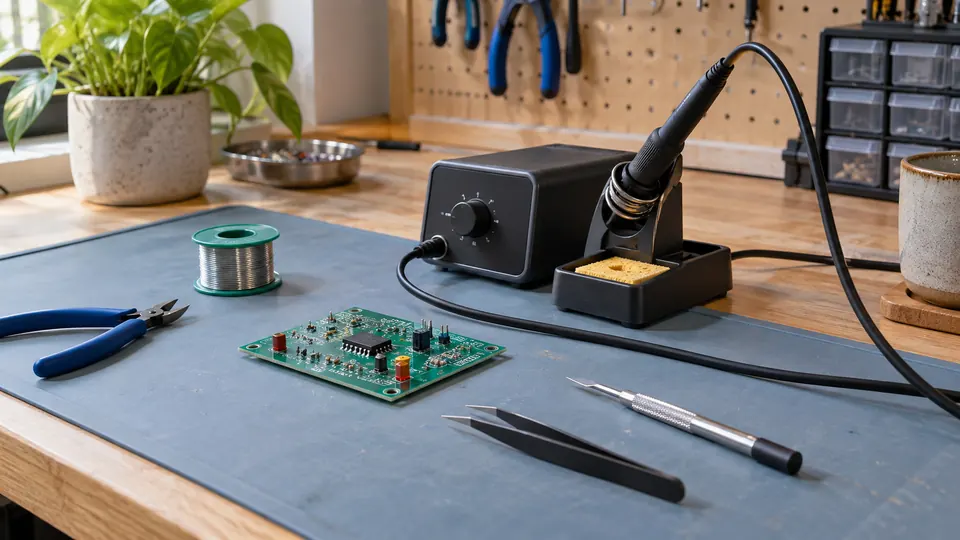
A first soldering setup can feel deceptively simple. Pick a station, set the temperature, touch the tip to the joint, and wait for the shiny little bead. Then reality arrives: the display may be awkward, the stand may feel flimsy, the included tips may not suit the job, or the iron may lack the control that makes learning feel predictable. The best soldering station for beginners should make those early practice sessions calmer, clearer, and easier to repeat.
Temperature adjustment matters more than an eye-catching maximum temperature, while a useful stand, readable display, replaceable tips, and basic desoldering tools can save plenty of frustration. A compact 60W station may suit circuit boards and household repairs, while a higher-powered model with preset channels can be useful for larger joints. Buyers who want portability may prefer a pen-style kit, whereas someone building a permanent bench will benefit from helping hands, tip storage, sleep mode, and a stable holder. The YIHUA 926 III stands out as the strongest overall starting point because it combines straightforward controls with a broad accessory package.
The comparison below weighs temperature control, included tools, workspace design, maintenance features, tip arrangements, and the practical trade-offs behind the headline wattage. Some entries are complete stations, while a few compact pen-style kits suit buyers who want a lower-cost introduction to soldering without committing to a larger bench setup.
Quick Answer
- Best Overall: YIHUA 926 III 60W Digital Soldering Station for clear controls, adjustable sleep settings, calibration support, helping hands, and six included tips.
- Best for Presets and Small Workspaces: WEP 927-IV 110W Soldering Station for three saved temperature channels, a dual display, and an integrated magnifier.
- Best Premium Step-Up: X-Tronic 3060-PRO for three temperature presets, an anti-static grounding wire, four helping hands, and a longer silicone iron cord.
- Best for SMD Rework: WEP 882D 2-in-1 Soldering and Hot Air Rework Station for buyers who need both a conventional iron and adjustable hot air.
Best Soldering Station for Beginners Comparison Table
| Product | Best For | Temperature Range | Standout Features |
|---|---|---|---|
| YIHUA 926 III 60W | Best overall bench setup | 194°F to 896°F | Calibration, sleep timer, six tips |
| X-Tronic 3020-XTS | Durable everyday bench work | 392°F to 896°F | Silicone mat, brass sponge, PID control |
| WEP 927-IV 110W | Preset temperatures and magnification | 194°F to 896°F | Three channels, LED magnifier |
| Plusivo 60W Kit | Portable starter bundle | 392°F to 932°F | Carrying bag, 21-piece kit |
| X-Tronic 3060-PRO | Feature-rich electronics bench | 194°F to 896°F | Three presets, four helping hands |
| WEP 926LED V3 | Compact lower-cost station | 392°F to 896°F | PID control, sleep mode, five tips |
| WEP 882D | SMD and hot air work | Iron: 392°F to 896°F | Variable hot air, three nozzles |
| Liouhoum 80W Digital Kit | Low-cost portable projects | 356°F to 896°F | 10-second heat-up claim, memory |
| 80W LCD Soldering Iron Kit | Basic repairs on a tight budget | 356°F to 896°F | Five tips, flux paste, simple stand |
The detailed reviews explain where each setup fits, what its controls and accessories bring to the bench, and which compromises may matter after the first few projects.
1. YIHUA 926 III 60W Digital Soldering Station: Best Overall
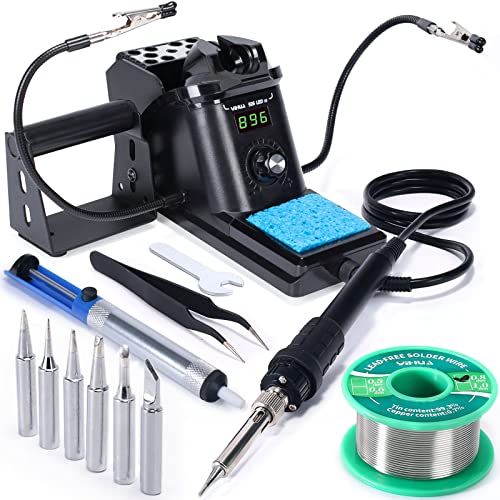
The YIHUA 926 III gets the fundamentals right for someone setting up a first electronics bench. Its digital display and single control knob keep temperature changes easy to see, while the listed range of 194°F to 896°F covers common board work and larger general-purpose joints. PID temperature stabilization is listed as part of the design, so the station is intended to compensate as heat demand changes rather than simply cycle on and off without control.
The package also answers several early frustrations before they appear. Two helping hands can hold a small PCB or wire, six YIHUA #1200/900M-series tips give different working shapes, and the solder sucker helps correct an overloaded joint. Sleep settings can be set to 5, 10, or 30 minutes, and digital calibration is available for users who want to refine the displayed setting. The integrated holder and rear mesh keep the station fairly tidy on a crowded desk, where every square inch matters.
Pros
- Adjustable temperature range from 194°F to 896°F.
- Digital display with a single control knob.
- Includes two helping hands and six listed #1200/900M-series tips.
- Offers selectable sleep timing and digital calibration.
- Includes solder, a solder sucker, tweezers, sponge, and wire dispenser.
Cons
- 110-127V US-standard power design limits use with incompatible outlets.
- The included lead-free solder may require different technique and heat management than leaded solder.
This is the easiest recommendation for a first fixed bench because it balances a readable interface with useful physical accessories. It suits circuit-board practice, wire repairs, and general DIY work better than a bare pen kit. Buyers who already know they want saved temperature channels or a separate hot-air tool may prefer another model, but the YIHUA gives a new user a complete starting point without making the controls feel mysterious.
To buy this product, click here.
2. X-Tronic 3020-XTS 75W Soldering Station: Best Everyday Bench Setup
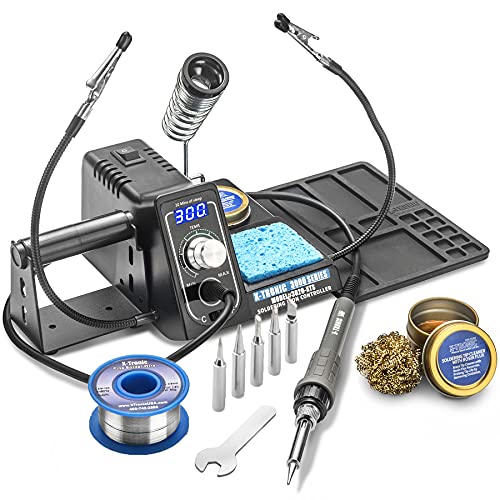
A silicone mat changes the feel of a small workbench. Screws and components have a place to land, stray solder is less likely to mark the desk, and the area around the station feels more deliberate. The X-Tronic 3020-XTS includes that mat along with two helping hands, five extra tips, a spring-style holder, brass sponge, wet sponge, cleaning flux, and a 50g roll of lead-free solder.
The station uses a 75W rating, with the listing describing 60W for the soldering iron and 15W for a mini motherboard in the unit. Its stated operating range runs from 392°F to 896°F, and the listing describes PID control, a blue LED display, a 10-minute sleep timer, and a Celsius/Fahrenheit switch. The flexible 40-inch iron cord is a practical detail for working around a board, although the station remains a US-voltage product rated for 110V.
Pros
- Includes a silicone tool mat for a more organized work surface.
- Comes with five extra tips and both brass and wet sponge cleaning options.
- Lists PID control and a 10-minute sleep timer.
- Includes two helping hands and a side-mounted solder roll holder.
- Supplies a flexible 40-inch iron cord.
Cons
- The stated iron output is 60W within the 75W station rating, which can confuse simple wattage comparisons.
- The listing specifies 110V operation and includes lead-free solder, which may not suit every project or outlet.
The 3020-XTS makes sense for someone who wants a complete station that feels ready for repeated bench sessions rather than a one-off repair. Its accessory mix is especially useful around small PCBs, while the mat reduces the clutter that tends to spread across a desk after the first few projects. The YIHUA offers more adjustable sleep choices, but X-Tronic is attractive for buyers who value the included mat, longer cord, and cleaning setup.
To buy this product, click here.
3. WEP 927-IV 110W Soldering Station: Best for Presets
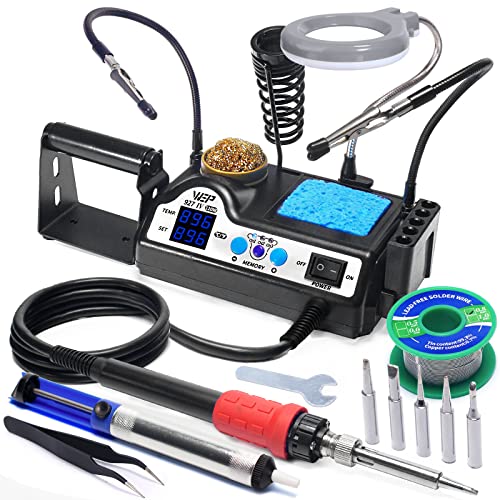
Temperature presets are handy when a project moves between delicate components, ordinary through-hole joints, and heavier connections. The WEP 927-IV stores three channels, so a user can move between saved settings without turning a knob through the full range each time. Its dual numerical display shows the set temperature and the actual temperature reading described by the listing, giving more information than a single target number.
The 110W heating element is paired with a stated 194°F to 896°F range, though wattage alone does not prove better joint performance. The more tangible advantage for a crowded desk is the integrated design. The holder, tip cleaner, solder dispenser, tip storage, two helping hands, and LED magnifier occupy one compact station. The model uses WEP #1400 tips, which are identified in the product information as the replacement tip family.
Pros
- Stores three temperature presets for quick changes between tasks.
- Displays both set and actual temperature readings.
- Includes an LED magnifier for closer component visibility.
- Integrates helping hands, tip storage, holder, and wire dispenser.
- Lists an adjustable sleep timer from 0 to 99 minutes.
Cons
- Uses WEP #1400 tips, so replacement planning should follow that specified tip family.
- Its 110-127V US specification is unsuitable for incompatible power systems.
This station suits a learner who expects the bench to grow with their projects. The presets are easier to appreciate after working on several types of joints, while the magnifier can make component placement less squinty under ordinary room lighting. It ranks below the YIHUA for simple first-day operation because there are more functions to learn, but it is a strong choice for someone who wants practical controls without moving to a more elaborate rework platform.
To buy this product, click here.
4. Plusivo 60W Digital Soldering Iron Kit: Best Portable Starter Bundle

The Plusivo kit is built around convenience rather than a larger dedicated station. Its 60W iron has a ceramic heating element, a silicone grip, a digital display, and a listed adjustment range of 392°F to 932°F. A carrying bag keeps the iron, stand, five replacement tips, solder wire, tweezers, sponge, screwdriver set, mini wire stripper, heat-shrink tubes, and other accessories together, which is useful if the workspace doubles as a dining table or storage shelf.
Its included 0.8mm flux-cored SnPb solder gives a new user a ready material for practice, although solder composition and ventilation habits still deserve attention. The kit also includes a desoldering pump and a small PCB, letting someone practice feeding solder, heating a joint, and correcting excess material without first gathering a drawer full of tools. The trade-off is that it does not provide the same integrated bench organization or two-handed component support as the larger stations.
Pros
- Compact kit with a carrying bag for storage and transport.
- Digital temperature display and listed 392°F to 932°F range.
- Includes five replaceable tips and a desoldering pump.
- Supplies a silicone-grip iron and ceramic heating element.
- Includes a broad group of hand tools and practice accessories.
Cons
- Does not include the integrated helping hands and station layout found on larger bench models.
- The listed solder is SnPb, so users should follow suitable handling and ventilation practices.
Choose Plusivo if the goal is a portable introduction or a kit that can be packed away after a weekend repair. It is easier to carry than the full stations and offers more small accessories than the simplest pen kits. For regular PCB work, a stable integrated holder and helping hands may be worth prioritizing instead, especially once projects involve tiny parts that need to stay still.
To buy this product, click here.
5. X-Tronic 3060-PRO 75W Soldering Station: Best Feature-Rich Setup
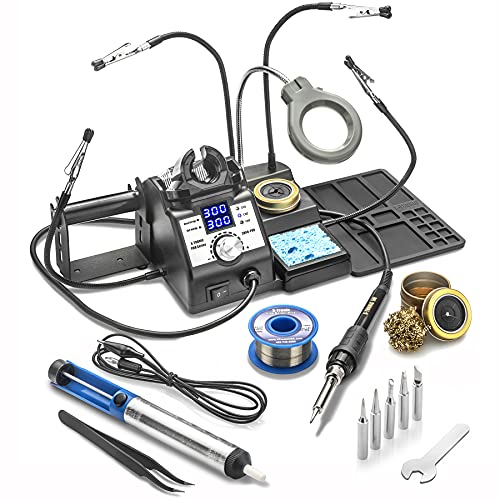
The 3060-PRO is aimed at a bench where small boards, loose wires, and close inspection share the same patch of desk. Four detachable helping hands provide more positioning options than the two-arm kits, while the mini magnifier lamp adds light and enlargement around a joint. A solder sucker, pinpoint tweezers, five extra tips, brass sponge with flux, wet sponge, and 50g of solder make the package unusually complete for electronics practice.
Its station lists a 60W heating element inside a 75W system, a 194°F to 896°F range, three temperature presets, calibration, and a programmable sleep timer with 0, 5, 10, and 30-minute settings. The dual display separates set and real temperature readings. The long 57-inch silicone iron cord gives the handpiece plenty of reach, but the unit is a 110V AC product and the larger accessory arrangement needs more bench space than a compact single-holder station.
Pros
- Includes four detachable helping hands and a mini magnifier lamp.
- Offers three temperature presets and dual temperature readouts.
- Lists a 57-inch silicone iron cord and 194°F to 896°F range.
- Includes an anti-static grounding wire for PCB work.
- Provides adjustable sleep timing and digital calibration.
Cons
- The fuller accessory layout takes more room than a basic station.
- It is limited to the listed 110V AC configuration.
This is the premium step-up for someone who already knows a first station will become a regular workbench tool. The controls remain approachable, but the four helping hands, lighting, and preset memory are easier to justify when projects involve repeated board work. A simpler station costs less space and may be less distracting for a first lesson, while the 3060-PRO rewards a buyer who wants room to develop.
To buy this product, click here.
6. WEP 926LED V3 Soldering Station: Best Compact Value Setup

The WEP 926LED V3 keeps its footprint compact by mounting the iron holder directly on the station body. That arrangement suits a narrow desk where a separate stand would steal valuable room. The kit includes five extra tips, solder wire, tweezers, a solder sucker, and a tip cleaner, giving a new user the pieces needed to begin practicing without building a shopping list first.
The product information lists PID temperature control, a digital display, a 392°F to 896°F range, and a sleep mode that activates after more than 10 minutes of inactivity. The temperature knob and Fahrenheit/Celsius conversion are simple features, but they matter when a learner is following tutorials that use different units. There is no helping-hand system in the listed package, so a board may need a separate holder once projects become more fiddly.
Pros
- Compact station with an integrated heat-resistant holder.
- Includes five extra tips, solder, tweezers, and a solder sucker.
- Lists PID temperature compensation and digital temperature display.
- Provides Fahrenheit/Celsius conversion.
- Includes a sleep mode intended to reduce idle wear.
Cons
- The listed package does not include helping hands or a magnifier.
- Its 110-127V US specification limits outlet compatibility.
This model is a sensible pick for someone who wants a true station layout but has very little room. It is less complete than the YIHUA for holding components, yet its direct controls and compact holder keep the learning curve manageable. Add a separate PCB holder later if the work shifts from basic wires to small boards, and this station can remain a tidy starting point.
To buy this product, click here.
7. WEP 882D 2-in-1 Soldering and Hot Air Rework Station: Best for SMD Rework

A conventional iron is enough for many beginner projects, but SMD work can call for heated air around small surface-mounted parts. The WEP 882D combines an adjustable soldering iron with a hot-air rework section, giving the buyer two tools in one compact body. Separate LED displays, power switches, temperature controls, and air-volume adjustment make the two functions easier to distinguish than a single shared control.
The iron is listed at 392°F to 896°F, while the hot-air section is listed at 212°F to 896°F with variable airflow. Three hot-air nozzles, five iron tips, two solder spools, brass wool, tweezers, and a desoldering pump are included. A setting on a hot-air display is not the same as the actual temperature at a component, so careful technique and suitable airflow remain part of the learning process.
Pros
- Combines a soldering station and hot-air rework station.
- Provides separate controls and displays for iron and hot air.
- Includes three hot-air nozzles and five soldering tips.
- Lists adjustable hot-air temperature and variable air volume.
- Includes sleep, standby, automatic shutdown, and calibration functions.
Cons
- The extra hot-air controls add complexity compared with a basic iron station.
- Its 110-127V US specification limits use with incompatible outlets.
Pick the WEP 882D when SMD rework is a real part of the planned work, rather than buying it solely because its temperature numbers look larger. For simple through-hole practice, the added hot-air section may sit unused and make the setup more complicated. For a learner repairing boards with small surface-mounted components, the included nozzles and adjustable airflow create a capability that the ordinary stations cannot provide.
To buy this product, click here.
8. Liouhoum 80W LCD Digital Soldering Kit: Best Portable Budget Option

This pen-style kit is aimed at buyers who want to plug in, make a repair, and put the tool away. The listing states that its ceramic core reaches operating temperature in 10 seconds, while the adjustable range runs from 356°F to 896°F. A digital screen shows the temperature, and the handle is described as heat resistant, giving the user more information than a basic fixed-temperature iron.
The automatic sleep function lowers the temperature after the iron rests on its stand for five minutes, and the listing describes temperature memory when the unit is switched off. Five tips, a stand, solder wire, sponge, and flux paste are included. That is a useful starting bundle, but there is no full station enclosure, dual display, helping-hand arrangement, or integrated storage for a larger bench workflow.
Pros
- Portable pen-style design with a listed 10-second heat-up claim.
- Adjustable 356°F to 896°F temperature range.
- Includes automatic sleep and temperature memory features.
- Supplies five tips, a stand, solder wire, sponge, and flux paste.
- Includes a stated 24-month replacement service.
Cons
- Does not provide the bench organization or component support of a full station.
- The 110-120V design requires a compatible US power source.
This kit suits a drawer, toolbox, or occasional repair corner. It can teach the basic relationship between temperature, solder feed, and tip shape without taking over the desk. A full station is preferable for repeated circuit-board work because the holder and controls are easier to manage, but the Liouhoum is a practical low-cost doorway into the hobby.
To buy this product, click here.
9. 80W LCD Digital Soldering Iron Kit: Best Basic Repair Kit

The appeal here is straightforward: an adjustable digital iron, five tips, a simple stand, solder wire, sponge, and flux paste in one small package. The listing gives a 356°F to 896°F adjustment range and says the ceramic heater can reach operating temperature within 20 seconds. Four ventilation holes are described for heat dissipation, while the handle is presented as heat resistant for longer repair sessions.
This setup can cover basic circuit-board repairs, appliance work, jewelry projects, and general DIY jobs. The LCD display helps a learner repeat a setting instead of guessing from a dial, but the kit remains a pen-style tool rather than a full bench station. There are no listed helping hands, solder sucker, or integrated tip storage, so the user will need a steadier external arrangement as projects become more intricate.
Pros
- Lists an adjustable 356°F to 896°F temperature range.
- Includes five tips, a stand, solder wire, sponge, and flux paste.
- Provides a digital temperature display.
- Lists a ceramic heater and a 20-second heat-up claim.
- Suitable for the broad repair and DIY uses identified in the listing.
Cons
- Basic stand and pen format offer less bench support than a dedicated station.
- The 110V design is intended for compatible US power.
This is the entry point for someone who wants to try soldering with the fewest pieces and the smallest commitment. It makes more sense for occasional repairs than a permanent electronics bench, where a station with helping hands and sleep controls will feel more composed. Choose it for basic practice, then upgrade when the work demands more stable component positioning or faster access to several tip shapes.
To buy this product, click here.
Buying Guide
Temperature Control Is More Useful Than a Huge Maximum
A wide temperature range gives room to adjust, but the maximum number on the display does not reveal how well an iron handles a real joint. Tip shape, heater design, contact with the workpiece, and the joint’s thermal mass all affect what happens when solder meets copper. For a first station, a clear display and an easy control knob are usually more helpful than chasing the highest listed setting.
Wattage Does Not Tell the Whole Heating Story
The products here range from pen-style kits to stations listing 110W or more. That figure describes available electrical power, not guaranteed tip temperature or recovery under every load. A higher rating may help with larger joints, but small electronics can benefit from a controllable iron and an appropriate tip rather than maximum power. The X-Tronic listings also show why comparisons need care, since their 75W station description assigns 60W to the iron and 15W to another part of the unit.
Choose Tips You Can Replace
Tips are consumables, and the shape affects how solder reaches a pad or wire. The YIHUA listings identify #1200/900M-series tips, while the WEP 927-IV identifies WEP #1400 tips. That difference matters. Confirm the correct tip family before buying replacements, and distinguish tips included in the box from additional tips that may be available separately.
Helping Hands Can Matter More Than Extra Accessories
A board that slides across the desk while the iron approaches is a fast route to frustration. Helping hands hold a component or PCB so one hand can guide the iron and the other can feed solder. The YIHUA and WEP 927-IV include two helping hands, while the X-Tronic 3060-PRO includes four detachable hands. Pen-style kits save space, but they may require a separate holder for steady two-handed work.
Sleep Modes Reduce Idle Heat
Sleep mode lowers the iron after a period of inactivity on models that include it. The exact behavior varies: the YIHUA offers selectable 5, 10, or 30-minute settings, the WEP 926LED V3 lists a 10-minute function, and the X-Tronic 3060-PRO offers several timer choices. These features do not replace switching off and safely storing a hot tool, but they can reduce the time a tip sits at full temperature between joints.
Decide Whether You Need Hot Air
A conventional station is enough for many through-hole and wire projects. Hot air becomes relevant for certain surface-mounted component tasks, where heated airflow can warm an area rather than touching one pad with a tip. The WEP 882D adds adjustable airflow and three nozzles, but it also adds controls and technique. If SMD rework is not part of the plan, a simpler station may be easier to learn.
Check the Electrical Configuration
Most products in this roundup list 110V or 110-127V US operation. That specification should match the intended outlet before ordering. A temperature converter does not change the station’s electrical compatibility, and a product intended for a US-standard plug should not be connected to an incompatible power system.
Best Soldering Station for Beginners FAQ
What wattage should a first soldering station have?
There is no single wattage that suits every project. The 60W to 75W stations in this roundup provide a practical starting range for common electronics and DIY work, while higher listed wattage may offer more available heating power for larger joints. Control quality, tip choice, and the actual task matter as much as the headline rating.
Is a soldering station better than a pen-style soldering iron?
A station usually provides better bench organization, a dedicated holder, clearer controls, and more support for repeated work. A pen-style kit is smaller and easier to store, which can be useful for occasional repairs. Pick the station format if the tool will remain on a workbench, and choose the pen format if portability matters more.
What temperature should a beginner use?
The correct setting depends on the solder alloy, tip, joint size, and workpiece. Start with the guidance for the solder being used, then adjust carefully if the joint is not wetting properly. A display shows the selected or reported station temperature, but it does not guarantee that every joint reaches that exact temperature.
Are included soldering tips interchangeable between stations?
No. Tip families and handpiece designs differ. The YIHUA 926 III listings identify #1200/900M-series tips, while the WEP 927-IV specifies WEP #1400 tips. Confirm the exact model and compatible tip family before purchasing replacements. A tip that looks similar may still fit poorly or fail to match the heater.
Do beginners need helping hands?
They are useful for work involving small boards, wires, or components that need to stay still. Helping hands free one hand for solder feed while the other guides the iron. They are less important for large wire joints, but they can make early practice less awkward and reduce the temptation to hold a component too close to the hot tip.
Is the WEP 882D suitable for ordinary soldering?
Yes, its listed design includes a conventional soldering station as well as a hot-air section. It is most useful for someone who expects to work with surface-mounted components or wants both functions in one unit. For simple wire and through-hole projects, the extra controls may be more equipment than necessary.
Can sleep mode replace switching the station off?
No. Sleep mode is an idle-temperature feature, not a substitute for safe shutdown and storage. Follow the product instructions, keep the hot tool in its holder, protect the work surface, and switch the station off when the session ends.
Final Verdict
The YIHUA 926 III 60W is the strongest overall choice for a first bench because it combines understandable digital controls, a useful temperature range, calibration support, adjustable sleep timing, six listed tips, and two helping hands. Those details matter in the first few sessions, when a stable component and an easy-to-read display can make the difference between a clean joint and a frustrating tangle of wire and solder.
The X-Tronic 3020-XTS is a strong alternative for a more organized everyday setup, while the X-Tronic 3060-PRO offers more positioning support and presets for buyers ready to build a fuller electronics bench. Choose the WEP 882D if hot-air SMD work is part of the plan, or a Plusivo and pen-style kit if low storage space and portability matter most. Match the station to the work, confirm the voltage and tip system, and give greater weight to usable controls and safe bench habits than to the biggest number printed on the box.

- Jesse
Jesse is the editor behind Soldering Gear, where he covers soldering irons, stations, rework equipment, and the tools that belong on a practical electronics bench. His work focuses on comparing product specifications, features, compatibility, and intended uses so readers can make more informed buying decisions.
- Best Cordless Soldering Iron: 9 Picks in 2026 September 28, 2026
- Best Portable Soldering Iron: 9 Picks in 2026 September 27, 2026
- What Temperature for Soldering Electronics? September 26, 2026
- Best Soldering Station for Beginners: 9 Picks in 2026 September 25, 2026
- Best Solder Fume Extractor: 9 Picks in 2026 September 24, 2026