Best Soldering Iron for Microsoldering: 9 Picks in 2026

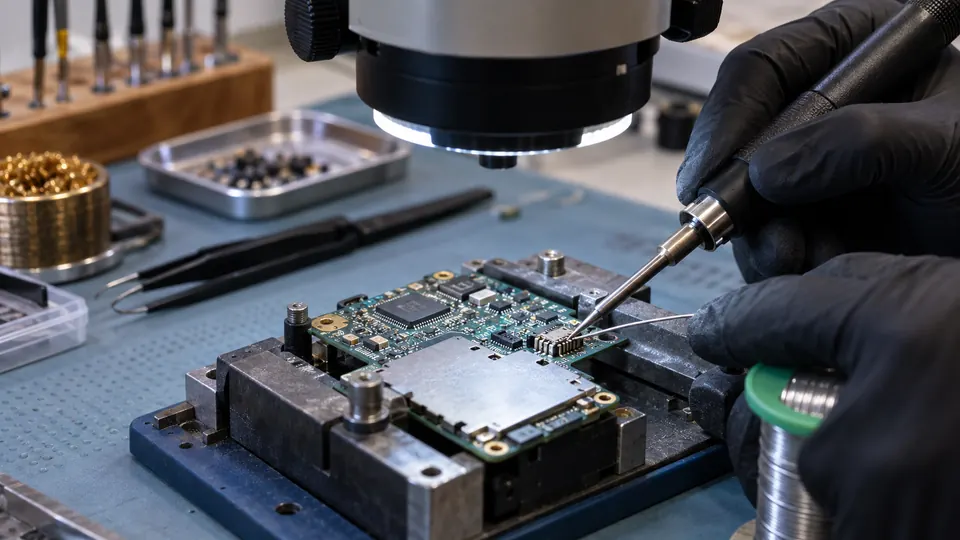
Microsoldering asks more from a soldering iron than a quick wire repair. Small pads, fine-pitch components, jumper wires, and heat-sensitive boards reward a tool with controlled temperature, a manageable tip, and enough thermal response to keep the joint moving without flooding nearby components. A broad, high-wattage iron can make a tiny repair feel like trying to write with a marker.
The headline temperature range is only part of the decision. Tip geometry, cartridge design, control layout, heat-up behavior, and the ability to work comfortably under magnification all matter. A basic pencil iron may suit occasional PCB repairs, while a C245 station or a multi-tool rework system makes more sense for repeated SMD removal and board-level work. Several inexpensive kits include useful supplies, but their conventional tips and simpler controls are less specialized for delicate microsoldering.
This comparison puts the strongest precision-oriented options first, then separates them from practical budget tools and broader repair stations. The YIHUA 982D-I PRO leads the list for focused microsoldering because it combines a C245 iron with hot tweezers, rapid heating, calibration, and SMD-specific accessories. The ALIENTEK T90B and YIHUA 948D IV offer different paths for buyers who value portability or a complete bench setup.
Quick Answer
- Best Overall: YIHUA 982D-I PRO Single-Channel 2 Tool Hot Tweezers Micro Soldering Station for precise board work, SMD removal, and a dedicated C245 cartridge system.
- Best Portable Option: ALIENTEK T90 Smart Soldering Iron for USB-C-powered repair work, fast temperature changes, and a compact 55-gram body.
- Best Complete Rework Setup: YIHUA 948D IV 5-IN-1 Micro Soldering Rework Station for users who need microsoldering, hot tweezers, desoldering, hot air, and a suction pen in one bench system.
- Best Lower-Cost Station: YIHUA 926 III 60W Digital Display Soldering Iron Station Kit for a controlled station with helping hands, multiple tips, and basic desoldering accessories.
Best Soldering Iron for Microsoldering Comparison Table
| Product | Best For | Temperature Control | Tip System |
|---|---|---|---|
| YIHUA 982D-I PRO | SMD work and component removal | 90°C to 450°C, PID, calibration | C245 iron and C120 tweezers |
| ALIENTEK T90 | Portable electronics repair | 80°C to 450°C, PID, presets | T245 version, quick-lock sleeve |
| YIHUA 948D IV | Full bench rework | Micro iron 194°F to 842°F | C245 iron, C120 tweezers |
| YIHUA 926 III | Entry-level station work | 194°F to 896°F, PID, calibration | 1200/900M series tips |
| Soldering Iron Premium Kit | General small electronics | 200°C to 450°C | Multiple interchangeable tips |
| 100W LED Digital Soldering Kit | PCB and phone repair on a budget | 180°C to 500°C, calibration | Included interchangeable tips |
| 80W LCD Soldering Iron Kit | Basic electronics repairs | 180°C to 480°C | Five included tips |
| 60W Electronic Soldering Iron Kit | Simple portable repairs | 200°C to 450°C | Five interchangeable tips |
| 80W Digital Soldering Iron Kit | Low-cost starter setup | 180°C to 480°C | Included kit tips |
The reviews below explain how each option handles fine tips, temperature control, component removal, portability, and the practical limits of its included accessories.
1. YIHUA 982D-I PRO Single-Channel 2 Tool Hot Tweezers Micro Soldering Station — Best Overall

Microsoldering becomes much more practical when the iron and hot tweezers are ready at the same station. The YIHUA 982D-I PRO combines a C245 precision iron with a C120 hot-tweezer handpiece, so a repair can move from soldering a fine connection to lifting an SMD resistor without swapping equipment. The listing describes separate interfaces for the two tools, with the display changing to match the handpiece in use.
Its temperature range runs from 90°C to 450°C, and the product information lists PID control, heat-up to the selected setting within two seconds, automatic calibration, four preset channels, sleep mode, and standby behavior. Those features matter around small pads because repeatable settings are easier to manage than constantly turning a basic dial. The kit also includes four C245 tips, six C120 tips, lead-free solder, brass wool, a sponge, thermocouples, and dedicated holders. It is a focused precision station rather than a general heavy-duty iron, which is exactly why it ranks first here.
Pros
- Combines a C245 microsoldering iron and C120 hot tweezers.
- Lists PID temperature control and rapid heating to the selected setting.
- Includes automatic temperature calibration and four programmable preset channels.
- Supplies multiple C245 and C120 tips for different SMD tasks.
- Includes sleep and standby functions intended to reduce unnecessary tip heating.
Cons
- The listing states that it is intended for precision work rather than general or heavy-duty soldering.
- The cartridge-style system is more specialized than the conventional tips used by basic kits.
This is the strongest choice for board repair involving small components, pad cleaning, and repeated SMD removal. The hot tweezers are the major advantage over ordinary pencil irons, while calibration and presets help keep a careful workflow consistent. Buyers who mainly solder large wires or occasional through-hole joints would be paying for tools they may rarely use, but anyone building a microsoldering bench gets a much more relevant setup here.
To buy this product, click here.
2. ALIENTEK T90 Smart Soldering Iron — Best Portable Option

A full station is useful until the repair has to happen away from the bench. The ALIENTEK T90B takes a different route, using USB-C input with support for PD3.1 and QC3.0 power sources across a stated 9 to 28V input range. The supplied information lists a 140W Type-C cable, seven selectable power levels, and automatic matching to the maximum output of the connected fast charger. That makes the tool compact, though the charger or power source still needs to meet its requirements.
The T90 offers an 80°C to 450°C setting range, PID control, three temperature presets, and a color display showing temperature, power, voltage, current, and hand-held status. The listing gives a body weight of about 55 grams, along with automatic sleep and protections for overcurrent, overheating, heater resistance, and other faults. The T90B version uses a T245 tip system, and the quick-lock sleeve is intended to speed tip changes. Its portability is the headline feature, but its usefulness depends heavily on having a suitable USB-C PD or QC power setup nearby.
Pros
- Compact body listed at approximately 55 grams.
- Supports USB-C PD3.1 and QC3.0 input across a stated 9 to 28V range.
- Offers PID temperature control from 80°C to 450°C.
- Provides three one-touch temperature presets and a detailed color display.
- Includes a 140W Type-C cable and uses a quick-lock T245 tip sleeve.
Cons
- A suitable USB-C power source is required, and the listing does not describe a bundled wall charger.
- The portable pen does not include hot tweezers or a dedicated station for component removal.
This iron fits field repairs, compact workspaces, and technicians who already carry a capable USB-C power supply. The display and presets offer more control than a basic travel iron, while the T245 format gives it a more serious precision focus than many inexpensive plug-in pens. It is less convenient as a complete first bench setup because the power arrangement and stand situation need separate attention.
To buy this product, click here.
3. YIHUA 948D IV 5-IN-1 Micro Soldering Rework Station — Best Complete Rework Setup

Some repairs begin with a tiny solder bridge and end with hot air, desoldering, or component lifting. The YIHUA 948D IV is aimed at that broader bench rather than a single soldering task. Its five integrated tools include a microsoldering iron, hot tweezers, a 110W desoldering gun, a 1000W hot-air rework station, and a suction pen. The handpieces have individual switches and dedicated holders, while the aluminum main unit keeps the tools organized in one footprint.
The microsoldering section uses a C245 iron with three included tips, while the hot tweezers use C120 tips. The listed iron temperature range is 194°F to 842°F. The hot-air section includes five nozzles, and the desoldering tool includes four nozzles from 0.8mm to 2.0mm. These accessories cover several common board-repair tasks, but a hot-air temperature setting should not be treated as the actual component temperature. This is a substantial system for a dedicated workspace, not a sensible match for someone who only needs occasional fine solder joints.
Pros
- Combines five repair tools in one integrated station.
- Includes a C245 microsoldering iron and C120 hot tweezers.
- Provides a 110W desoldering gun with four included nozzles.
- Includes a 1000W hot-air section and five quick-change nozzles.
- Offers individual tool switches, standby timers, sleep settings, function lock, and password protection.
Cons
- Its broad feature set and large bench role are excessive for simple soldering tasks.
- The listing gives separate temperature information for the micro iron, but does not provide a full airflow specification.
This station makes sense for phone repair, board rework, and a workspace where component removal is as common as component installation. It ranks below the 982D-I PRO for buyers who want a focused microsoldering station because the extra hot-air and desoldering hardware adds size and complexity. Choose it when those tools will genuinely earn their space, not because a longer feature list automatically improves fine soldering.
To buy this product, click here.
4. YIHUA 926 III 60W Digital Display Soldering Iron Station Kit — Best Lower-Cost Station
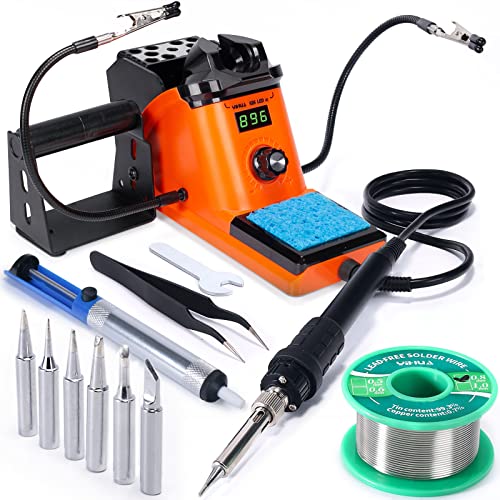
A temperature-controlled station is a more comfortable starting point for microsoldering than a bare plug-in iron. The YIHUA 926 III pairs a 60W station with a digital display, a master control knob, temperature calibration, and adjustable sleep settings. Its published range is 90°C to 480°C, or 194°F to 896°F, and the product information describes PID heat control. Those controls do not turn the included conventional tips into precision cartridges, but they give the operator a clearer way to set and maintain heat.
The kit is unusually complete for its category. It includes six YIHUA #1200/900M series tips, two helping hands, lead-free solder, a solder sucker, stainless-steel tweezers, a wire dispenser, and a cleaning sponge. The integrated holder and rear mesh protector keep the hot iron contained while also providing tip storage. For small PCB jobs, the helping hands can steady a board while the iron approaches a joint, although the setup remains less specialized than a C245 station with hot tweezers.
Pros
- Provides a 60W digital temperature-controlled station.
- Lists PID heat control and digital temperature calibration.
- Includes six #1200/900M series soldering tips.
- Supplies two helping hands, a solder sucker, tweezers, solder, and cleaning accessories.
- Offers adjustable sleep settings and an integrated iron holder with tip storage.
Cons
- Its conventional 900M-style tip setup is less specialized for dense SMD work than C245 cartridges.
- The included helping hands and accessories add usefulness, but do not replace hot tweezers for two-sided component removal.
This is a sensible station for someone moving from occasional repairs toward a more organized electronics bench. It offers the control, stand, and accessories that inexpensive pen irons often lack, while keeping the setup focused on ordinary soldering. Choose a more specialized cartridge station for repeated work under a microscope, especially where thermal response and quick tip changes are central to the job.
To buy this product, click here.
5. Soldering Iron Premium Kit, 60W Adjustable Temperature — Best General-Purpose Kit

This 60W kit takes the familiar plug-in pencil approach and adds the supplies needed for a first repair session. The listing gives a 200°C to 450°C adjustment range, a 110V input, an on/off switch, and a ceramic heater. Ventilation openings are intended to help manage heat around the handle, while the supplied silicone protective cover and insulated grip address the hand-contact area during longer jobs.
For small electronics, the kit includes interchangeable tips, solder wire, solder paste, and a pump. The product information mentions use with mobile devices, computer hardware, watches, wires, and circuit boards. That broad application list should be read as general suitability rather than proof of specialized microsoldering performance. The conventional format can handle basic pads and wires, but buyers working on very dense boards may prefer the finer control and cartridge options of the higher-ranked stations.
Pros
- Offers adjustable temperature from 200°C to 450°C.
- Includes an on/off switch for direct power control.
- Supplies interchangeable tips, solder wire, solder paste, and a pump.
- Uses a ceramic heater and includes ventilation openings around the iron body.
- Provides a silicone protective cover and insulated grip design.
Cons
- The listing does not identify a dedicated precision cartridge system for dense microsoldering.
- It is a 110V corded tool, which limits use to a suitable electrical supply.
This kit suits occasional repairs where the priority is getting a usable iron and basic consumables in one package. It can be a practical low-cost way to learn tip control on larger pads before moving to finer work. Skip it for repeated SMD component removal or repairs that demand hot tweezers, preset temperatures, and documented calibration features.
To buy this product, click here.
6. 100W LED Digital Soldering Iron Kit — Best Budget Kit for Phone and PCB Repairs

The 100W rating attracts attention, but the more useful feature for small electronics is the digital temperature display. This kit lists an adjustable range of 180°C to 500°C, temperature calibration, and a ceramic heating core that reaches its operating setting in about 15 seconds according to the product information. A four-vent body and steel tube are intended to move heat away from the handle, while the pen format keeps the tool easy to carry.
The package includes soldering tips, wick braid, solder wire, a sponge, a stand, and flux paste. That selection is helpful around a phone or PCB repair because desoldering wick and flux can be as useful as fresh solder. The listing also describes a password or child-lock setting. It does not provide a dedicated microsoldering cartridge system, so the tool is better viewed as a broad repair iron with digital controls than as a replacement for a purpose-built SMD station.
Pros
- Provides an LED temperature display with Celsius and Fahrenheit settings.
- Lists temperature adjustment from 180°C to 500°C.
- Includes temperature calibration and a ceramic heating core.
- Supplies wick braid, solder wire, flux paste, sponge, stand, and tips.
- Includes a password or child-lock setting according to the listing.
Cons
- The 100W rating does not by itself establish better microsoldering recovery or tip precision.
- The available information does not identify a specialized cartridge tip ecosystem.
This is a reasonable lower-cost choice for mixed repair work where the user wants a digital readout and a fuller accessory bundle. The included wick and flux make it more useful for cleanup than a bare iron kit. For very small components, work slowly and match the tip geometry to the pad, because the high advertised power and broad temperature ceiling do not guarantee delicate control.
To buy this product, click here.
7. 80W LCD Digital Soldering Iron Kit — Best Basic LCD Kit

The small LCD makes this 80W kit easier to set than a pencil iron with no visible temperature reference. Its published range is 180°C to 480°C, and the listing describes a ceramic heater that reaches operating temperature within about 20 seconds. Four ventilation openings and a heat-resistant handle are intended to keep the grip more manageable during repair sessions.
Five tips, a simple stand, solder wire, a sponge, and flux paste give the kit a useful starting point for circuit boards, appliance repairs, and general electrical work. Those included parts reduce the need to assemble a bench from scratch, but the design remains a conventional digital iron. It lacks the hot-tweezer function, cartridge handpiece, and documented calibration controls that make the top choices more suitable for dense microsoldering.
Pros
- Offers LCD temperature indication and adjustment from 180°C to 480°C.
- Uses an 80W ceramic heater according to the listing.
- Includes five tips for different soldering tasks.
- Supplies a stand, solder wire, sponge, and flux paste.
- Uses ventilation openings and a heat-resistant handle design.
Cons
- The listing does not specify automatic calibration, PID control, or a specialized micro tip system.
- The included stand is described as simple, so bench organization is more basic than with a full station.
This kit fits occasional board repairs, small DIY projects, and users who want an LCD without stepping up to a station. It can handle basic fine-tip work when paired with an appropriate included tip, but its control system is less documented than the YIHUA stations. Buyers repairing tiny SMD components regularly should treat this as an entry tool rather than a long-term precision platform.
To buy this product, click here.
8. 60W Electronic Soldering Iron Kit — Best Simple Portable Kit

There is something appealing about a tool that plugs in, reaches its setting, and gets out of the way. This 60W pencil-style kit lists adjustable thermostatic control from 200°C to 450°C and a ceramic heating core that reaches the selected setting within approximately 15 seconds. Its on/off switch gives direct control over power, while four ventilation holes are intended to reduce heat transfer toward the handle.
The package includes five interchangeable tips, a stand, a conventional sponge, 0.6mm solder wire, and no-clean rosin flux paste. The 0.6mm wire is more manageable than thick general-purpose solder around smaller joints, although the available information does not identify the alloy or flux percentage. This is still a basic tool with a conventional tip system, so the buyer should keep expectations realistic around very fine-pitch work and avoid treating its temperature range as proof of precision.
Pros
- Provides adjustable temperature from 200°C to 450°C.
- Includes five interchangeable tips.
- Supplies 0.6mm solder wire and no-clean rosin flux paste.
- Lists a ceramic heater with approximately 15-second heat-up time.
- Includes an on/off switch, stand, and sponge.
Cons
- The product information does not specify PID regulation or automatic temperature calibration.
- The 110V pencil format is less controlled and less specialized than a dedicated microsoldering station.
This is a practical pick for light electronics repair, especially where a compact kit and small-diameter solder wire matter more than advanced station functions. The included flux and five tips make the first session straightforward. A buyer working under a microscope on fine-pitch packages should step up to a cartridge station with clearer control and more suitable handpieces.
To buy this product, click here.
9. 80W LCD Digital Adjustable Soldering Iron Kit — Best Low-Cost Digital Option

This 80W iron gives a low-cost bench a digital temperature readout, adjustable settings from 180°C to 480°C, and a stated heat-up time of about 10 seconds. The ceramic core and thermostatic design are intended to keep the iron near its selected setting, while the display can switch between Celsius and Fahrenheit. For someone learning how different solder types respond, seeing the selected temperature is more useful than guessing from a numbered dial.
Automatic sleep behavior lowers the temperature after five minutes on the stand, and the temperature-memory function can restore a previous setting when the iron is powered back on. The kit also includes five tips, a stand, solder wire, a sponge, and flux paste. Like the other conventional pen kits, it offers a broad temperature range without the dedicated C245 or C120 system found in the leading stations. Its strongest role is occasional electronics work where cost and a visible display come first.
Pros
- Offers an LCD temperature display with Celsius and Fahrenheit switching.
- Lists an adjustable range from 180°C to 480°C.
- Includes automatic sleep behavior after five minutes on the stand.
- Provides temperature memory for the previous setting.
- Supplies five tips, a stand, solder wire, sponge, and flux paste.
Cons
- The product information does not identify PID control or precision cartridge compatibility.
- Its basic stand and pen format provide less bench support than a dedicated soldering station.
This iron is a reasonable starting point for small repairs, practice boards, and occasional jumper-wire work. The sleep and memory functions add convenience without requiring a more complex station interface. It ranks ninth because the listing offers less evidence of the thermal control and tip ecosystem that matter most for demanding microsoldering, but it remains more informative and flexible than a fixed-temperature iron.
To buy this product, click here.
Buying Guide
Cartridge Tips Matter More Than a Huge Temperature Range
Microsoldering depends on how the tip transfers heat into a small joint, not merely on the highest number shown on the display. The YIHUA 982D-I PRO uses C245 iron cartridges and C120 hot-tweezer tips, while the YIHUA 948D IV uses the same general cartridge families within a broader rework system. By comparison, the lower-cost kits use conventional interchangeable tips. A fine conventional tip can still handle careful work, but a cartridge system is more closely aligned with repeated precision repairs and quick handpiece changes.
Wattage Does Not Tell the Whole Heating Story
A 100W or 80W label may suggest plenty of available heat, yet wattage alone does not establish tip temperature, recovery, or control quality. Heater construction, sensor placement, tip mass, joint size, and the regulation system all affect the result. The ALIENTEK T90 lists 140W input capability and PID control, while the YIHUA 982D-I PRO lists PID regulation and rapid heating in a dedicated station. Treat these published specifications as useful clues, not as a guarantee that one tool will outperform another on every board.
Hot Tweezers Change Component Removal
Removing a small resistor or capacitor with one pointed iron can heat one end while leaving the other attached. Hot tweezers apply heat from both sides, which can make SMD removal more direct. The 982D-I PRO includes a C120 hot-tweezer handpiece, and the 948D IV adds hot tweezers alongside hot air and desoldering. A conventional kit is still suitable for simple joints, but it does not provide the same two-sided removal method.
Match the Power Arrangement to the Workspace
A corded 110V or 110-127V station is straightforward for a fixed bench with a suitable outlet. The ALIENTEK T90 is more portable, but its USB-C input depends on a compatible PD3.1 or QC3.0 power source and the required output level. USB-C by itself does not mean every charger or power bank will operate the iron correctly. Confirm the power requirements and cable arrangement before choosing portability over a traditional station.
Temperature Settings Need Sensible Context
An iron set to 350°C does not guarantee that the solder joint, component body, or PCB reaches exactly 350°C. Tip condition, contact time, solder alloy, copper area, and heat flow all influence the joint. Start with an appropriate setting for the solder and board, use the smallest tip that transfers heat effectively, and avoid lingering on pads simply because the display shows a familiar number.
Accessory Bundles Are Helpful, But They Do Not Replace Control
Helping hands, solder wire, flux, wick, pumps, sponges, and tweezers can make a kit more usable on day one. The YIHUA 926 III is attractive partly because it includes many of these items. Still, accessories should not outweigh the iron’s actual precision. A basic kit with ten extras remains a basic kit if its temperature behavior and tip system are less suited to dense SMD work.
Plan for Fumes, Heat, and Board Protection
A soldering iron review cannot replace safe bench practice. Use appropriate ventilation or fume control, protect the work surface, keep the hot handpiece in its stand, and follow the product instructions. Lead-containing solder and flux require sensible handling and cleanup. Features such as sleep mode and an on/off switch can reduce unattended heating, but they do not remove the need for careful tool use.
Best Soldering Iron for Microsoldering FAQ
What makes a soldering iron suitable for microsoldering?
A suitable tool should offer controllable heat, a tip that matches the joint size, a handpiece that allows precise movement, and a tip system with useful fine geometries. For repeated SMD work, hot tweezers or cartridge tips can matter more than a high maximum temperature. The YIHUA 982D-I PRO is especially focused on this type of work because it combines a C245 iron with C120 tweezers.
Is higher wattage better for microsoldering?
Higher wattage can provide more available heating power, but it does not automatically produce better low-mass electronics work. Control quality, heater design, tip geometry, and thermal contact also affect the joint. A high-wattage pen with a broad conventional tip may be less manageable than a lower-rated station with better control and a suitable cartridge.
Are conventional 900M-style tips suitable for small PCB repairs?
They can be suitable for basic fine soldering when the tip shape matches the pad and the operator controls contact time carefully. The YIHUA 926 III includes 900M-series tips and adds digital control, calibration, and sleep functions. Dense, repeated microsoldering may still favor a C245 system because cartridge-style handpieces are more directly aimed at precision work.
Do I need hot tweezers for microsoldering?
No. A standard iron can solder jumper wires, touch up pads, and replace components with careful technique. Hot tweezers become especially useful for removing small two-terminal SMD parts because they heat both ends at once. If component removal is a regular part of the job, the added handpiece can save time and reduce awkward contact with the board.
Is a USB-C soldering iron suitable for bench microsoldering?
It can be, particularly when portability matters or the workspace already has a suitable high-output USB-C power source. The ALIENTEK T90 lists PD3.1 and QC3.0 support, a 9 to 28V input range, PID control, and a T245 version. Check the required charger output and cable arrangement first, because a regular low-power USB-C charger may not provide what the iron needs.
What temperature should I use for microsoldering?
The correct setting depends on the solder alloy, tip, joint, board design, and component sensitivity. A display setting is a starting point rather than a guarantee of actual joint temperature. Use the lowest setting that allows the solder to flow cleanly, keep contact brief, and avoid relying on the iron’s maximum temperature as a measure of performance.
Do included tips guarantee compatibility with future replacements?
No. Included tips identify what comes with that particular kit, while future replacement compatibility depends on the exact handpiece and tip family. C245, C120, 900M, and other systems are not interchangeable simply because their tips look similar. Confirm the model and cartridge or tip family before ordering replacements.
Final Verdict
The YIHUA 982D-I PRO is the strongest overall choice for microsoldering because its design focuses on the tasks that separate fine board repair from general soldering. The C245 iron, C120 hot tweezers, PID control, calibration, preset channels, and included tip selection form a more coherent precision setup than a high-wattage pencil iron with a broad temperature range. It is the pick for repeated SMD work, pad cleanup, and component removal.
The ALIENTEK T90 is the better alternative for portable repairs, provided the required USB-C power source is available. The YIHUA 948D IV is the premium bench option for users who also need hot air and desoldering, while the YIHUA 926 III offers a more approachable station with useful accessories and conventional tips. Basic kits remain viable for occasional repairs, but buyers should match them to larger or less demanding joints rather than expect them to behave like dedicated microsoldering stations.

- Jesse
Jesse is the editor behind Soldering Gear, where he covers soldering irons, stations, rework equipment, and the tools that belong on a practical electronics bench. His work focuses on comparing product specifications, features, compatibility, and intended uses so readers can make more informed buying decisions.
- Best Soldering Iron for Microsoldering: 9 Picks in 2026 November 10, 2026
- Best Soldering Station for PCB Repair: 9 Picks in 2026 November 9, 2026
- How to Desolder Electronics November 8, 2026
- Best Hot Air Rework Station for PCB Repair: 9 Picks in 2026 November 7, 2026
- Soldering Iron Tip Shapes Explained November 6, 2026