Best USB-C Soldering Iron: 9 Picks in 2026

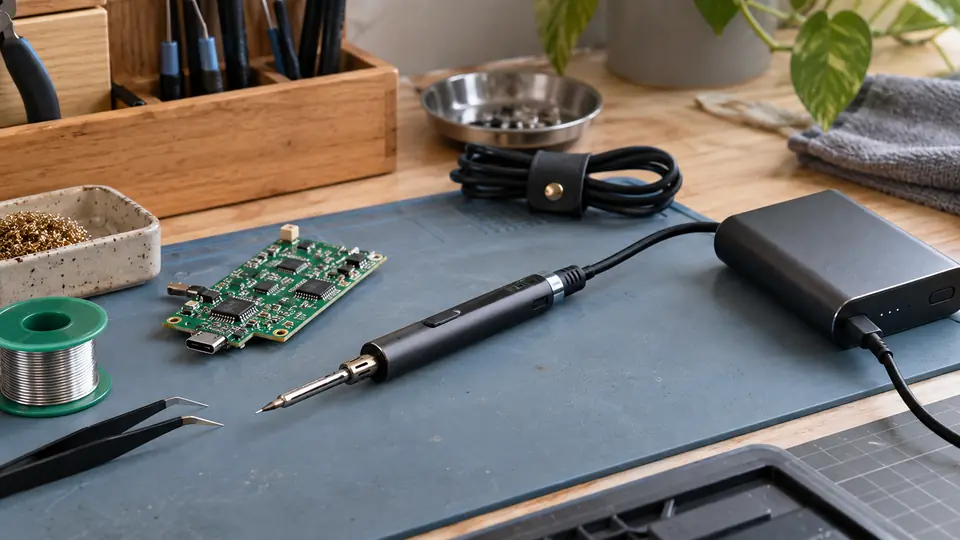
A USB-C soldering iron can turn a bulky bench setup into a tool that travels in a laptop bag, repair kit, or drawer. The appealing part is convenience, but the connector alone tells you very little. A compact iron may need USB-C Power Delivery, a strong power bank, or a particular voltage profile before it can deliver useful heat. Others include a battery and work cordless, while some are USB-C powered only and still require a capable charger.
Power capability, temperature control, tip design, and heat recovery matter more than a headline temperature or a fast warm-up claim by itself. A fine tip is handy for PCB work, but larger joints and ground planes can pull heat away quickly. Likewise, a high-wattage model may be a poor fit if its power requirements are awkward for your charger. The ALIENTEK T90 stands out overall because its USB-C input, broad power range, display, adjustable controls, and support for demanding joints make it unusually adaptable.
The products below cover several useful approaches, from the simple Pinecil and programmable TS101 to battery-powered irons and higher-output tools. Some are better for occasional repairs, some suit field work, and others make more sense beside a strong USB-C PD charger on a regular electronics bench. The comparison weighs those differences rather than treating every USB-C soldering iron as interchangeable.
Quick Answer
Best Overall: The ALIENTEK T90 Smart Soldering Iron offers the broadest combination of USB-C power flexibility, high output, temperature control, useful display information, and tip compatibility.
Best Portable Value: The PINECIL Smart Mini Portable Soldering Iron remains an appealing compact choice for readers who already have a suitable PD or QC power source.
Best for Higher-Load Work: The HOTO SNAPBLOQ I-A06 adds a larger C245 tip system, 140W wired input, and 60W cordless output for thicker wires, connectors, and ground planes.
Best USB-C Soldering Iron Comparison Table
| Product | Power | Temperature Control | Tip System | Best For |
|---|---|---|---|---|
| ALIENTEK T90 | USB-C, up to 140W | 80 to 450°C, PID claim | T90B, T245 type | Overall versatility |
| HOTO SNAPBLOQ I-A06 | USB-C PD, up to 140W wired | 200 to 840°F | Three C245 tips | Higher-load soldering |
| PINECIL Smart Mini | USB-C PD or QC 3.0 | Listing does not specify range | B2 tip included | Compact everyday repairs |
| UY CHAN TS101 | USB-C PD up to 45W | 50 to 400°C | B2 tip included | Programmable portability |
| iFixit FixHub | USB-C, 100W | Listing does not specify range | Exact system not stated | Repair-focused use |
| FNIRSI HS-03 | Battery or USB-C | 212 to 842°F | K, I, and IS tips | Cordless work with display |
| Fanttik T1 Max | Battery, USB-C wired mode | 200 to 450°C, six levels | Four C210 tips | Fine portable soldering |
| FNIRSI HS-02A | USB-C cable, up to 100W | 212 to 842°F | Six tips included | Portable corded kits |
| Larlarsa 1400mAh Kit | Battery or USB-C PD | 260 to 420°C | Three tips included | Lower-cost cordless setup |
The detailed reviews explain how each power arrangement, control layout, and tip choice changes the practical experience.
1. ALIENTEK T90 Smart Soldering Iron — Best Overall
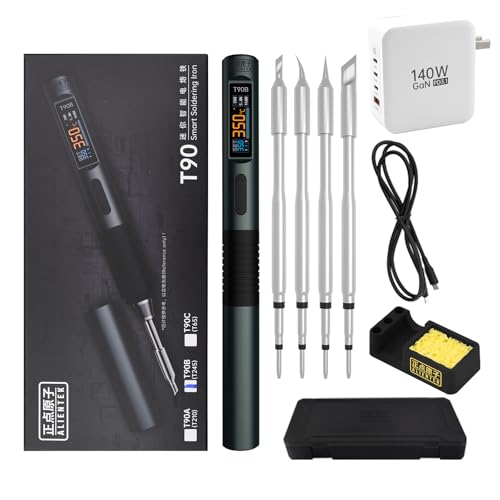
The T90 makes the strongest case for a USB-C soldering iron that can move between delicate electronics and heavier joints. Its USB-C input accepts 9 to 28V and the listing describes support for PD3.1 and QC3.0 sources, with power ranging from 18W to 140W. That gives the tool more headroom than small travel irons, particularly for large solder joints or ground planes that absorb heat quickly.
A 0.99-inch color LCD shows temperature, power, voltage, current, and hand-held status, while the adjustable range runs from 80 to 450°C. Three preset temperatures, seven power levels, automatic sleep, and a supplied 140W USB-C cable make the controls more useful than a basic two-button pen. The T90B configuration listed here uses a T245-style tip system, and the aluminum body with quick-lock sleeve keeps the format compact without reducing the emphasis on serious bench work.
Pros
- USB-C input supports a broad 9 to 28V range and up to 140W.
- Color display shows temperature, power, voltage, current, and hand-held status.
- Adjustable 80 to 450°C range with three quick presets.
- Includes a 140W, 1.2-meter Type-C cable.
- T90B configuration uses a T245-style tip system and quick-lock sleeve.
Cons
- A suitable high-output USB-C power source is required for the full 140W capability.
- The supplied product information does not clearly identify the complete accessory set beyond the listed cable and tip configuration.
This is the most balanced pick for a reader who wants one portable iron that can handle fine board work and larger connections without switching to a traditional station. The power claims remain listing specifications rather than independent measurements, so charger capability still matters. Choose it over the Pinecil or TS101 if higher USB-C output and richer monitoring matter more than the simplest setup.
To buy this product, click here.
2. HOTO SNAPBLOQ I-A06 Soldering Iron Kit — Best for Higher-Load Work

Thick wires, RC connectors, and broad ground planes are where a small soldering pen can feel strained. The I-A06 approaches those jobs with a C245 tip system, a 140W wired mode, and a listed 60W cordless mode. Its included C2 chisel, KU knife, and B bevel tips provide more working surface than the fine C210-oriented systems found on several smaller irons.
The full-color screen offers three presets at 400, 650, and 800°F, plus adjustments across 200 to 840°F in 10°F or 5°C steps. That mix makes quick changes simple while retaining finer control for a specific joint. A 2,000mAh battery supports cordless use, and the iron also accepts USB-C PD, DC input, and a compatible power bank. The Hall-effect cover, no-tip detection, foldaway stand, and adjustable sleep timer add practical bench touches, though the larger power capability demands a suitable source.
Pros
- Supports up to 140W in wired mode and 60W in cordless mode.
- C245 tips offer three supplied geometries for different joint sizes.
- Full-color LCD provides presets and fine temperature adjustments.
- Supports USB-C PD, DC input, and a compatible power bank.
- Includes no-tip detection, adjustable sleep timing, and a foldaway stand.
Cons
- Its highest wired output requires a capable power source and suitable connection.
- The C245 system is a larger format than the fine-tip setup preferred for very small work.
The I-A06 suits a workbench that occasionally turns from small electronics into heavier wiring. It is a stronger fit than a slim C210 iron for heat-hungry joints, while its cordless mode keeps the tool useful away from an outlet. Choose a smaller model for delicate, low-mass work where the larger C245 tip may feel excessive.
To buy this product, click here.
3. PINECIL Smart Mini Portable Soldering Iron — Best Simple Portable Pick

The Pinecil keeps the travel setup refreshingly small. Its USB-C port supports PD and QC 3.0, and a second DC5525 barrel input gives it another power route when a compatible supply is already nearby. The listing states a 12-second warm-up and an on-demand boost feature, so it is aimed at quick repairs rather than a permanently installed station.
Its slim body uses a stainless steel core inside a polycarbonate shell, and automatic standby reduces idle heating when the tool is left untouched. The package includes a B2 tip, but the power supply is not included. That last detail matters: a USB-C connector does not mean every phone charger will provide the voltage and power the iron needs, so buyers should match the tool with a compatible PD or QC source before starting a repair.
Pros
- Supports both USB-C PD and QC 3.0 input.
- Offers a DC5525 input alongside USB-C.
- Listing states a 12-second operating-temperature warm-up.
- Compact stainless steel and polycarbonate construction.
- Automatic standby helps reduce idle heating.
Cons
- Power supply is not included.
- Only one B2 tip is listed in the package.
This is a sensible lower-complexity choice for repairs, kits, and occasional electronics work, especially for anyone who already owns an appropriate USB-C PD or QC supply. It gives up the display and built-in battery found on newer cordless models, but that also keeps the tool straightforward. Check the charger specification first rather than assuming a basic laptop or phone adapter will be enough.
To buy this product, click here.
4. UY CHAN TS101 Smart Soldering Iron — Best Programmable Option

The TS101 is built for people who like a small iron with more control under the hood. Its USB-C PD input supports 12 to 24V and up to 45W, while the DC5525 input reaches 9 to 24V and up to 65W. That dual-input arrangement is useful for a portable kit that may see a USB-C power bank one day and a barrel-output supply the next.
An OLED screen displays the selected temperature across a 50 to 400°C range, and the boost function is intended to speed heating for demanding moments. Dual temperature sensors, acceleration sensing, automatic sleep, and overheat warning add control features without turning the handle into a bulky station. The ability to connect to a computer for custom temperature curves and functions is a distinctive advantage, although it is more valuable to a tinkerer who enjoys configuration than to someone seeking the fewest possible settings.
Pros
- Supports USB-C PD and DC5525 power input.
- USB-C input supports up to 45W, while DC input reaches 65W.
- OLED display covers a 50 to 400°C adjustment range.
- Includes boost heating, automatic sleep, and overheat warning.
- Can be reprogrammed through a computer for custom functions.
Cons
- USB-C power is lower than the 100W and 140W options ranked above it.
- The listing identifies a B2 tip, but does not detail a broader included tip selection.
The TS101 makes sense for portable electronics work where programmable behavior and dual power input matter. It offers more customization than the Pinecil, but its lower USB-C ceiling is less attractive for large joints. Pick it for control and flexibility, not because the 400°C maximum alone promises greater soldering performance.
To buy this product, click here.
5. iFixit FixHub Smart Soldering Iron — Best Repair-Focused Design

FixHub takes a focused approach: a compact 100W USB-C iron with automatic cool-down when set down and automatic reheating when picked up. That behavior fits the stop-start rhythm of repair work, where the tool may rest beside a board while a component is positioned or inspected. A ring light indicates whether the iron is heating, hot, or cooling, giving the handle a clear visual status cue.
The listing describes a durable repair-oriented design with easy-to-replace components, but it does not specify the temperature range, charger requirements, or tip system in the supplied information. Those omissions prevent a closer comparison with the T90 or HOTO on fine adjustment and consumable selection. Still, the 100W USB-C input and automatic thermal behavior give it a clean appeal for readers who want a compact repair tool from an ecosystem built around serviceability.
Pros
- USB-C powered with a listed 100W rating.
- Automatic cool-down when placed down.
- Automatic reheating when picked up.
- Ring light indicates heating, hot, and cooling states.
- Listing describes easy-to-replace components.
Cons
- The supplied information does not clearly specify the temperature range.
- Tip-system and charger details are not clearly identified in the listing information provided.
FixHub is best for a repair kit where clear status feedback and automatic set-down behavior matter more than deep configuration. Readers who regularly solder large joints or need detailed tip compatibility should look first at the T90 or HOTO, whose published information is more specific. Confirm the current accessory and power details before ordering.
To buy this product, click here.
6. FNIRSI HS-03 Cordless Soldering Iron Kit — Best Cordless Control

The HS-03 is aimed at repairs where a cable gets in the way. Its 2,600mAh battery supports cordless operation, and the listing says it can also run directly from a power source without the battery installed. That second mode is useful for a workbench session, while pass-through USB-C operation keeps a project moving when the battery needs support.
Controls combine a five-level adjustment knob with buttons for 1 to 50°F changes, covering 212 to 842°F. The 0.96-inch IPS color display has adjustable brightness, and left- and right-hand modes help keep the screen visible from either grip. Tool-free tip changes are another practical touch, with K, I, and IS tips listed for joints, precision work, and tight spaces. The product information does not identify the exact USB-C power requirement, so charger matching remains part of the setup.
Pros
- 2,600mAh battery supports cordless use.
- Can operate from a power source without the battery installed.
- Combines quick knob adjustments with finer button control.
- Color IPS display includes adjustable brightness and hand modes.
- Tool-free tip changes with K, I, and IS tips listed.
Cons
- The listing does not clearly specify the USB-C input power requirement.
- Battery operation adds charging management compared with a simple corded pen.
This is a strong fit for field repairs, gaming modifications, and cramped work areas where cordless freedom has real value. Its controls are more flexible than those on basic battery pens, while the direct-power mode gives it a useful bench fallback. Choose the T90 or HS02A if your priority is clearly documented high-output USB-C operation rather than battery convenience.
To buy this product, click here.
7. Fanttik T1 Max Soldering Iron Kit — Best for Fine Portable Work

The T1 Max uses a C210-style tip family, making its supplied I, IS, and K tips more naturally suited to compact joints and detailed electronics work than the larger C245 system in the HOTO. The listing states seven-second heating and a 200 to 450°C range delivered through six temperature levels. Those controls are simple enough for quick changes, though they offer less fine adjustment than a continuously adjustable digital interface.
A built-in 2,600mAh battery provides cordless operation with a listed maximum 12W DC output for up to 60 minutes at 450°C. Wired operation through a Type-C charger or mobile power supply increases the maximum output to 16W. Gravity sensing puts the tool into sleep mode after 30 seconds and wakes it when picked up, while the aluminum stand stores the tip. The modest output makes it better suited to smaller joints than thick wire or large ground areas.
Pros
- Includes four C210 tips for precision-oriented work.
- Offers cordless and USB-C wired operation.
- Built-in 2,600mAh battery with a listed 60-minute maximum runtime claim.
- Six temperature levels cover 200 to 450°C.
- Gravity sensing supports automatic sleep and wake behavior.
Cons
- Maximum listed output is lower than the higher-power irons above it.
- Six levels provide less adjustment detail than fine digital temperature controls.
The T1 Max belongs in a portable electronics kit where C210 tips and battery freedom are more useful than brute heating capacity. It should be skipped for thick connectors and substantial ground planes, where a larger tip and greater power reserve are more appropriate. For small boards and careful field repairs, its compact format is easier to justify.
To buy this product, click here.
8. FNIRSI HS-02A Portable Soldering Iron Kit — Best Corded Kit

The HS-02A is a useful reminder that USB-C portability does not always mean cordless operation. This model requires its configured charging cable and explicitly does not support cordless use, but it accepts up to 100W across a 9 to 20V range. A supplied 100W charging adapter means the kit is ready to use without assembling a separate power arrangement.
Six included tips, covering K, KU, JS, I, C2, and B shapes, give the iron a broad starting selection. The temperature range runs from 212 to 842°F, with three preset groups for faster changes. A storage case, stand, brass tip cleaner, and solder wire round out the package. Sleep and standby modes can wake through a button or movement, which is handy at a bench, while the lack of battery operation makes this less suitable for repairs far from a powered workspace.
Pros
- Supports up to 100W across a listed 9 to 20V input range.
- Includes a 100W charging adapter.
- Six soldering tips cover several joint shapes.
- Includes a storage case, stand, brass tip cleaner, and solder wire.
- Offers preset temperatures, sleep mode, and standby mode.
Cons
- It does not support cordless operation.
- It requires the configured charging cable rather than offering broad standalone power flexibility.
Choose the HS-02A for a portable corded kit that stays organized and brings a generous collection of tips to the job. It is a better fit for a garage, classroom, or bench with access to power than for outdoor troubleshooting. The included adapter simplifies setup, but readers seeking a power-bank-only solution should choose a battery model instead.
To buy this product, click here.
9. Larlarsa 1400mAh USB-C Soldering Iron Kit — Best Lower-Cost Complete Kit

The Larlarsa kit focuses on giving a new setup the basic pieces in one box. Its 1,400mAh battery supports cordless work, and the listing identifies USB-C PD charging through power banks and laptops. Temperature is adjustable from 260 to 420°C, with an OLED display that can switch between Celsius and Fahrenheit. That is a more informative control layout than a fixed-temperature pen, especially for PCB component replacement and small repair jobs.
Three tips, an aluminum solder sucker, lead-free solder wire, and a heat-resistant stand are included. Ceramic heating and real-time temperature calibration are listed features, while the automatic sleep mode activates after 10 minutes of inactivity. The lower maximum temperature and smaller battery separate it from the FNIRSI HS-03 and higher-output tools, but the kit format keeps the first purchase relatively simple for light electronics work.
Pros
- Includes a 1,400mAh rechargeable battery for cordless use.
- Supports USB-C PD charging through power banks and laptops.
- OLED display supports Celsius and Fahrenheit.
- Includes three tips, lead-free solder wire, a solder sucker, and a stand.
- Listing describes real-time temperature calibration and automatic sleep.
Cons
- The 260 to 420°C range is narrower than several competing irons here.
- Its smaller battery and lower listed range make it less suited to demanding joints.
This kit suits occasional repairs, classroom projects, and a first portable setup where included accessories matter. It is less convincing for repeated heavy soldering, and the supplied information does not establish the exact USB-C input wattage. Buyers who want more battery capacity and finer control should move up to the HS-03, while those who already own a charger and tip collection may prefer the Pinecil.
To buy this product, click here.
Buying Guide
Match USB-C Power Requirements to the Charger
USB-C is a connector standard, not a promise that every charger will power every iron. The Pinecil lists PD and QC 3.0 support, the TS101 specifies USB-C PD voltage and power ranges, and the T90 lists 9 to 28V input with up to 140W. Those details should guide the charger choice. A basic phone adapter may charge a small device yet fail to provide the voltage or power profile required for useful soldering.
Wattage Does Not Tell the Whole Heating Story
Higher available power can help a tip recover when it touches a large joint, but wattage alone does not predict the result. Tip geometry, heater design, sensor placement, control behavior, and the workpiece all affect heat transfer. The HOTO gains a practical advantage from its C245 tip system and high wired output, while a C210 tool such as the Fanttik T1 Max is better matched to smaller joints.
Choose the Tip System Around the Work
Fine C210 tips can help with small pads and compact components, while broader C245 or T245-style systems offer more contact area for wires, connectors, and ground planes. Included tips are different from compatible tips, so check what arrives in the box and what the exact model supports. The HS-02A includes six shapes, while the Pinecil listing identifies one B2 tip, creating very different starting setups.
Decide Between Corded USB-C and Battery Operation
A corded iron avoids battery runtime limits and may deliver more power, but the cable remains part of the workspace. Battery models such as the HS-03 and Fanttik T1 Max provide freedom around a board or vehicle, though their output and runtime depend on the listed battery design. Pass-through operation can reduce interruptions, but it still requires a suitable source and does not make every model equivalent to a high-output corded tool.
Use Temperature Control as a Working Tool
A broad temperature range is useful only when the controls let you reach an appropriate setting without fuss. The T90 offers presets and seven power levels, the HS-03 combines a knob with fine button changes, and the TS101 provides an OLED display with programmable behavior. Maximum temperature should not be treated as proof of superior soldering. Joint size, solder type, tip condition, and heat loss still shape the actual work.
Check What the Kit Really Includes
A complete-looking product title can hide a missing charger or a narrow tip selection. The Pinecil does not include a power supply, while the HS-02A lists a 100W adapter, six tips, a case, and cleaning accessories. Kits such as the Larlarsa 1400mAh model include solder and a solder sucker, which may reduce the number of separate purchases for light repairs. Confirm cable, charger, stand, tip, and consumable details before ordering.
Keep Heat and Fumes Under Control
Automatic sleep, standby, and set-down behavior can reduce idle heating, but they do not replace careful handling. Use a stable heat-resistant work surface, suitable eye protection, and appropriate ventilation or fume control. USB-C portability makes it easier to solder in different locations, so the work area still needs to be prepared for a hot tool and solder residue.
Best USB-C Soldering Iron FAQ
What Is the Best USB-C Soldering Iron Overall?
The ALIENTEK T90 is the strongest overall choice in this group because its listing combines USB-C input up to 140W, an 80 to 450°C range, a color display, presets, adjustable power levels, and a supplied 140W cable. It still needs a compatible high-output power source to reach its full potential.
Can Any USB-C Charger Power a Soldering Iron?
No. USB-C irons can require different voltage profiles and power levels. The supplied information identifies PD or QC support for some models, while others specify input ranges or maximum wattage. Check the exact iron and charger requirements before connecting them, and do not assume a low-power phone charger will provide useful heating.
Is a USB-C Soldering Iron Better Than a Traditional Station?
A USB-C iron is easier to carry and can work from suitable adapters, power banks, or other portable sources. A traditional station may offer a more permanent setup and a broader control or accessory arrangement, depending on the model. USB-C is most valuable for compact repairs, field work, and workspaces where portability matters.
Which USB-C Soldering Iron Is Best for Large Wires?
The HOTO SNAPBLOQ I-A06 is the strongest fit among these options because its listing identifies up to 140W wired output and a C245 tip system with broader tip shapes. The ALIENTEK T90 is another capable choice with up to 140W listed input. Actual results still depend on joint size, tip condition, and the power source.
Are Cordless USB-C Soldering Irons Suitable for PCB Work?
Yes, several are aimed at electronics repair and PCB work. The Fanttik T1 Max uses C210 tips for smaller joints, while the FNIRSI HS-03 provides a wider range and tool-free tip changes. Battery output is lower on some cordless models than on high-output corded irons, so match the tool to the board and joint size.
Does a Higher Maximum Temperature Mean a Better Iron?
No. Maximum temperature describes the upper setting listed for the tool, not its heat recovery, control accuracy, or ability to maintain useful heat at a joint. Tip geometry, heater design, power delivery, and the thermal mass of the workpiece all matter. A well-matched tip at a controlled temperature can be more useful than a higher unused setting.
Should a USB-C Soldering Iron Include a Charger?
Including a charger makes setup easier, but it is not always necessary if you already own a suitable USB-C PD supply. The Pinecil listing specifically says its power supply is not included, while the FNIRSI HS-02A lists a 100W adapter. Verify the required output before treating an existing charger as compatible.
What Safety Features Are Useful on a Portable Soldering Iron?
Automatic sleep, standby, set-down cooling, overheat warnings, and clear hot-state indicators can reduce idle heating and make a portable tool easier to manage. They do not eliminate burn or electrical risks. Use a stable stand or heat-resistant surface, keep the hot tip away from cables and skin, and provide suitable ventilation.
Final Verdict
The ALIENTEK T90 is the strongest overall choice for a USB-C soldering iron because it covers the widest range of practical situations in this group. Its published USB-C input range, high listed power ceiling, adjustable temperature, presets, display data, and T245-style configuration give it more room for both detailed electronics and larger joints. The HOTO I-A06 is the better alternative for readers who specifically want C245 tips, cordless operation, and extra thermal capacity for connectors or thick wires.
For a simpler portable tool, the Pinecil remains a sensible pick if you already have a compatible PD or QC supply. The TS101 is better for programmable control and dual USB-C/DC input, while the FNIRSI HS-03 and Fanttik T1 Max make stronger cases for battery-powered work. Before ordering, match the iron to the charger, tip size, battery expectations, and joint size. A compact pen is convenient, but the right power source and tip system determine whether that convenience turns into useful soldering performance.

- Jesse
Jesse is the editor behind Soldering Gear, where he covers soldering irons, stations, rework equipment, and the tools that belong on a practical electronics bench. His work focuses on comparing product specifications, features, compatibility, and intended uses so readers can make more informed buying decisions.
- Best Soldering Iron for SMD: 9 Picks in 2026 October 15, 2026
- Best Hot Air Rework Station for SMD: 9 Picks in 2026 October 14, 2026
- What Tools Do You Need for Soldering Electronics? October 13, 2026
- Best USB-C Soldering Iron: 9 Picks in 2026 October 12, 2026
- How to Choose Solder for Electronics October 11, 2026