Best Soldering Iron for Beginners: 9 Picks in 2026

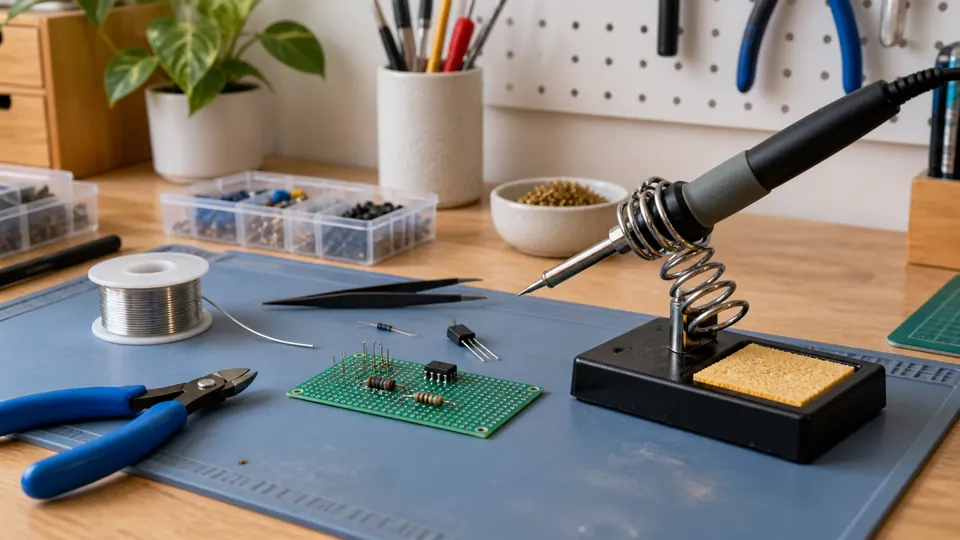
A first soldering project often starts with a small circuit board, a loose wire, or a kit spread across the kitchen table. Then the iron heats up, the solder beads instead of flowing, and the beginner discovers that wattage alone does not explain why one tool feels manageable while another feels awkward. The best soldering iron for beginners should offer adjustable heat, understandable controls, useful tip shapes, a stable place to rest, and enough included equipment to begin without assembling a separate workbench.
The tempting shortcut is to choose the highest wattage or the largest accessory bundle. That can miss the real issue. A compact pen-style iron is convenient for occasional repairs, while a station offers a more organized workspace, easier temperature adjustment, and better support for repeated electronics projects. Digital displays can make settings easier to follow, but a clear control system and suitable tips matter just as much. Different buyers have different priorities, so the overall recommendation here favors the YIHUA 926 III station for its combination of temperature control, included tools, and beginner-friendly workbench setup.
The products below range from simple portable kits to compact stations with helping hands, sleep modes, calibration functions, and digital displays. Their temperature ranges and wattage ratings are useful reference points, but they do not guarantee identical performance at every joint. Tip geometry, solder type, component size, and safe working habits still shape the result.
Quick Answer
Best Overall: YIHUA 926 III 60W Digital Display Soldering Iron Station Kit offers a compact station, adjustable temperature, PID control, sleep settings, calibration support, two helping hands, and six included tips.
Best Premium Setup: WEP 927-IV Soldering Station Kit adds preset temperature channels, a double numerical display, an LED magnifier, helping hands, and integrated storage.
Best Portable Kit: 80W LCD Soldering Iron Kit Adjustable Temp 180-520°C keeps the setup compact while including five tips, solder, flux, a desoldering pump, cutters, tweezers, and a carrying case.
Best Budget Station: WEP 926LED V3 Soldering Station provides a temperature-controlled station, digital readout, sleep mode, five tips, solder, tweezers, and a desoldering pump.
Best Soldering Iron for Beginners Comparison Table
| Product | Best For | Power And Range | Useful Features |
|---|---|---|---|
| YIHUA 926 III Digital Station | Best overall | 60W, 194°F to 896°F | PID control, sleep mode, calibration |
| WEP 927-IV Station | Premium bench setup | 110W, 194°F to 896°F | Presets, magnifier, helping hands |
| WEP 926LED V3 Station | Compact station value | 130W maximum, 392°F to 896°F | PID control, sleep mode, digital display |
| HANDSKIT 90W Kit | Portable electronics work | 90W, 356°F to 896°F | Memory, calibration, auto sleep |
| 80W LCD 180-520°C Kit | Broad temperature range | 80W, 356°F to 968°F | LCD, five tips, tool case |
| Plusivo 60W Digital Kit | Large accessory bundle | 60W, 392°F to 932°F | 21-in-1 kit, carry bag |
| 100W LED Digital Kit | Higher-power portable work | 100W, 356°F to 932°F | Calibration, child-lock setting |
| 60W Premium Soldering Kit | Portable general repairs | 60W, 200°C to 450°C | On/off switch, tips, pump, paste |
| 60W Interchangeable-Tip Kit | Simple first setup | 60W, 392°F to 842°F | Five tips, stand, solder, flux |
The detailed reviews explain how each setup handles temperature control, workspace organization, included tools, and the compromises that matter during early soldering projects.
1. YIHUA 926 III 60W Digital Display Soldering Iron Station Kit: Best Overall
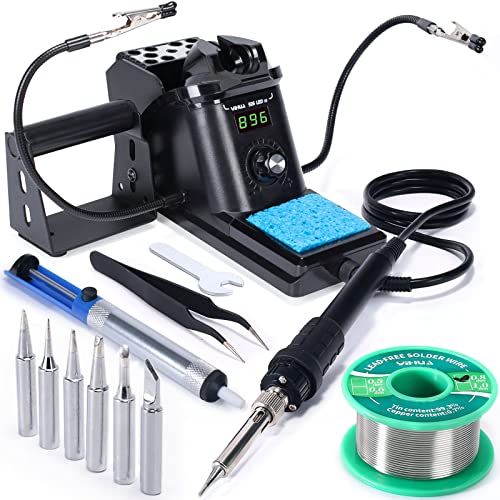
For a first serious electronics bench, a station is often easier to live with than a loose soldering pen and a tiny folding stand. The YIHUA 926 III gives the user a digital display, a master control knob, adjustable temperature from 194°F to 896°F, and a holder integrated into the compact station body. That arrangement keeps the hot tool in a predictable location while leaving room for a board, solder, and small parts.
The listing describes PID temperature stabilization, digital calibration, and selectable sleep settings of 5, 10, or 30 minutes. Those features do not guarantee a particular joint temperature, yet they give a new user more consistent control than a fixed-temperature iron. Six tips, lead-free solder, a solder sucker, tweezers, a sponge, and two helping hands create a practical starting point for through-hole practice and general circuit-board work. The helping hands are especially useful when a learner is still figuring out how to hold the board, solder, and iron without creating a three-handed juggling act.
Pros
- Adjustable temperature range from 194°F to 896°F.
- Digital display, Celsius and Fahrenheit conversion, and calibration support.
- Selectable sleep mode helps reduce idle heating.
- Includes six tips, two helping hands, lead-free solder, tweezers, and a solder sucker.
- Compact station design includes a built-in iron holder and tip storage.
Cons
- The included solder is lead-free, which can require different technique and settings than leaded solder.
- The listing specifies operation on 110 to 127 volts with a U.S. plug.
This is the strongest match for someone who expects the hobby to grow beyond one quick repair. The controls are more structured than a basic pen, and the included accessories help create a usable work area from the first session. A buyer who wants the smallest possible kit may prefer a portable iron, while someone planning regular PCB work will likely appreciate the station format more.
To buy this product, click here.
2. WEP 927-IV Soldering Station Kit: Best Premium Setup
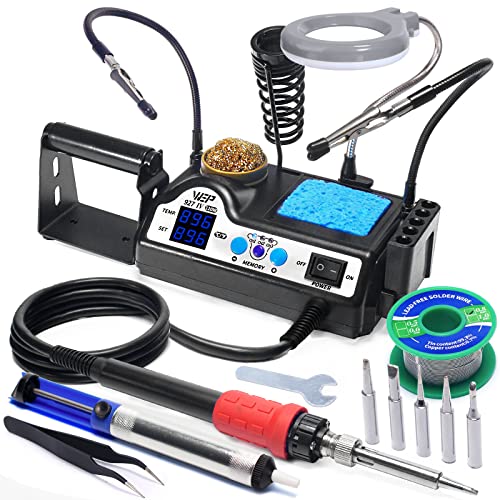
The WEP 927-IV takes the organized station idea further by combining the iron holder, tip storage, solder dispenser, LED magnifier, and helping hands in one bench-oriented unit. Its published temperature range begins at 90°C and extends to 480°C, while the double display shows the selected temperature and the reported actual temperature. For a new user following tutorials that move between settings, seeing both values can make the controls less mysterious.
Three preset channels are useful when projects involve different joint sizes or solder types. Instead of repeatedly adjusting the control, the user can save familiar settings and switch between them. The kit includes five extra tips, lead-free solder, tweezers, a tip cleaner, and two helping hands. The WEP #1400 tip requirement is a meaningful ownership detail because replacement planning matters after the first few tips wear or oxidize.
Pros
- 110W heating element and adjustable range from 90°C to 480°C.
- Three preset channels simplify repeated temperature changes.
- Double numerical display shows set and reported actual temperature.
- Integrated LED magnifier, helping hands, tip storage, and solder dispenser.
- Includes five extra tips, lead-free solder, tweezers, and a tip cleaner.
Cons
- Uses WEP #1400 soldering iron tips, so replacement tips need to match that system.
- The station is more elaborate than necessary for occasional wire repairs.
This setup suits a learner who wants a dedicated bench rather than a drawer-friendly pen. The magnifier and helping hands can make small components easier to position, although they add structure and bulk compared with the simpler picks below. Its 110 to 127 volt specification also makes the intended electrical environment clear before purchase.
To buy this product, click here.
3. WEP 926LED V3 Soldering Station: Best Compact Station Value

A small desk can turn soldering into a constant game of moving boxes, wire cutters, and hot tools out of the way. The WEP 926LED V3 addresses that problem by integrating the holder into the station body. A control knob sets the temperature from 392°F to 896°F, and the digital display reports the temperature setting. Five extra tips, solder wire, tweezers, and a desoldering pump keep the first project from stalling because one basic accessory is missing.
The product information describes PID temperature compensation and a sleep mode that lowers idle temperature after more than 10 minutes without use. Those functions are useful for a learner who pauses often to inspect a joint or reposition a component. The station is rated for 110 to 127 volts, and the supplied information specifically warns against connecting it to a 220-volt socket. That detail deserves attention before the first satisfying hiss of solder reaches the board.
Pros
- Integrated holder saves bench space.
- Temperature control covers 392°F to 896°F.
- Digital readout and Celsius to Fahrenheit conversion aid setup.
- PID control and sleep mode support steadier, lower-idle operation.
- Includes solder wire, five tips, tweezers, and a desoldering pump.
Cons
- The supplied information specifies a 110 to 127 volt U.S. configuration.
- Its temperature range starts higher than several portable irons in this group.
This is a sensible station for someone who wants clearer controls and a tidy holder without moving into the larger WEP 927-IV arrangement. It gives up the latter model’s presets, magnifier, and integrated helping hands, yet the smaller footprint may matter more on a crowded desk. Choose it for structured practice and compact storage, rather than for maximum accessory coverage.
To buy this product, click here.
4. HANDSKIT 90W Soldering Iron Kit: Best Portable Electronics Kit
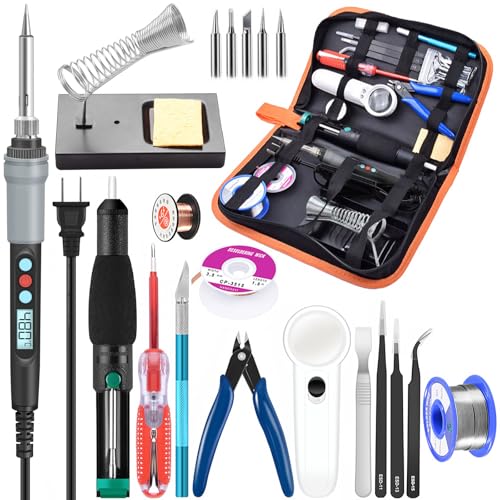
The HANDSKIT kit keeps the controls on the iron itself, which makes it easier to move from a desk drawer to a repair table. Its LCD shows the selected temperature across a 180°C to 480°C range, and the product information lists a ceramic heating core with an advertised heating time of about 10 seconds. A 15-minute sleep function pauses heating after inactivity, while temperature memory recalls the last selected setting when the tool starts again.
This kit is unusually broad for a pen-style setup. Alongside six 900M tips, it includes solder, flux, a stand and sponge, wire cutters, desoldering braid, copper wire, an LED magnifier, a scraper, screwdrivers, a carving knife, tweezers, and a desoldering pump. The carrying case gives all those pieces a home, although a crowded accessory list can take longer to sort than a station with dedicated storage. Calibration offset adjustment is useful for users who want to fine-tune the displayed setting, but it should not be confused with an independently verified measurement.
Pros
- 90W iron with adjustable range from 180°C to 480°C.
- LCD display, temperature memory, Celsius and Fahrenheit conversion.
- Supports calibration offset adjustment from -99°C to 99°C.
- Includes six 900M tips and a broad set of repair accessories.
- PU carrying case makes transport and storage straightforward.
Cons
- The portable design does not provide the integrated bench organization of a station.
- The large accessory assortment may be more than needed for simple solder joints.
This model fits a learner who wants one portable case for soldering and basic electronics repair. It gives more tool coverage than the simplest kits and more temperature range than the 60W options, but the user must still provide a stable work surface and place the hot iron safely in its stand. It is a strong choice for moving between projects, classrooms, or storage shelves.
To buy this product, click here.
5. 80W LCD Soldering Iron Kit Adjustable Temp 180-520°C: Best Broad-Range Portable Iron
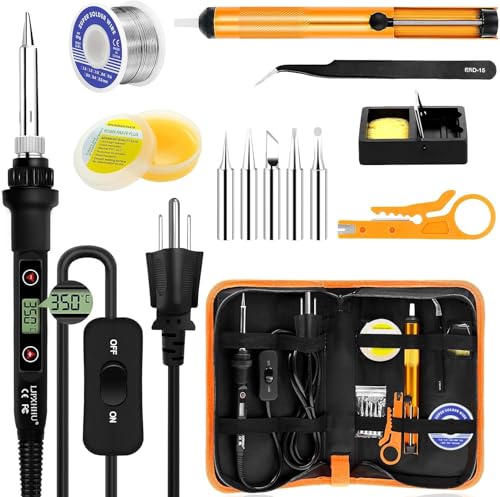
Some first projects involve tiny circuit-board joints, while others involve heavier wires or connectors that pull more heat from the tip. This 80W kit offers a listed 180°C to 520°C adjustment range, displayed on a large LCD, with plus and minus buttons for changes. The product information also lists an advertised 15-second heat-up time and an on/off switch, creating a direct setup that feels familiar to anyone who has used a basic plug-in tool.
Five 900M tips cover different shapes for precision work, larger contact areas, and general repair. The case includes 0.8mm rosin-core solder, no-clean flux paste, a stand with sponge, a pump, wire stripper and cutter, and tweezers. Those details make the kit practical for learning the basic sequence of heating, feeding solder, inspecting, and removing a poor joint. The listing describes a 24-month replacement guarantee, but buyers should confirm the current terms before ordering.
Pros
- 80W heating system with a listed 180°C to 520°C adjustment range.
- Large LCD and simple plus and minus controls.
- Includes five interchangeable 900M tips.
- Supplies solder, no-clean flux paste, pump, cutters, wire stripper, and tweezers.
- Carrying case keeps the portable kit together.
Cons
- Temperature range and advertised accuracy come from listing information rather than independent testing.
- The pen-style format requires separate attention to stand stability and bench organization.
This is a useful middle path between a bare-bones iron and a station. It offers a broad setting range and plenty of starter tools without requiring a permanent desk setup. Pick it for portable repairs and varied wire or PCB work, while choosing a station if repeated practice and orderly tool placement matter more than mobility.
To buy this product, click here.
6. Plusivo 60W Digital Soldering Iron Kit: Best Accessory Bundle

The Plusivo kit is aimed at the moment a new user realizes that soldering requires more than the iron itself. Its LED display shows the selected setting, and the listed range runs from 200°C to 500°C. Five replaceable tips support different tasks, while the heat-resistant silicone grip and ventilation openings address basic handling concerns without turning the tool into a full station.
The 21-in-1 package includes 0.8mm flux-cored SnPb solder wire, a desoldering pump, tweezers, stand, sponge, mini wire stripper, screwdrivers, a small PCB, heat-shrink tubes, and other pieces in a carrying bag. That combination is handy for a learner practicing on simple boards and wires because the first session can begin with actual materials on hand. The inclusion of lead-containing solder means users should follow sensible ventilation, hygiene, and handling practices rather than treating the bundle as a complete safety solution.
Pros
- Adjustable 200°C to 500°C temperature range with LED display.
- Includes five replaceable soldering tips.
- Supplies SnPb flux-cored solder wire for practice joints.
- Includes a pump, tweezers, cutters, screwdrivers, sponge, and heat-shrink tubes.
- Carry bag keeps the wide accessory set organized.
Cons
- The kit includes lead-containing solder, so careful handling and cleanup are required.
- The pen-style iron has fewer integrated controls and storage features than the station picks.
This option works for someone who values a broad starter bundle and expects to practice desoldering as well as soldering. Its accessory coverage is the main reason to choose it, while users focused on precise, repeatable bench work may prefer the YIHUA or WEP stations. Confirm the included items in the current listing because bundled contents can change.
To buy this product, click here.
7. 100W LED Digital Soldering Iron Kit: Best Higher-Power Portable Option

A 100W rating may appeal to someone who expects to work on larger wires or parts that draw heat away quickly, but wattage does not by itself prove better temperature stability or joint quality. This pen-style model pairs its listed power with a ceramic heater, a 180°C to 500°C adjustment range, LED temperature display, and a calibration function. The product information gives an advertised heat-up time of about 15 seconds.
The kit includes tips, solder wire, wick braid, a stand, sponge, and flux paste. A password or child-lock setting is also listed, which can prevent casual changes to the controls, though it does not replace safe storage or supervision around a hot tool. Four ventilation openings and a steel tube design are described as heat-dissipation features. Those details may make the handle more comfortable to hold, but the actual experience depends on tip condition, setting, joint size, and work technique.
Pros
- 100W ceramic-heater design with adjustable 180°C to 500°C range.
- LED display supports Celsius and Fahrenheit temperature viewing.
- Calibration function and password-lock setting are included.
- Includes solder, flux paste, wick braid, sponge, stand, and tips.
- Portable pen format suits repairs away from a permanent station.
Cons
- Higher wattage should not be treated as proof of superior temperature recovery.
- The kit does not provide the integrated helping hands and station controls found on the top picks.
This iron is a reasonable fit for a buyer who wants a portable tool with more advertised power and a broad temperature ceiling. It is less compelling for delicate practice if the user assumes the 100W label removes the need for careful settings and tip selection. Choose it for general repair flexibility, not as a substitute for a controlled bench station.
To buy this product, click here.
8. 60W Premium Soldering Iron Kit: Best Portable General-Repair Kit

This 60W kit keeps the operating routine simple: plug it in, select a setting between 200°C and 450°C, and use the on/off switch when the tool is idle. Six air vents and a ceramic heater are listed in the product information, while the silicone-covered handle is intended to provide a steadier grip during longer repair sessions. The broad application list includes wires, small electronics, guitar work, watches, and computer hardware.
Its package includes solder wire, solder paste, a pump, and interchangeable tips, with the listing describing increased quantities of solder and paste. That can be useful for a first attempt because the learner has material for practice rather than saving every tiny strand for the final joint. The trade-off is a less structured workstation. There is no stated digital station display, helping-hand system, or integrated tip storage, so the user must supply more organization around the iron.
Pros
- Adjustable 200°C to 450°C temperature range.
- On/off switch allows the iron to be turned off between tasks.
- Ceramic heater and six ventilation openings are listed.
- Includes solder wire, paste, pump, and interchangeable tips.
- Silicone protective handle is intended to support grip and insulation.
Cons
- The portable kit lacks the digital station display and helping hands of the leading station options.
- The exact number and shapes of included tips are not clearly specified in the supplied information.
This model makes sense for occasional repairs where a compact kit and simple switch matter more than bench features. It gives a learner the basic materials for wires and small electronics, yet anyone planning frequent PCB practice may appreciate a station’s holder, display, and more organized controls. Check the current package contents before ordering if specific tip shapes matter.
To buy this product, click here.
9. 60W Interchangeable-Tip Soldering Iron Kit: Best Simple First Setup

There is something appealing about a small kit that does not ask a new user to learn a control panel before learning how solder flows. This 60W pencil-style iron offers a listed 200°C to 450°C adjustment range, an on/off switch, and an advertised heat-up time of about 15 seconds. Five interchangeable tips give the user a little room to move from small joints to broader contact areas.
The package includes a simple stand, sponge, 0.6mm solder wire, and no-clean rosin flux paste. That 0.6mm wire is a useful size for practicing controlled feeds on small electronics joints, although the right diameter still depends on the work. Four ventilation openings are listed for heat dissipation, and the portable design plugs directly into a 110-volt outlet. It lacks the digital display and sleep functions found higher in this list, so careful switching off and safe stand placement matter.
Pros
- Adjustable temperature range from 200°C to 450°C.
- Five interchangeable tips are included.
- Includes a stand, sponge, 0.6mm solder wire, and no-clean rosin flux paste.
- On/off switch supports straightforward operation.
- Portable pencil format is easy to store and carry.
Cons
- No digital temperature display or automatic sleep function is listed.
- The supplied stand and control layout are more basic than those of the station models.
This is the right kind of simplicity for occasional wire repairs, school projects, and first practice boards. It keeps the initial setup uncomplicated and includes the basic consumables, but it asks the user to provide more attention during pauses because the listing does not identify an automatic sleep feature. Choose it for low-cost simplicity, or move to the YIHUA station if repeatability and workspace support matter more.
To buy this product, click here.
Buying Guide
Temperature Control Matters More Than the Maximum Number
A wide range is useful only if the controls are easy to adjust and the iron can maintain a suitable setting during the joint. The reviewed products list ranges from 180°C or 200°C at the lower end to 450°C, 480°C, 500°C, or 520°C at the upper end. A higher maximum does not automatically mean better results. Start with the solder manufacturer’s guidance, use the smallest practical setting, and adjust based on the joint, tip, and workpiece rather than chasing the biggest number.
Wattage Does Not Tell the Whole Heating Story
These kits span 60W to 110W, with one station listing a 130W maximum. More available power can help when a larger wire or ground plane draws heat away, yet heater design, control behavior, tip geometry, and contact still influence the joint. A 60W station with PID control may be easier to manage for routine electronics than a higher-rated pen with less structured control. Think of wattage as available heating capacity, not a complete performance score.
Choose Tips That Match the Work
Tip shape changes how heat and solder reach a joint. Fine tips can help with small pads, while chisel or broader tips can transfer heat across larger contacts. The kits here include five or six tips, but the exact ecosystem varies. The WEP 927-IV specifically uses WEP #1400 tips, while several portable kits identify 900M tips. Confirm replacement compatibility before buying, since an included tip does not automatically mean every similar-looking tip will fit.
A Station Can Simplify the First Workbench
A station gives the iron a defined holder and usually puts the temperature control in one predictable place. The YIHUA 926 III and WEP models add features such as sleep modes, digital displays, calibration, or preset channels. A pen-style kit takes less room and travels more easily, but it needs a stable stand and a clear area for loose accessories. If the work will happen at one desk each weekend, the station format may reduce clutter and awkward pauses.
Included Solder Is Part of the Setup
The products differ in the materials bundled with the iron. Some include lead-free solder, while others list SnPb solder or rosin-core wire. Alloy affects working technique and cleanup, so identify what is in the package before beginning. No-clean flux can still leave residue that may matter for a particular board or finish. Flux intended for electronics should be used according to its labeling, with ventilation and sensible hand-washing practices.
Voltage And Workspace Safety Deserve Attention
Several stations specify 110 to 127 volt U.S. operation, and the WEP 926LED V3 explicitly warns against connecting the product to a 220-volt socket. A hot iron should rest in its stand on a stable, heat-resistant surface, with the cord positioned so it cannot pull the tool to the floor. Fume control, eye protection, ventilation, and careful handling of lead-containing materials remain part of the setup. An auto-sleep feature helps manage idle heating, but it does not replace supervision.
Best Soldering Iron for Beginners FAQ
What temperature should a beginner use?
There is no single setting for every joint. The correct choice depends on the solder alloy, tip, component, and amount of metal drawing heat away. Start with the solder maker’s guidance and use a moderate setting rather than the maximum available. Adjust only when the solder fails to flow cleanly or the joint requires excessive contact time.
Is a 60W soldering iron enough for electronics?
A 60W iron can be suitable for many small electronics and wire projects, especially when paired with adjustable temperature control and an appropriate tip. A station’s control system can matter more than the wattage label alone. Larger connectors, heavy wires, or broad copper areas may benefit from greater available heating capacity.
Should a beginner buy a soldering station or a pen-style iron?
A pen-style iron is easier to store and carry, while a station usually offers clearer organization, a dedicated holder, and more convenient control. The YIHUA 926 III and WEP stations are useful for a permanent work area. A portable kit makes more sense for occasional repairs or users who need to pack the tool away after each session.
Are the included soldering tips interchangeable between kits?
Do not assume that tips from different kits fit one another. Several products list 900M tips, while the WEP 927-IV identifies WEP #1400 tips. Tip appearance alone is not enough to establish compatibility. Match the replacement tip to the exact iron or station model and confirm the current product information before ordering.
Is lead-free solder better for a beginner?
Lead-free solder is common in electronics, but it can require different heat and technique than leaded solder. Some kits include lead-free wire, while others include SnPb or rosin-core solder. Read the alloy information, keep the workspace ventilated, avoid eating near the bench, and wash hands after handling solder or flux.
Do digital displays guarantee accurate tip temperature?
No. A digital display reports a selected or system-measured value, but the actual joint temperature can change with tip condition, contact, thermal mass, and control behavior. Calibration features may provide additional adjustment, yet the listing information does not replace independent measurement. Use the display as a control reference rather than a guarantee of exact heat at the solder joint.
What accessories are most useful at the beginning?
A stable stand, suitable tips, solder, flux, tweezers, and a way to remove excess solder are the practical essentials. Helping hands become especially useful when a board or wire must stay still. A carrying case is convenient, but a large accessory count matters less than having the few tools that make positioning, heating, feeding, and correction manageable.
Final Verdict
The YIHUA 926 III 60W Digital Display Soldering Iron Station Kit is the strongest overall choice in this group because it combines a manageable 60W format with adjustable temperature, PID stabilization, calibration support, sleep settings, a compact holder, and a useful set of accessories. It gives a new user a clearer path from first practice joint to more regular PCB work. The WEP 926LED V3 is a sensible compact-station alternative, while the WEP 927-IV earns attention for its presets, magnifier, helping hands, and integrated bench organization.
For a portable setup, the HANDSKIT 90W kit and the 80W 180-520°C kit offer broad tool coverage without requiring a permanent station. The 60W interchangeable-tip kit keeps the first purchase simple, and the Plusivo kit supplies a particularly broad collection of accessories. Match the iron to the way you will actually work. A small pen is convenient for an occasional repair, while a station with a holder, readable controls, and temperature management can make repeated practice feel far less cluttered.

- Jesse
Jesse is the editor behind Soldering Gear, where he covers soldering irons, stations, rework equipment, and the tools that belong on a practical electronics bench. His work focuses on comparing product specifications, features, compatibility, and intended uses so readers can make more informed buying decisions.
- Best Soldering Iron for SMD: 9 Picks in 2026 October 15, 2026
- Best Hot Air Rework Station for SMD: 9 Picks in 2026 October 14, 2026
- What Tools Do You Need for Soldering Electronics? October 13, 2026
- Best USB-C Soldering Iron: 9 Picks in 2026 October 12, 2026
- How to Choose Solder for Electronics October 11, 2026